DataOps TestGen connects to Databricks through a SQL warehouse, runs every profiling query and test there as SQL, monitors tables over time, and scores the results. It never writes to your tables. This page is the setup. For how TestGen compares with Databricks’ native features and with Monte Carlo or Anomalo, read the Databricks tool comparison.
Connect
TestGen’s access requirements for Databricks SQL, as of October 2026:
| Permission | Purpose |
|---|---|
USE CATALOG on the target catalog | Reach objects in the catalog |
USE SCHEMA on the target schema | Reach the schema with your tables |
SELECT on tables in the schema | Profile, test, and collect monitor metrics |
CAN USE on the SQL warehouse | Run queries on that compute |
Authenticate with a personal access token or a service principal’s client ID and client secret. Use a service principal for anything that runs unattended. Column discovery reads information_schema.columns, which needs no separate grant. These grants are written for Unity Catalog workspaces.
Profile
Profiling collects 55 column characteristics and flags 32 data hygiene issues: type mismatches, unexpected nulls, mixed patterns, suspect dates, and probable PII.
Map the medallion to table groups. A table group is one schema plus include and exclude masks, so bronze, silver, and gold become three table groups on one connection, each with its own suites, monitors, and profiling schedule. DataKitchen’s post on the four points in a medallion architecture where testing matters explains what each layer’s tests are for.
Large Delta tables cost warehouse time. Turn on profile sampling in the table group to estimate pattern and character counts from a sample. Record counts, distinct counts, minimums, maximums, and percentiles always cover the full table.
Test
Generate tests and TestGen picks from 34 test types, sets thresholds from the profile, and fills the suite. You add any of 19 business-rule and custom SQL test types by hand. Every test runs as SQL on the SQL warehouse.
Schedule test runs in TestGen, daily to weekly per the scheduling docs, or trigger them from a Databricks job task through the REST API. The job-task version is a gate: DataKitchen’s tripwire post puts one after bronze-to-silver and another after silver-to-gold, and a failure stops the job before gold is written. That April 2026 post reached TestGen over SSH because the API hadn’t shipped yet. The API now replaces that step, as the Databricks Workflows how-to shows.
Observe
Monitors watch each table between test runs. Freshness compares a hash of key columns to the last run and learns the update schedule. Volume tracks row counts. Schema reports every added, dropped, or retyped column. Metric monitors track a custom value you define. Run them at about twice the rate your tables change.
TestGen watches the tables. DataOps Observability watches the jobs: its Databricks agent monitors Databricks workflows on Azure Databricks, Databricks on AWS, and Databricks on Google Cloud. Export TestGen results to Observability and a failed test sits next to the job run that loaded the table.
Dashboard
Each table group gets a scorecard on the Quality Dashboard. The quality score multiplies a profiling score by a testing score, weighted so an issue on a primary key in a small dimension table can count more than the same issue on a low-cardinality flag in a large fact table. A CDE score covers only columns flagged as critical data elements. Profiling runs also produce a PDF issue report you can send to the owner of a source.
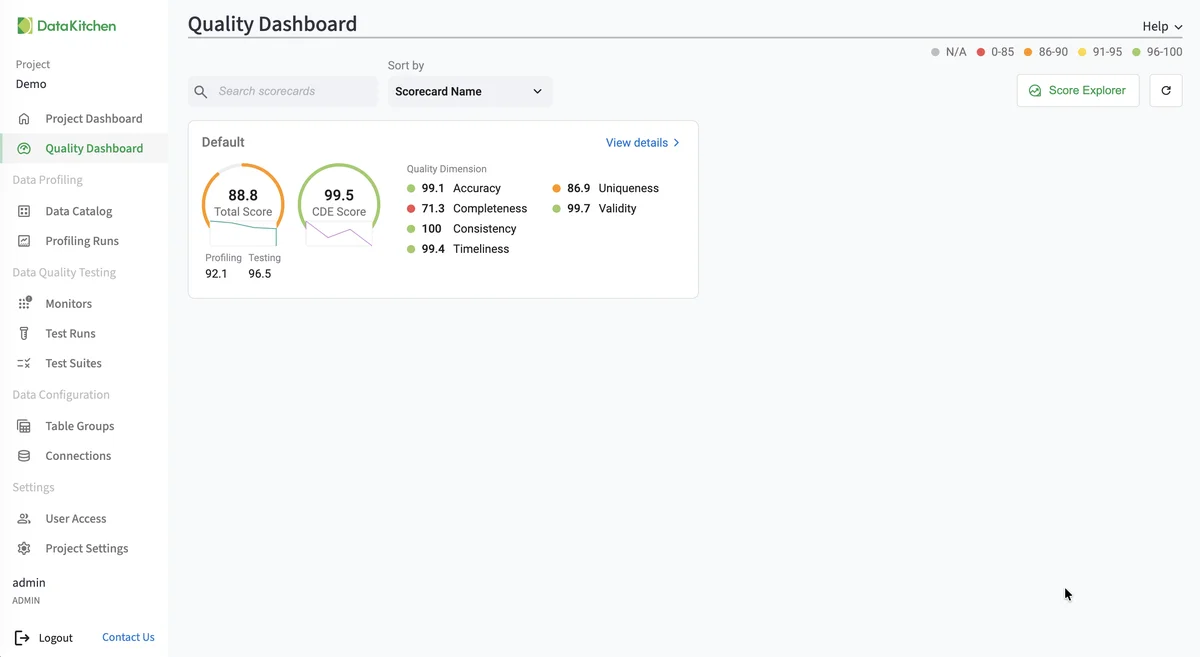
The screenshot shows TestGen’s Quality Dashboard. It is the same on every database TestGen supports.
Walkthrough
These steps follow the Databricks quickstart and the current Manage Connections page.
- Install TestGen.
- Grant the four permissions above to a service principal or user.
- In TestGen, open Connections, click Add Connection, and choose Databricks.
- Enter the connection details and credentials, then click Test Connection.
- Create a table group: name the schema, set the masks, and click Verify Access.
- Leave Run profiling on. Review hygiene issues on the Profiling Runs page.
- Leave Generate and schedule tests on, name the suite, and set a schedule.
- Configure monitors and set their schedule.
- Open the Quality Dashboard.
TestGen and Databricks’ native features
| Databricks native | DataOps TestGen | |
|---|---|---|
| Freshness and volume | Anomaly detection, schema-wide | Freshness, volume, schema, and metric monitors |
| Column statistics | Data profiling (formerly Lakehouse Monitoring) | 55 characteristics plus 32 hygiene detectors |
| Value rules | CHECK and NOT NULL constraints, Lakeflow expectations you write | 34 generated test types plus 19 business-rule types |
| Where it runs | Serverless compute | Your SQL warehouse |
| Cost basis | Serverless DBUs | SQL warehouse time; free open source, or Enterprise per user and connection |
Native sources: data quality monitoring, constraints, and expectations, checked October 21, 2026. Use both: constraints block bad writes, and TestGen covers the columns nobody wrote a rule for. DataKitchen’s post on medallion test coverage counts how many that is.
Pricing
The core profiling, testing, and monitoring engine is free and open source. Enterprise adds team access, security, Commercial Pharma tests, source-data controls for AI, and support. Open source covers one user, one database connection, and one project, with unlimited tables. Enterprise is $100 per user per month plus $100 per database connection per month. Databricks is one of 14 databases TestGen supports, on the same pricing.
Documentation: Databricks quickstart, Connect your data, Access requirements, Manage connections, Manage table groups, Monitor tables, Quality scores, Run profiling and tests, Observability Databricks agent.