End-to-End Data Journey Monitoring

DataOps Observability

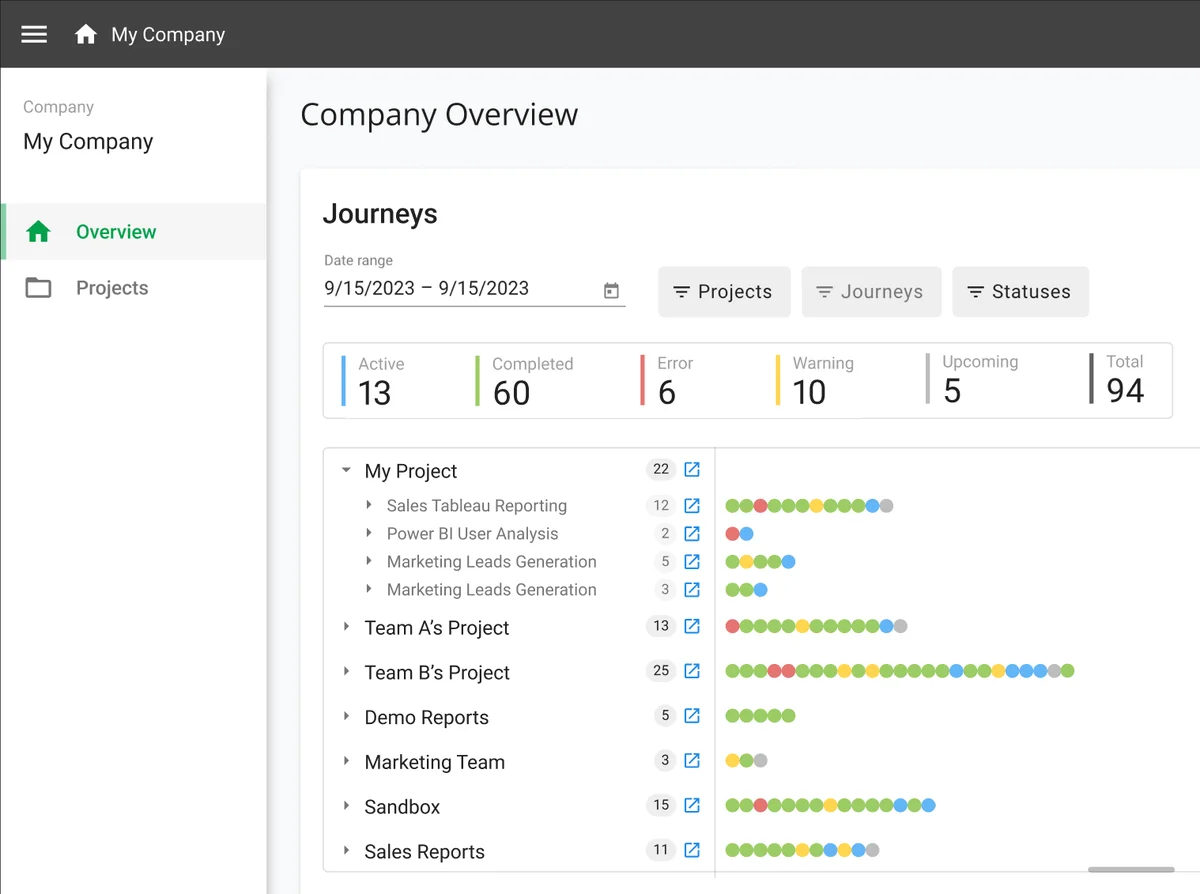
End-to-end monitoring of every data journey from source to the dashboards that depend on it. Detect errors, bottlenecks, and late arrivals across every tool, team, and environment before your stakeholders do.

Observability dashboard

See Observability in Action

How Observability Works

Up and running in minutes, not months

Model

Define your data journeys: the end-to-end paths data takes from source systems through pipelines, datasets, and tools to reach the people who use it.

Monitor

Observability ingests events from every tool in your stack via pre-built agents and a REST API. See status, timing, and test results in real time.

Alert

Rule-based alerting detects failures, late arrivals, and test regressions. Get notified via email, Slack, Teams, or Jira before customers notice.

Key Capabilities

Data Journey Mapping

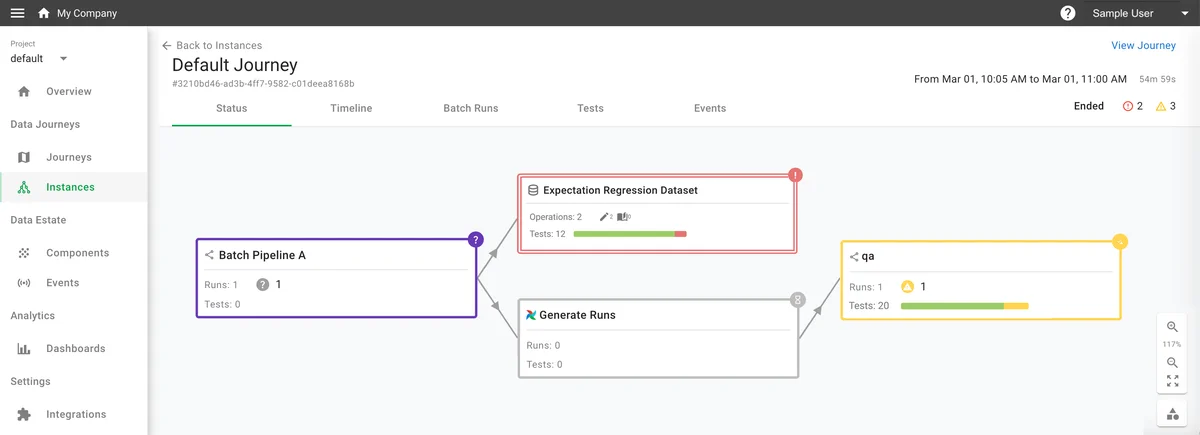
Model end-to-end data journeys that span multiple pipelines, datasets, and tools. Visualize how data flows from source to delivery, with component-level status on every step.

Data Journey Mapping

Unified Event Stream

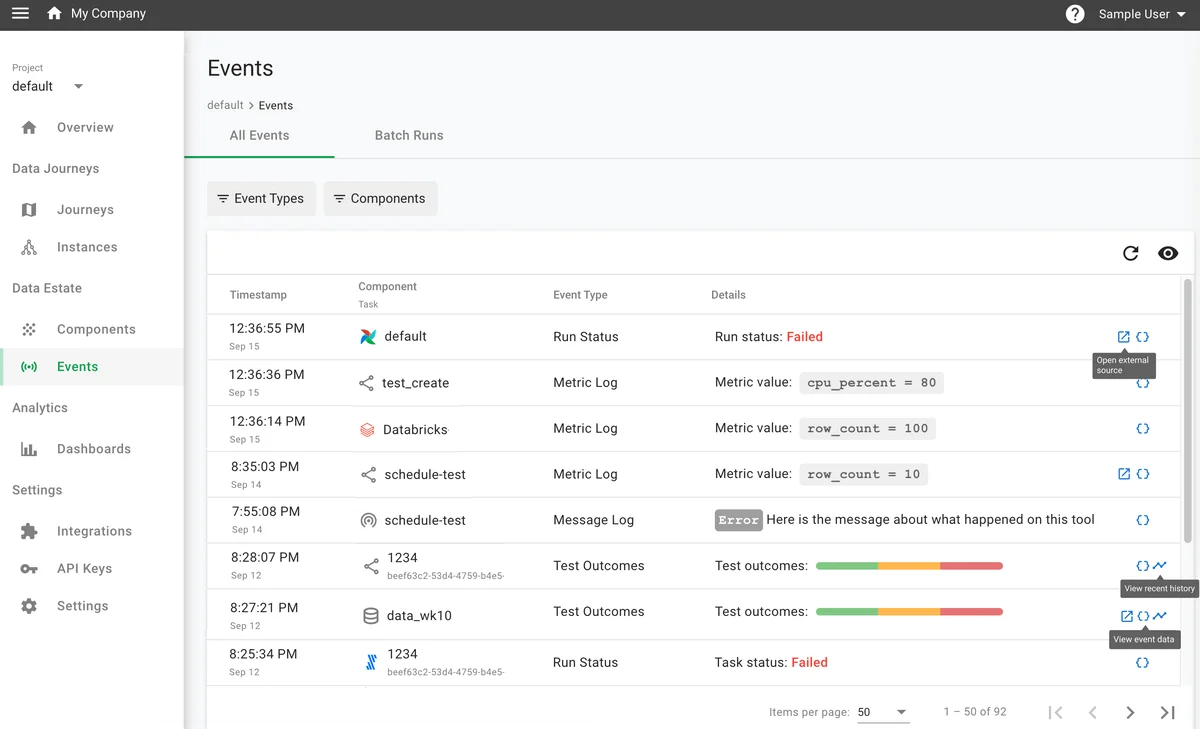
Aggregate logs, metrics, run statuses, test outcomes, and message events from every tool in your data estate into a single, filterable view. Pre-built agents and a REST API ingest events in real time.

Unified Event Stream

Rule-Based Alerting

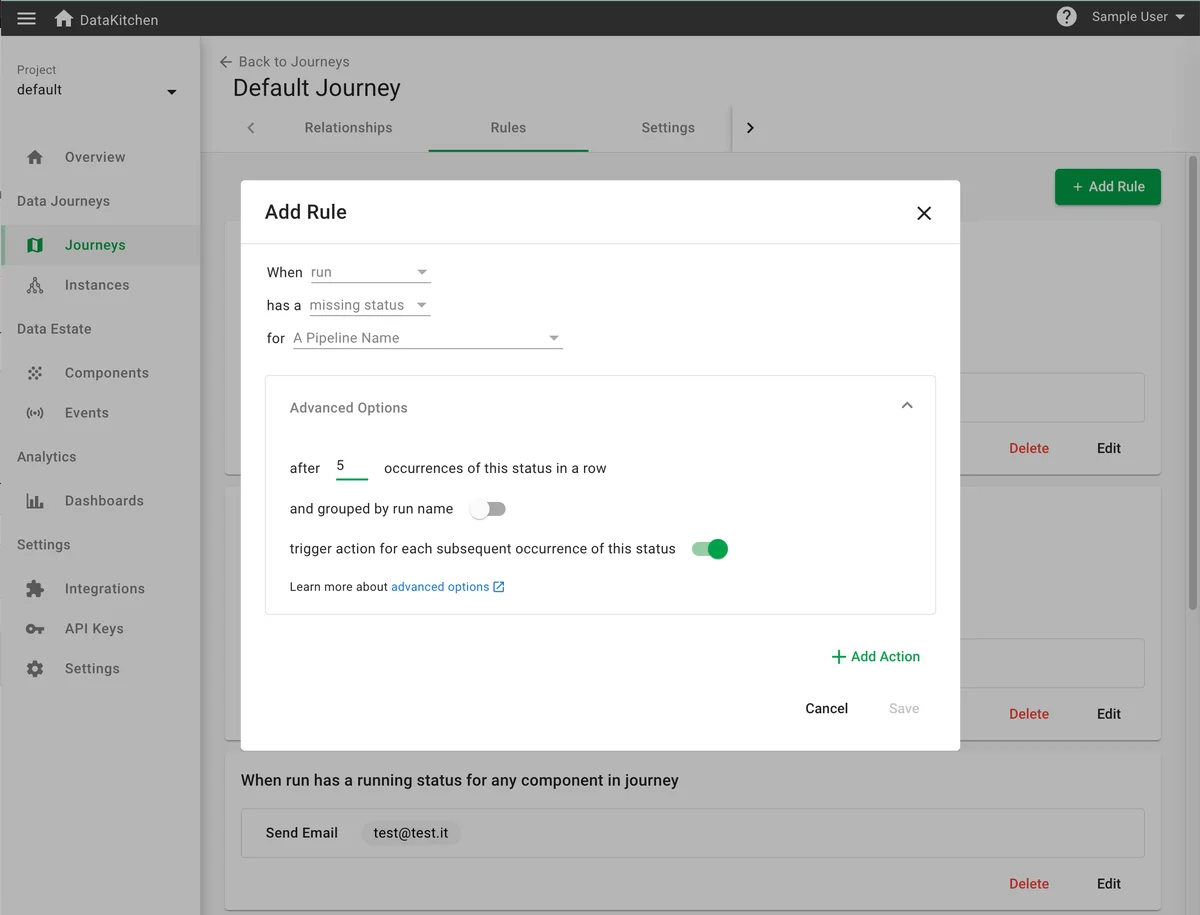
Define rules in a trigger-condition-action format: when a run fails, a dataset arrives late, or tests regress, automatically send notifications to email, Slack, Microsoft Teams, or Jira.

Rule-Based Alerting

Timeline Visualization

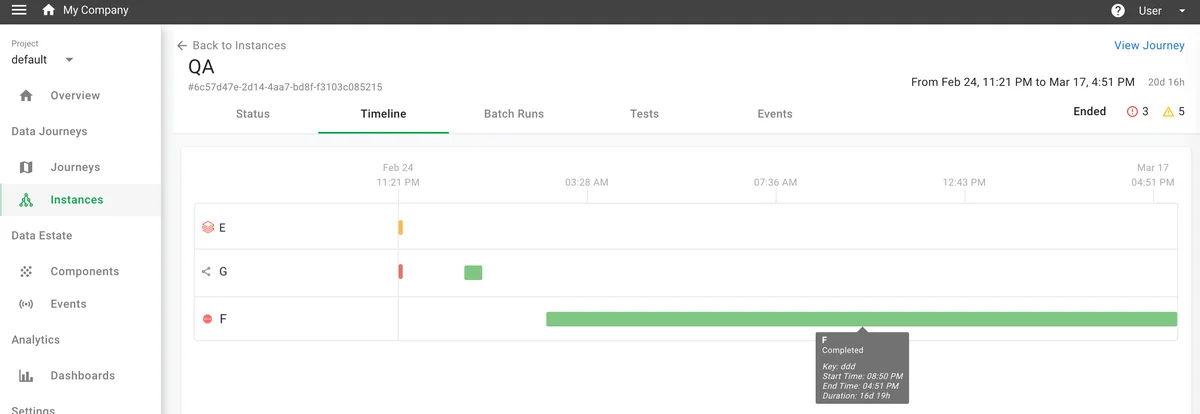
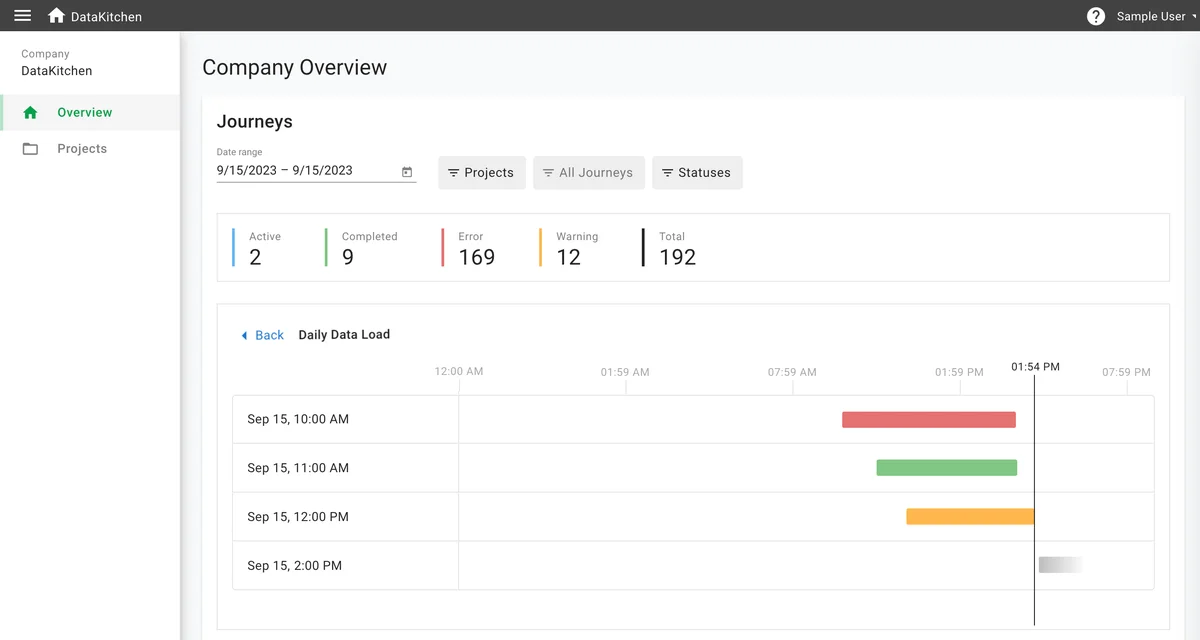
Gantt-style timeline view shows the execution sequence and duration of every component in a journey instance. Spot bottlenecks, parallelism opportunities, and unexpected delays at a glance.

Timeline Visualization

Pre-built agents + REST API and Python SDK for any tool

Think in Data Journeys. Pipelines Aren't Enough.

Most observability tools monitor individual pipelines or tables in isolation. DataOps Observability tracks the whole data journey: the chain of pipelines, datasets, and tools behind a specific use case. When something breaks, you see exactly where it happened and what downstream consumers are affected.

Think in <strong>Data Journeys</strong>. Pipelines Aren't Enough.

Why Teams Choose Observability

Find Problems Before Your Customers Do

You're often the last to know when something breaks. Observability watches every step of every data journey and alerts you to failures, late arrivals, and test regressions in real time. You fix problems before they reach dashboards, reports, or a downstream team.

Open Source with Reasonable Enterprise Pricing

Open source under Apache 2.0 with the UI, event ingestion API, and integration agents. Enterprise adds multi-user access, single sign-on, and dedicated support at a flat $100 per month per user and per agent. No per-event fees, no per-pipeline fees.

Works With Your Existing Tools

Observability does not replace your orchestrator, transformation layer, or BI tool. Pre-built agents for Airflow, Databricks, dbt, Azure Data Factory, Power BI, and 10+ other platforms send events to Observability without changing your existing workflows.

Mission Control for Your Data Estate

DataOps Observability is mission control for every data journey you run. Instead of monitoring individual pipelines in isolation, it gives you a unified view across every tool, team, and environment, so you see the problem, know which component caused it, and know which downstream consumers are affected.

"After implementing, we reduced errors to just about one per quarter. We kept adding tests over time; it has been several years since we've had any major glitches. This has dramatically increased our team's efficiency and our end stakeholders' confidence in the data."

— Associate Director, Insights, Top 10 Global Pharmaceutical Company

Components

The building blocks: batch pipelines, streaming pipelines, datasets (tables and files), and infrastructure. Every event attaches to a specific component, so you know what happened and where.

"When you start looking underneath those pipelines, you start seeing how many places things can go wrong."

— Head of Data Engineering, Top Ten Pharmaceutical Company

Rules

Trigger-condition-action rules define what Observability watches for and how it responds. Set a rule to fire when a run fails, a dataset arrives late, or test results regress. Route the notification to email, Slack, Teams, or Jira.

"Within 5 minutes, we started seeing events flow into the system."

— Director of Data Engineering, Large Online Store

Learn More

Frequently Asked Questions

Common questions about DataOps Observability

What tools does Observability integrate with?

Pre-built agents are available for Airflow, Amazon S3, AutoSys, Azure Blob Storage, Azure Data Factory, Azure Functions, Azure Synapse, Databricks, dbt Core, Fivetran, Google Cloud Composer, Google Cloud Storage, Microsoft Power BI, Microsoft SSIS, Qlik, and Talend. You can also integrate any tool using the REST Event Ingestion API or the Python SDK.

What is a Data Journey?

A data journey is the end-to-end path data takes from source systems to the people who use it. It spans multiple pipelines, datasets, and tools, often owned by different teams. Observability lets you model these journeys so you can monitor the full chain, not just isolated pipeline runs.

How does Observability differ from pipeline monitoring?

Pipeline monitoring tools watch individual pipelines in isolation. Observability tracks data journeys: the chain of pipelines, datasets, and tools that deliver a specific business outcome. When a pipeline fails, you see the failure and which downstream consumers and deliverables are affected.

What events does Observability track?

Observability ingests run statuses (started, completed, failed), metric logs (row counts, CPU usage, custom metrics), message logs, test outcomes (pass/fail with visual result bars), and dataset operations. All events are timestamped and associated with specific components.

What's the difference between Open Source and Enterprise?

Open source includes the full observability engine: data journey modeling, event ingestion, integration agents, rule-based alerting, dashboards, and the complete UI. Enterprise adds multi-user access with single sign-on (SSO) authentication support, multi-project management, and dedicated support.

How long does it take to set up?

Most teams see their first events flowing within 5 minutes. Deploy the Observability container, point an integration agent at your tool (e.g., Airflow, Databricks), and events start appearing. Modeling your first data journey typically takes under an hour.

Can Observability work alongside TestGen?

Yes. TestGen and Observability are complementary products. TestGen handles deep data quality testing: profiling, auto-generated tests, hygiene detection, and anomaly monitoring. Observability monitors the operational health of your data journeys: pipeline runs, timing, and cross-tool coordination. TestGen test results can be sent as events to Observability for end-to-end visibility.

See every data journey, end to end

Install open source Observability today, or request an Enterprise demo.