Why small teams look past Monte Carlo
Monte Carlo is proprietary and VC-backed. It bills credits per monitor, and it publishes no list price. The pricing page says to contact sales. So you take a sales call before you learn whether you can afford the product.
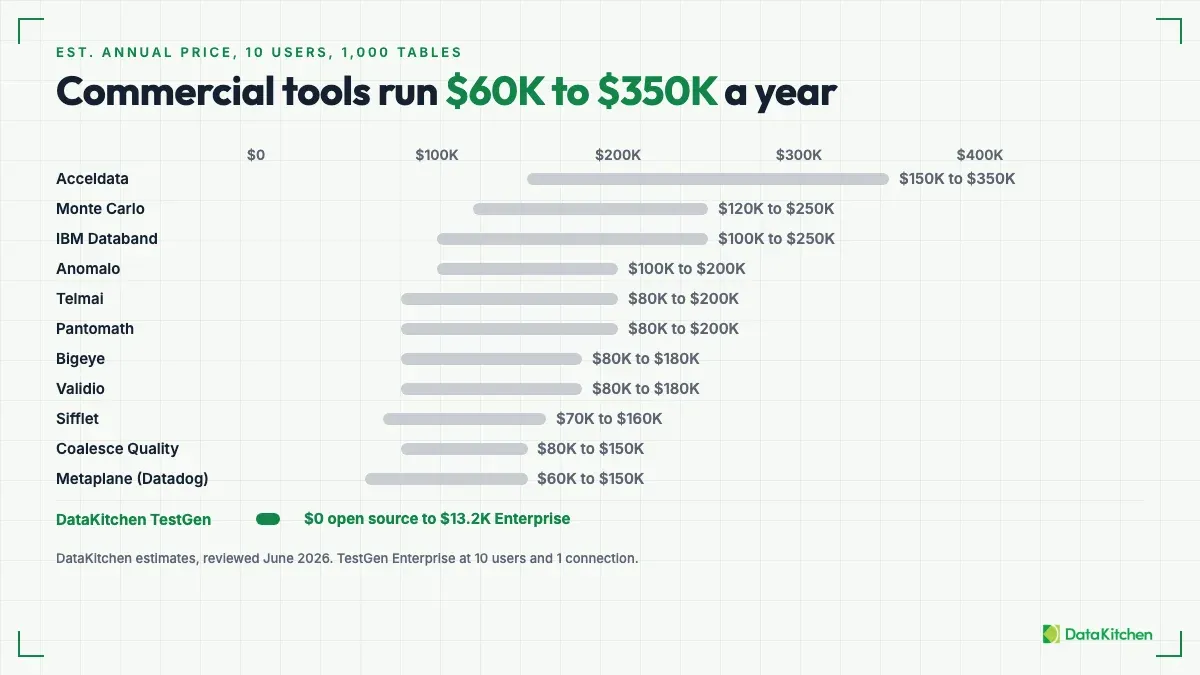
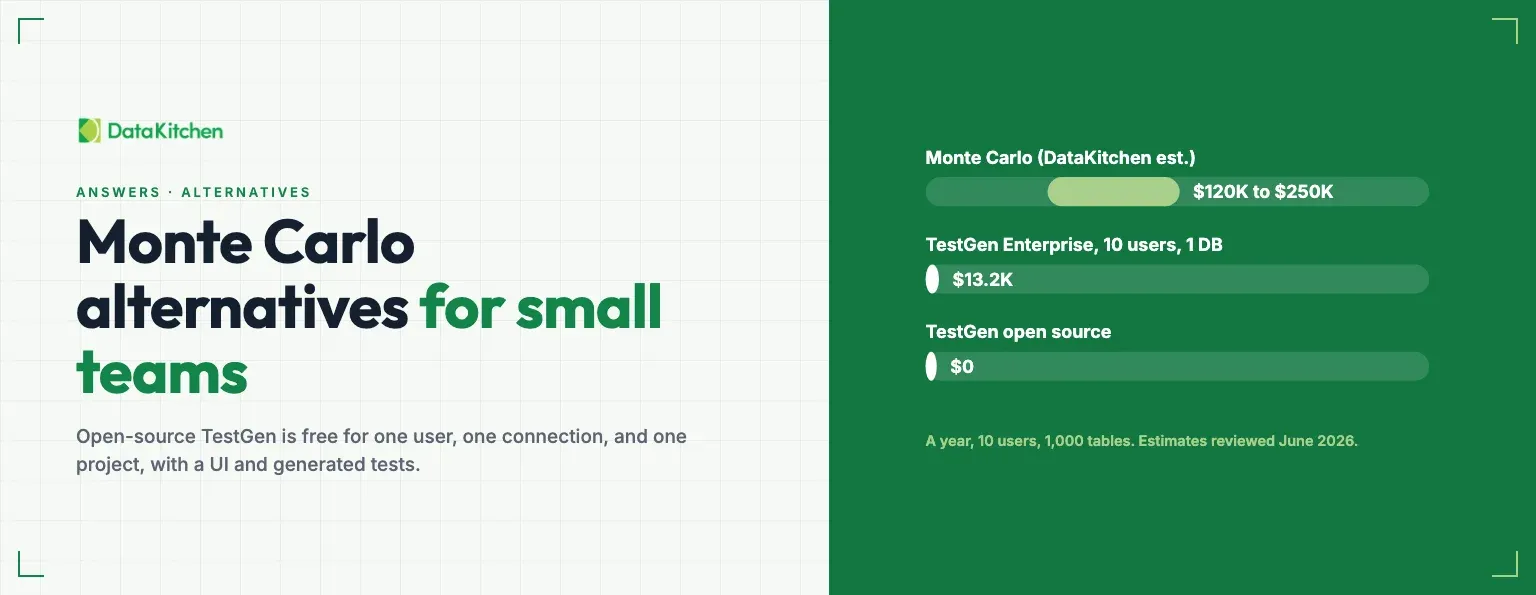
DataKitchen’s estimate, reviewed June 2026, is $120,000 to $250,000 a year. That estimate is for 10 users and 1,000 tables. It is not a small-team number, and you should not divide it down to guess your own bill. Ask for a quote.
Per-monitor credits mean the bill grows with every table you watch, while your team stays the same size. If you want the side-by-side, the DataKitchen vs Monte Carlo comparison has it.
The alternatives
These are the options that fit a team of one to five. The roundup of data observability tools covers the wider market.
| Tool | License | How it is priced | What a small team pays | Fit |
|---|---|---|---|---|
| DataKitchen TestGen | Apache 2.0 open source, UI included | Free for 1 user, 1 connection, 1 project, unlimited tables. Enterprise is $100 per user per month plus $100 per database connection per month | $0 on open source. Three users and two connections on Enterprise is $500 a month, $6,000 a year | Teams that want generated tests, a UI, and no per-table bill |
| Elementary OSS | Apache 2.0, dbt package | $0 software | $0 | Teams that live in dbt |
| Soda Core | Source-available under the Elastic License 2.0 since January 2026 | Free library and CLI. Soda’s Team plan is $750 a month plus usage | $0 for Core, $750 a month plus usage for the Team plan | Teams happy to write checks as code |
| DQOps Community Edition | Business Source License 1.1 (source-available) | Free edition capped to a few tables | $0 | A trial |
| Metaplane, now part of Datadog | Proprietary | Per-table or consumption pricing through Datadog | No list price. DataKitchen’s estimate of $60,000 to $150,000 a year is for 10 users and 1,000 tables, not small-team scale. Ask for a quote | Teams already paying for Datadog |
| Snowflake data metric functions, Databricks Lakehouse Monitoring | Part of the warehouse platform | See your platform’s pricing | Not covered here | Teams already on those platforms |
Elementary is dbt-native and does anomaly detection, schema monitoring, and quality reports. Soda Core uses SodaCL checks that you write. DQOps ships about 150 built-in checks and dashboards. The warehouse monitors are named here so you know they exist. This page makes no claims about their features or cost.
Why TestGen is the strongest fit
TestGen is built for the person who has to cover many tables with little time. Five things make it fit.
It is open source under Apache 2.0, and the open-source edition is free for one user, one database connection, and one project, with unlimited tables. The table count never touches your bill.
It comes with a UI. Engineers, data stewards, and business users open a web UI to see profiles, tests, monitors, and results.
It generates the tests. DataKitchen TestGen profiles every column and writes data quality tests from the profile, so nobody hand-writes YAML or Python to get coverage.
It monitors freshness, volume, schema, and metrics on every table, set up from a read-only connection.
It has a strong MCP server. The open-source edition includes 117 Model Context Protocol tools, so Claude, Copilot, Cursor, or an agent you build can run profiles, generate tests, and read results under the connected user’s own role.
When a second person joins or you add a second connection, you move to Enterprise. Enterprise adds multi-user access with SSO, role-based access control, multiple projects, PII masking, and dedicated support. It costs $100 per user per month plus $100 per database connection per month. Three users and two connections come to $500 a month, or $6,000 a year.
What to check before you switch
Ask four questions of any tool on the list, ours included.
How do tests get created? Someone writes them by hand, or the tool generates them from a profile. Hand-written coverage is only as wide as your free hours.
Does the price grow with table count? If it does, your bill climbs as your coverage improves. For a sense of what small teams actually spend, see how much data quality software costs a small team.
Are results stored and trended, or only alerted on? An alert tells you something broke today. A stored history tells you which table breaks every Monday.
Who owns the vendor? Elementary was acquired by Boomi on October 19, 2026. GX Cloud shut down on June 1, 2026 with about 30 days’ notice. Released Apache 2.0 code stays yours to run if the vendor changes hands, though you then own the upgrades. Licenses can change for future versions, as Soda Core’s move to the Elastic License 2.0 showed, and that applies to TestGen too. A hosted-only product leaves you nothing to run.
When Monte Carlo is still the right call
Monte Carlo is the right call for a large team with the budget, many BI and lake integrations to cover, and a need for automatic field-level lineage and root cause analysis.
If that describes you, get a quote and compare it against the alternatives here. If your team is one to five people, check whether you need lineage, root cause analysis, and that many integrations before you pay for them.
The gap every option leaves
Everything above watches the data. None of it watches the jobs that make the data.
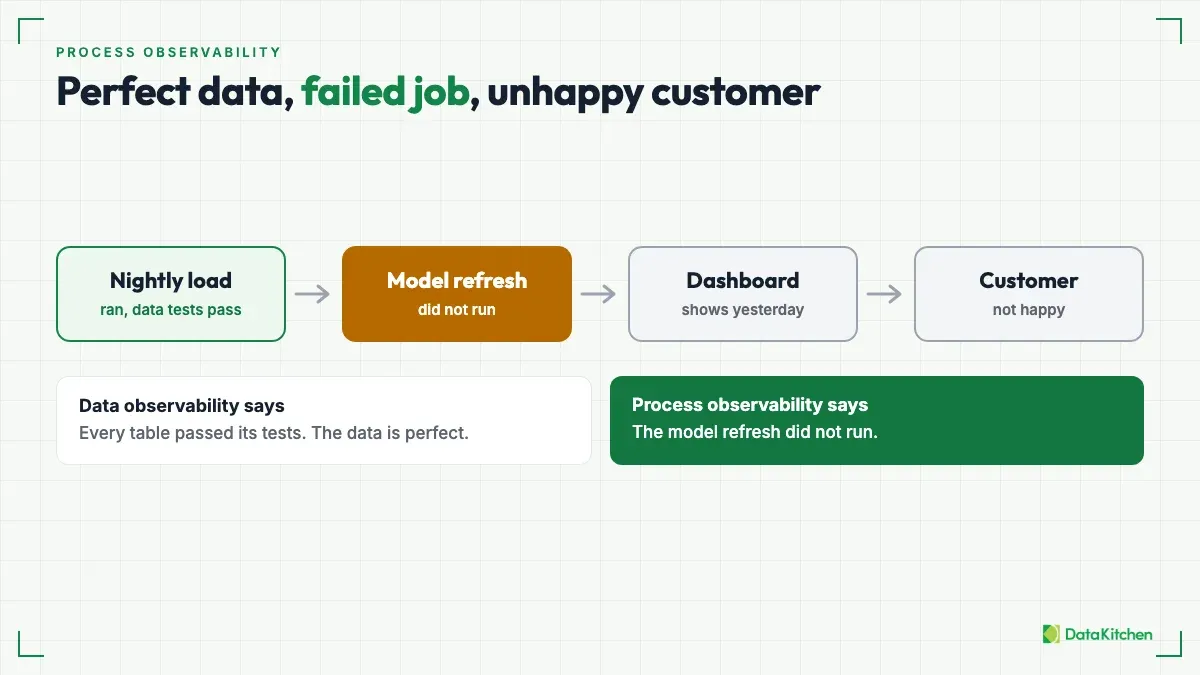
All the other data observability tools miss process observability. You can have perfect data, but if the engines that run your ETL, your models, or your reports fail or run late, your customers are not going to be happy.
Picture the small-team version. You are the one person on call. A job silently did not run overnight. The tables look fine, and a dashboard is showing yesterday’s numbers. Nobody told you, and the first alert is a message from a customer.
DataOps Process Observability watches the ETL runs, model runs, and report refreshes across every tool, and flags errors, bottlenecks, and late arrivals. It is open source under Apache 2.0, with the UI, the event ingestion API, and the integration agents. Enterprise is a flat $100 per month per user and per agent.
Next step
Install TestGen and point it at a read-only connection. Or price it on the calculator first.