
DataOps improves your ability to orchestrate your data pipelines, automate testing and monitoring, and speed new feature deployment. DataOps recognizes that, in any data project, many different tools play an important role as independent components of the data toolchain. With DataOps, you should be able to continue to use your tools of choice – to collect, store, transform, visualize and govern the data running through the data pipelines.
DataKitchen DataOps Automation makes it easy for you to integrate any tool into your DataOps pipeline. A prospective customer recently asked if DataKitchen could orchestrate a tool we hadn’t encountered before – Qubole to be exact. Our response to a question like this is always the same. If a tool has an API or SDK, then DataKitchen can orchestrate it. Why? Because the platform uses containerization to facilitate a tool-agnostic architecture. If you can install a package or call an API to interact with your tool from within a Docker container, then DataKitchen can orchestrate your tool in our platform.
How It Works
In this specific use case, a customer was transferring data from Qubole to Snowflake for analysis. Therefore, they wanted a way to easily transfer their data from S3 into Snowflake and perform data integrity checks to ensure the transfer was successful. This use case was ideally suited for DataKitchen DataOps Automation, which, among other things, serves as a unifying foundation for multi-tool, multi-language interoperability.
DataKitchen DataOps Automation provides a general-purpose docker container node that makes it exceptionally easy to install dependencies and run scripts to perform analytics in the tool of your choice (in this case, the Qubole Data Service API python library). Similarly, our easy-to-use native testing infrastructure requires minimal effort to configure and add tests. This is especially helpful when testing spans multiple tools domains.
We implemented a pipeline (set of steps) consisting of two nodes in the graph shown below.
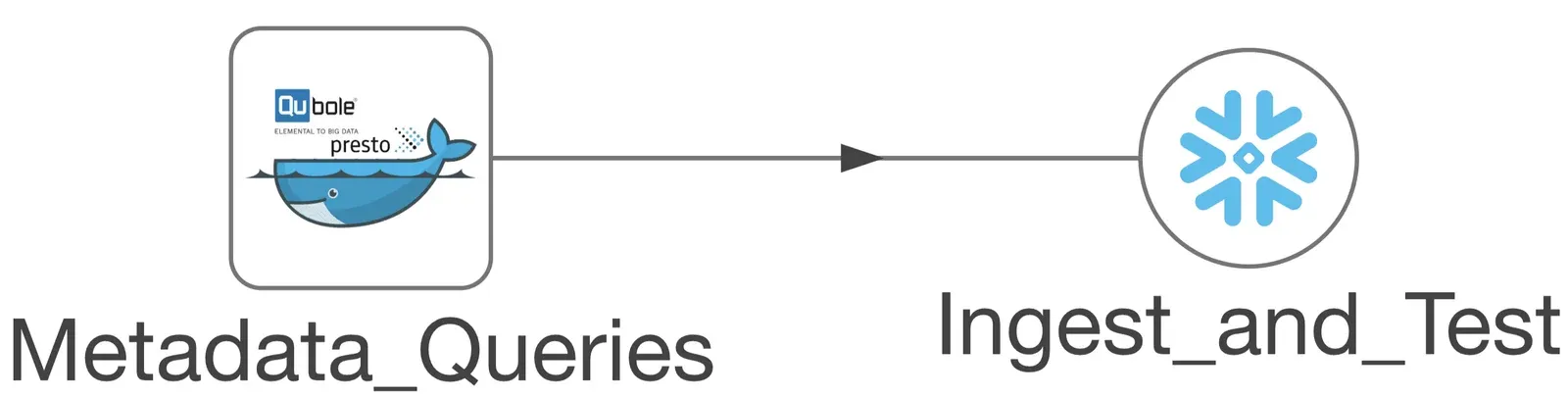
Figure 1: Example of a simple pipeline to transfer data from Qubole to Snowflake.
Step 1: Perform SQL metadata queries using Qubole
The Metadata_Queries node performs a set of Presto SQL queries on data in S3 using Qubole . These queries collect metadata for use in performing data parity checks (e.g. table row counts) on the data being transferred. Configuring the docker container node is as simple as specifying your DockerHub credentials and image details as shown below.
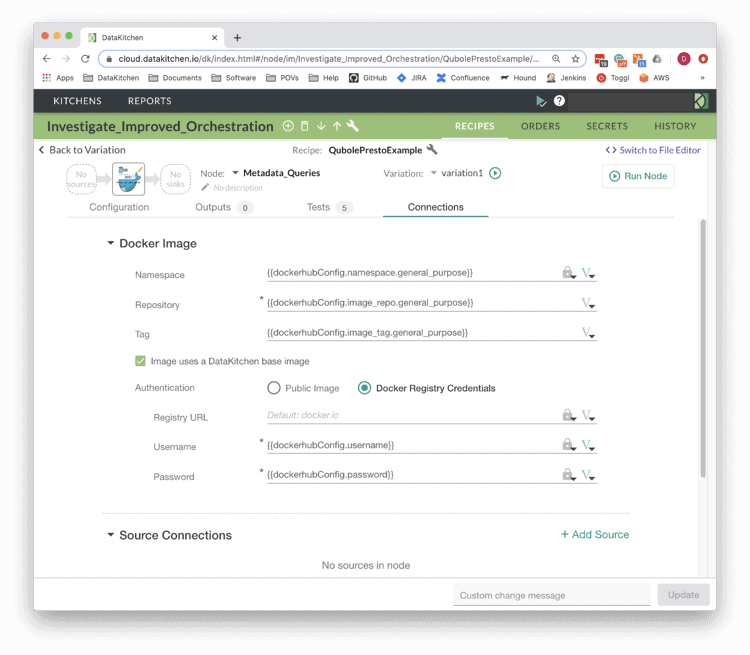
Figure 2: Using the DataKitchen UI, it’s simple to configure a Docker container to run Presto SQL queries using the Qubole Data Service Python SDK
Similarly, it’s simple and straightforward to add the required Qubole SDK dependency to the container, along with a python script (run_presto_sql.py) to connect to Qubole and perform queries. The DataKitchen platform also makes it easy to maintain security. A Vault is used to store and pass secrets such that they never appear in plain text – secrets are only resolved at runtime in a secure fashion.
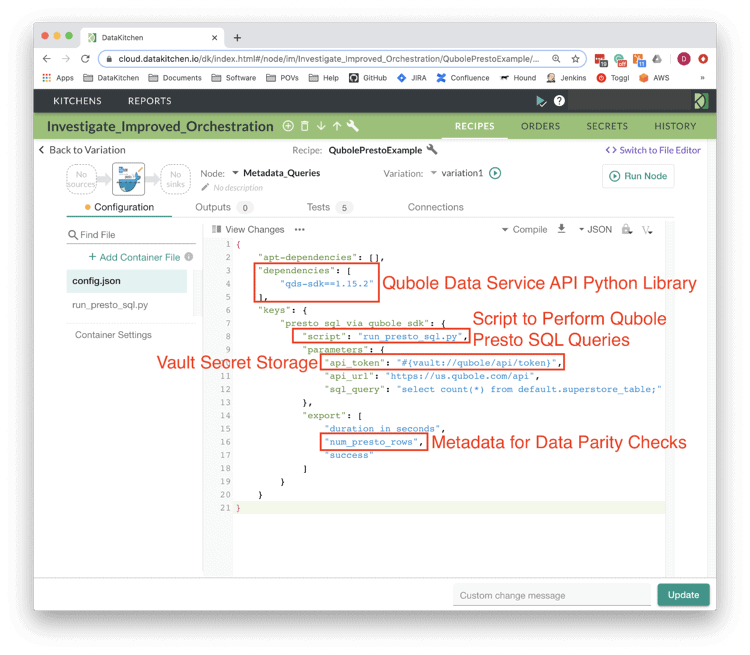
Figure 3: DataKitchen DataOps Automation uses a JSON file to configure the container node: define the Qubole python library dependency, a python script to run, a secure Vault and a variable “num_presto_rows” which, among others, will be exported to a downstream node and compared with another value.
Step 2: Ingest Data Into SnowFlake and Ensure Data Parity
The “Ingest_and_Test” node ingests data from S3 into Snowflake tables and performs similar queries to collect metadata on the transferred data. Finally, tests were added to perform the data parity checks by testing for equality between the collected Qubole and Snowflake metadata. The “Ingest_and_Test” node is a native connector provided by the DataKitchen platform. To use this Snowflake connector, simply define the Connection Details and a list of steps (SQL queries) to be performed.
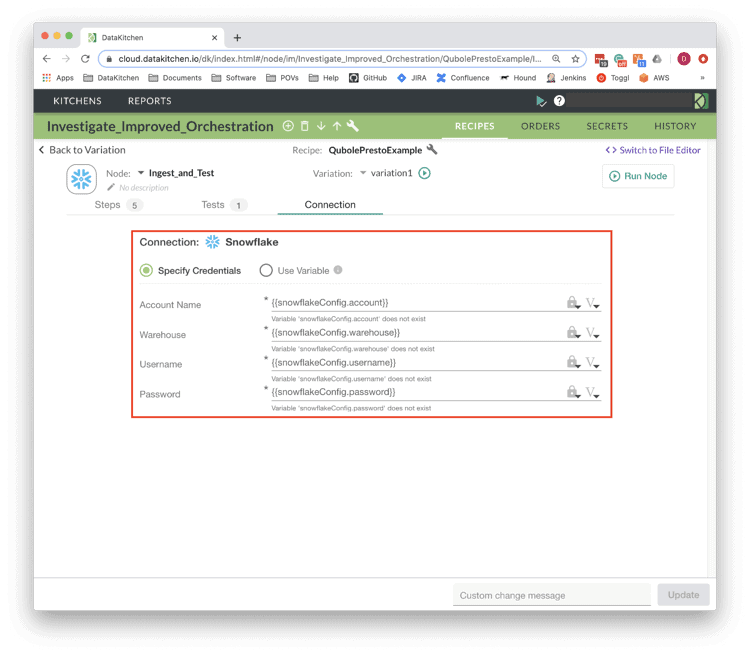
Figure 4: Configuring a Snowflake connection is simple via the DataKitchen UI.
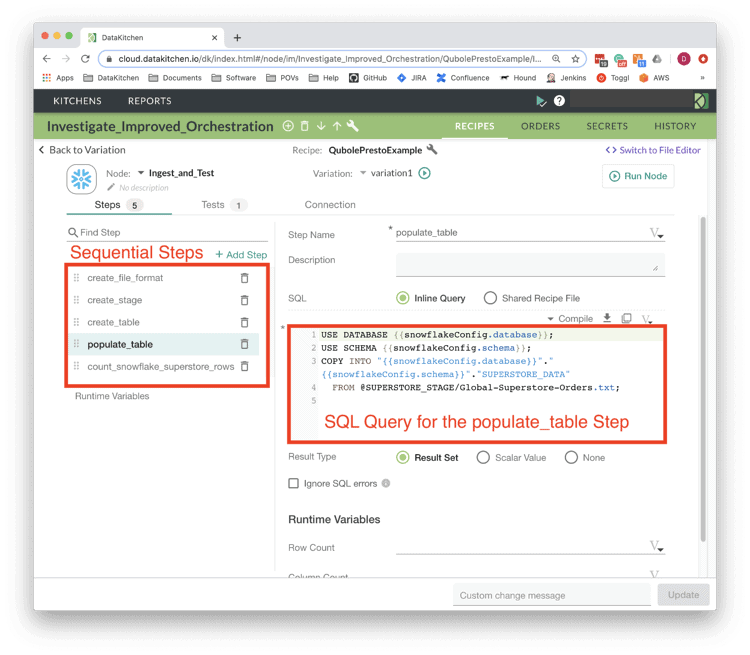
Figure 5: The “Ingest_and_Test” Snowflake node consists of five sequential steps. The SQL query for the “populate_table” step is shown.
Additionally, the DataKitchen platform provides a simple and intuitive user interface for adding tests. As shown below, a simple row count test was added to check data parity between the original data on Qubole to the data transferred to Snowflake.
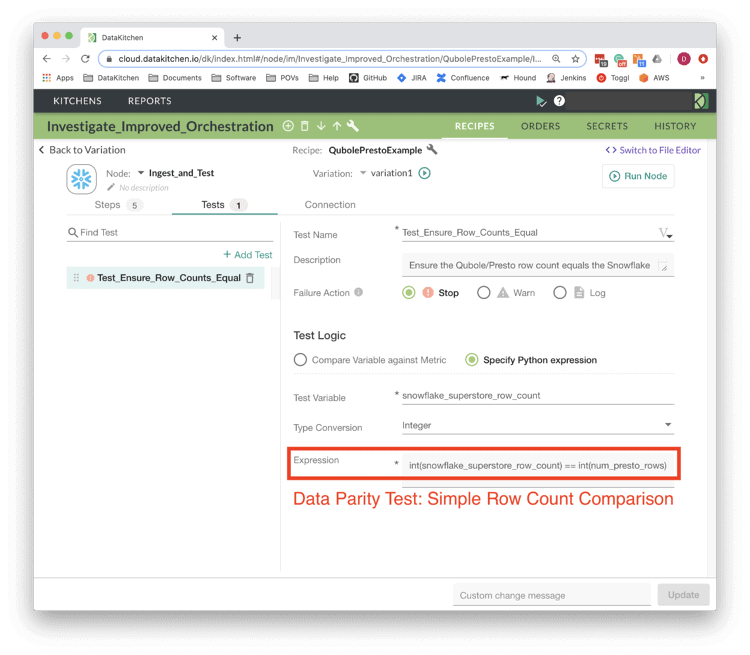
Figure 6: The DataKitchen UI shows a defined test which compares the row counts calculated from Qubole (Presto SQL) and Snowflake. This test ensures that the number of data rows output from Qubole is the same number as received into Snowflake.
DataKitchen DataOps Automation makes it easy to share this pipeline within a list of reusable microservices. If the pipeline is ever incorporated into production analytics, the metadata comparison will catch any issue in the transfer of data from Qubole to Snowflake.
The big question is, how difficult was this to achieve and how long did it take? Not long at all, thanks to the flexibility of DataKitchen DataOps Automation and its toolchain-agnostic approach to DataOps. The pattern above is not an uncommon one. For instance, many customers want to migrate their data into the cloud (not only is the platform tool agnostic, but it’s also cloud agnostic). Due to our agnostic approach to tools and infrastructure, our DataKitchen DataOps Automation makes this process a breeze.
To learn more about how orchestration enables DataOps, please visit our blog, DataOps is Not Just a DAG for Data.
FAQ
What are the key points in this blog?
DataOps Automation is tool-agnostic because it runs work inside containers: any tool with an API or SDK that can be called from a Docker container can be orchestrated. The worked example moves data from Qubole to Snowflake in two nodes, runs Presto SQL metadata queries on data in S3, compares row counts on both sides as a parity test, and keeps credentials in a Vault resolved only at runtime.
Can DataOps Automation orchestrate a tool it has never encountered before?
Yes, if the tool has an API or an SDK. Qubole was new to DataKitchen when a prospective customer asked about it, and the answer was the standard one: anything you can install as a package or call through an API from inside a Docker container can be orchestrated. Native connectors exist for common targets such as Snowflake, but they are not a prerequisite.
How does containerization make an orchestration platform tool-agnostic?
A general-purpose Docker container node lets DataOps Automation install whatever dependency a tool needs and run a script against it, so the platform does not need built-in knowledge of the tool. In the Qubole example the container carried the Qubole Data Service python library and a script that ran Presto SQL queries, with the results exported as variables to the next node.
How do you check that data moved between two tools without loss?
Collect the same metadata on both sides and test for equality. In the Qubole to Snowflake example, Presto SQL queries counted rows in the source data on S3, the Snowflake node counted rows after ingest, and a test compared the two values. Adding tests like this takes little configuration and the check keeps running once the pipeline is in production.
Where do credentials go when a pipeline calls an external tool?
Into a Vault, not into the pipeline configuration. DataOps Automation stores and passes secrets so they never appear in plain text, and they are resolved at runtime when the container needs them. In the worked example the Vault held the secrets the Qubole and Snowflake steps needed, while the container node configuration named only the DockerHub image and the script to run.
What does a tool-agnostic approach to DataOps mean for a data stack you already own?
You keep the tools you already use to collect, store, transform, visualize and govern data, and DataOps supplies the orchestration, testing and deployment around them. Nothing has to be replaced to get automated tests and monitoring, which is also why the pattern suits cloud migration: the approach is cloud agnostic as well as tool agnostic.