
Many organizations take an excruciatingly long time to create an analytic environment or deploy new analytics. According to an Eckerson survey, 76 percent of organizations are too slow to deploy, facing deployment times of weeks or months. The cause is usually the same: manual processes with little automation and little testing.
The problem
A large telecom company needed more than four months to release new features into production. The team was capable. Their established processes simply emphasized quality over speed and agility, and the delay kept the business from getting the analytic insight it asked for.
Getting a change to production meant a four-stage manual deployment: development with unit tests, a test stage with manual tests, a staging stage with manual tests, and production with no data monitoring at all. Like most large enterprises, the pipeline coordinated a wide range of tools, environments, and teams. That coordination introduced complexity, slowness, and errors.
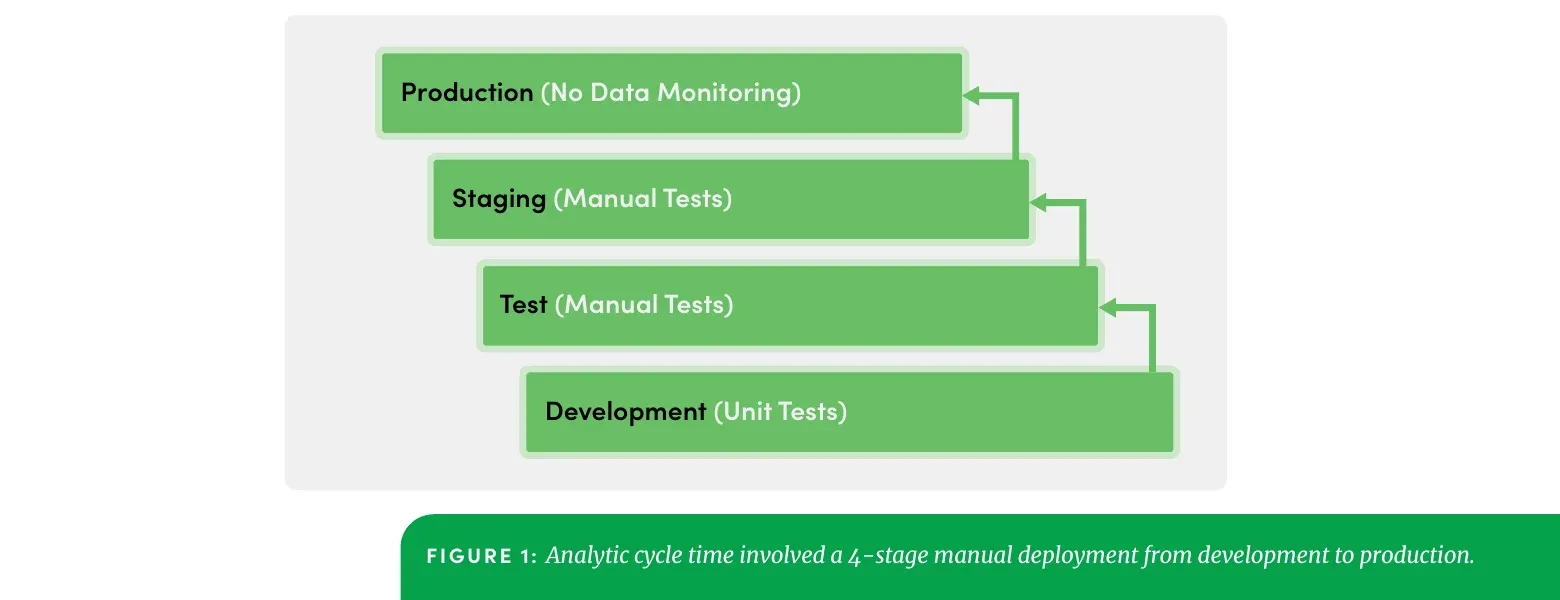
There was no automated testing. What testing did happen was manual, with no coordination or feedback loops between environments or teams. Detecting an error kicked off a long sequence: file a bug report, notify developers, try to reproduce the error, fix it, run QA again. If the error persisted, the sequence repeated.
Worse, many errors slipped through to production, where business users found them. Every one of those cost the analytics organization a little more of the trust it depended on.
What the manual loop actually cost
It is worth adding up that sequence, because “we test manually” sounds like a staffing choice rather than a schedule.
Each of the three pre-production stages needed a person to run tests and a person to wait for the result. A failure did not fail fast: it produced a bug report, a notification, an attempt to reproduce it in an environment that did not match the one where it happened, a fix, and another QA pass. Reproduction was the expensive step, because the environments differed. And every repetition of the loop pushed the release further out while the business kept asking for the feature.
The errors that escaped were more expensive still. A business user finding a bad number does not just cost the fix; it costs the argument about whether the rest of the numbers are right.
The solution
The team implemented DataOps using the DataKitchen platform. They started small, and looked for a single bottleneck in the core EDW pipeline where relieving the pressure would produce a real business benefit. Inside that pipeline, they put their first effort into the two earliest stages, development and test.
Starting at one bottleneck is the part worth copying. A four-month cycle time is not four months of evenly distributed work, and rebuilding the whole pipeline at once is how these programmes stall before they show a result. Find the constraint, relieve it, show the number moving, then move to the next one.
Environments that match production
The team built separate but aligned environments. Spinning up a development environment that clones production is the part most teams skip, and it pays for itself three ways: testing gets easier, deploying to production gets easier, and reproducing a production error stops being guesswork.
TIP
More on why this matters: Environments Power DataOps Innovation
Automated tests at every stage
The team embedded automated tests at every step in the pipeline, so that analytics moving from development through each separate environment kept working. Errors now surface well before production and well before a business user sees them.
Alongside standard unit tests, the team added functional, regression, and performance tests. A location balance test confirmed no rows were lost as data moved between environments, which is exactly the failure a unit test will not catch. Because the platform exposes a standardized interface, each test could be written in the tool its author already used.
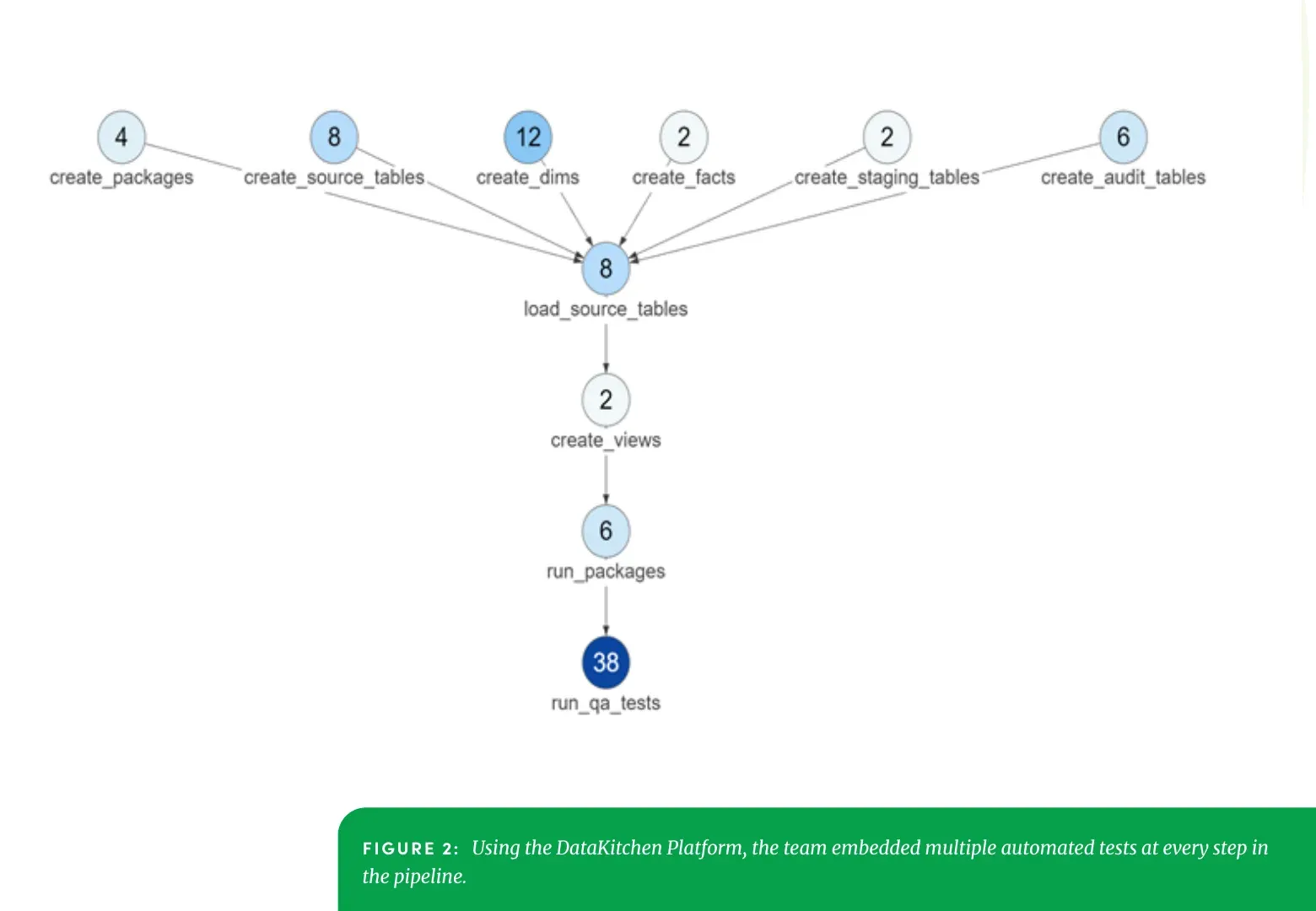
The counts are per step: 12 tests on create_dims, eight on create_source_tables, and 38 on run_qa_tests at the end of the run.
Test result histories became readable by teammates who had not written the tests. When something breaks, the person looking at it can find the root cause and add a test that keeps it from happening twice.
Results
Developers catch errors as they happen and fix them immediately, instead of running the long report-notify-reproduce-fix-retest loop. Time not spent chasing errors goes to new work.
What comes next
Two things remain on this team’s list. The first is automating the deployment of new analytics into production, which is where the remaining manual stages still live. The second is adding automated monitoring to the production pipeline, so data problems are caught in production rather than reported from it.
TIP
Enjoyed this case study? Download the PDF to share it with your team.
FAQ
What are the key points in this blog?
A large telecom company needed more than four months to release new analytics, through a four-stage manual deployment with no automated testing. Errors reached production and business users found them. Cloning production into aligned development environments and embedding automated tests at every pipeline step moved error detection ahead of release, and freed the time the team had spent chasing defects.
Why do analytics releases take months?
Manual process with little automation or testing. An Eckerson survey found 76 percent of organizations are too slow to deploy, facing deployment times of weeks or months. In this case a change crossed four stages, three of them staffed by people running tests by hand, and any failure restarted a report, notify, reproduce, fix, retest loop.
Why do development environments need to match production?
Because reproduction is the expensive step in every bug. If the environment where you investigate differs from the one where the error happened, you are guessing. Cloning production pays three ways: testing gets easier, deployment gets easier, and a production error can be reproduced rather than theorised about.
What kinds of tests belong in an analytics pipeline?
More than unit tests. This team added functional, regression, and performance tests, plus a location balance test confirming no rows were lost as data moved between environments. That last one catches a failure no unit test will: the code ran correctly and the data still arrived incomplete.
Where should a team start if cycle time is already months long?
At one bottleneck, not at the whole pipeline. This team picked a single constraint in the core warehouse pipeline where relief would produce a visible business benefit, and worked the two earliest stages first. Rebuilding everything at once is how these programmes stall before they can show a number moving.
What does automated testing change about a team’s week?
Developers catch errors while they are still working on the change and fix them immediately, instead of running the long report, notify, reproduce, fix, retest sequence days later. The time not spent chasing defects goes to new work, which is the return that pays for the test suite.