Production engineers and analytics developers sometimes row the enterprise boat in different directions. Perhaps it is their roles and objectives which keep them at odds.
It’s the production engineer’s duties to keep data operations up and running. Innovation is good, but not at the expense of smoothly executing data pipelines. When there’s a problem, production engineering is accountable, and they are often not shy about pointing the finger.
Analytics developers face customers and business users who demand quick turnaround for new analytics features. The data team must fix errors, address user requests and keep adding innovative new features and capabilities. There’s never sufficient time to test everything perfectly before deployment. Data scientists and analysts often make heroic efforts to produce robust analytics, but it’s hard to find subtle errors when you are not permitted to test analytics in the production environment.
The Productivity Impact of Sharing Infrastructure
Enterprises that co-locate development and production on the same system face many potential issues. There is a constant struggle between production’s need to maintain a controlled, repeatable environment and development’s need to access operational systems for testing. Sometimes operational systems are the only place where analytics can be tested on real data. Development can also be processor-intensive, impacting production performance and query response time.
Nothing destroys creativity like fear. When analytics can’t be fully tested, deployment is riskier. Development and production may feel that they cannot innovate without the nagging fear that a deployment will create production errors. One of the most important benefits of separating development and production infrastructure is that it enables the team to innovate without fear.
Cloud infrastructure has simplified the prospect of spinning up new systems. It’s now much simpler and less expensive to instantiate a copy of a toolchain and all associated applications and data pipelines. These resources can be provisioned on demand within an automated orchestration.
For example, when storage was expensive, data teams had an incentive to minimize the amount of disk space consumed by removing extraneous dataset copies. To reduce cost, a data-analytics professional might have been forced to do development work using a production database. As scary as this may sound, many enterprises still operate this way.
Some enterprises create development systems for data analytics but fail to align the development and production environments. Development uses cloud platforms, while production uses on-prem. Development uses stale three-month-old data, while production uses live data. One issue that data scientists must consider is the possibility that subtle differences in data affect model training.
The list of opportunities for misalignment are endless. The incongruity of development and production environments increases the chance of unexpected errors. Sometimes errors that occur in production or on user systems are difficult to reproduce because development runs a different target environment. These misunderstandings erode trust and prevent production, development and users from effectively collaborating.
Separate and Align
DataOps requires separate system environments that are aligned. In other words, the development environment should be a clone of production (to the extent possible). The more similar, the easier it will be to deploy code to production and replicate production errors in the dev environment. Some divergence may be necessary. For example, data given to developers may have to be sampled or masked for practical or governance reasons.
Figure 1 shows a simplified production technical environment. The production technical environment is the infrastructure and toolchain that executes data pipelines in data operations. In this example, the system transfers files securely using SFTP. It stores files in S3 and utilizes a Redshift cluster. It also uses Docker containers to run Python applications. Production alerts are forwarded to a Slack channel in real-time. Note that we chose an example based on Amazon Web Services, but we could have selected Azure, GCP, on-prem, a hybrid, or anything else.
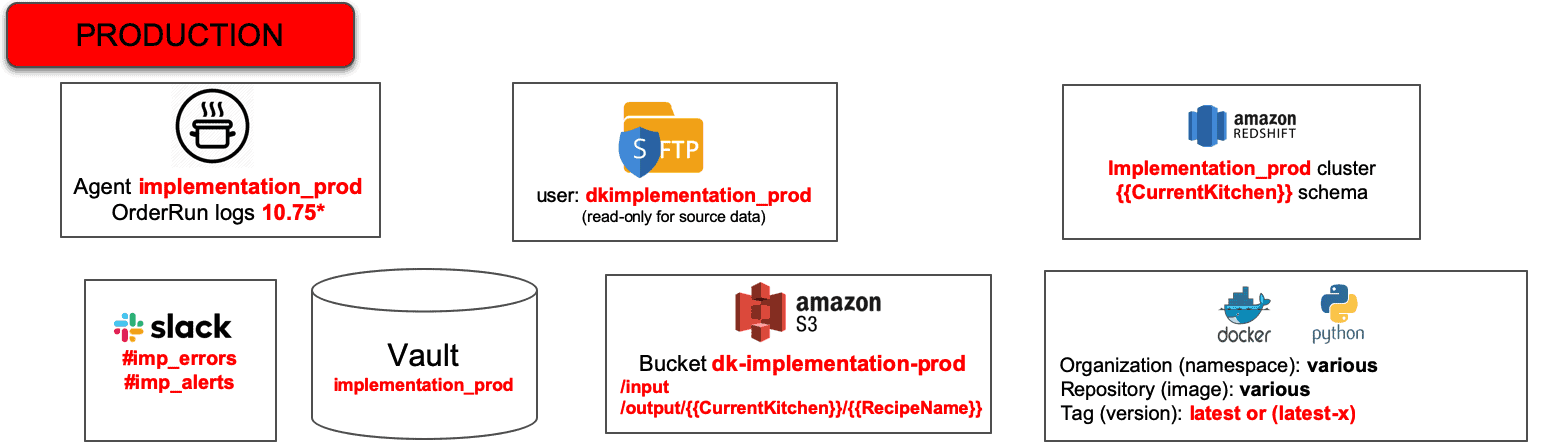
Figure 1: Simplified Production Technical Environment
The production technical environment includes a set of hardware resources, a software toolchain, data, and a security Vault which stores encrypted, sensitive access control information like usernames and passwords for tools. The Vault secures the environment toolchain – the developers do not have access to production. Production has dedicated hardware and software resources, so production engineering can control performance, quality, governance and manage change.
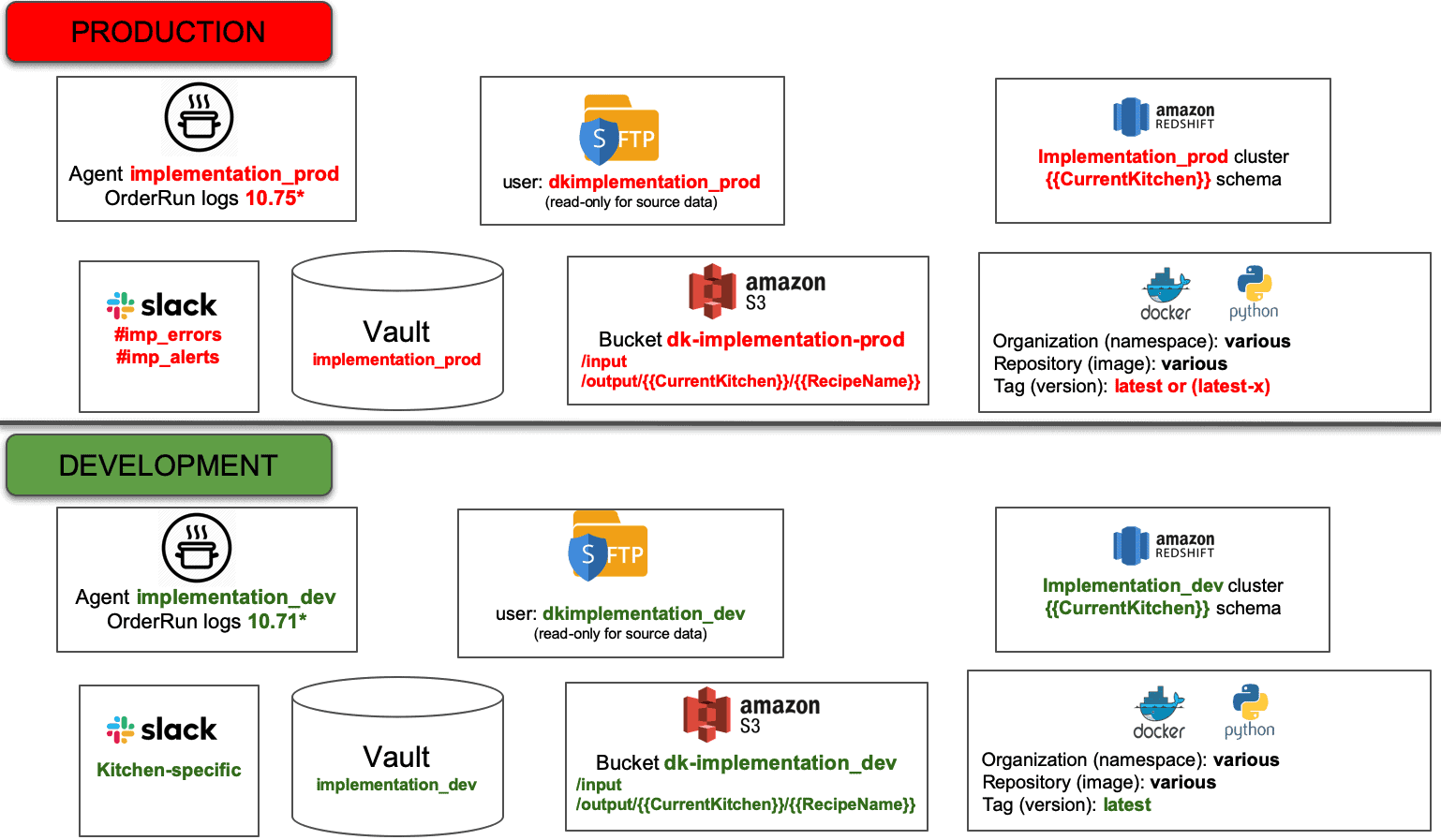
Figure 2: Production and development maintain separate but equivalent environments.
In DataOps, we create a technical environment for analytics developers that aligns with the production technical environment. Distinct instances of the identical toolchain architecture are used for the two environments. In Figure 2 we see a development environment that is basically a copy of the production technical environment introduced earlier. This makes it easier to develop a data pipeline with embedded tests in a development environment and seamlessly migrate it to the deployment environment. When there is an issue in production, it’s much easier to reproduce in the development environment when the environments match each other.
Maintaining separate but aligned environments provides development and production with controlled work environments. Production engineers can keep all non-essential activity off their system. They can manage change, mitigate risk and enforce governance without impacting developer productivity. Production manages their environment, making sure that nothing interferes with data operations.
Development has free reign on their system with the freedom to try out new ideas, set up error conditions and reinitialize the system as needed. Developers should have everything that they need in order to be productive: data, code, tools and system resources. With separate and aligned environments, development and production can fully pursue their objectives without stepping on each other’s toes. In a later post, we’ll also talk about how multiple users can work in parallel within the same environment.
Fitting Separate Environments into DataOps
As we step back and consider the full analytics development lifecycle, it’s clear that separating environments is only the beginning of a robust DataOps implementation. There are other issues that must be addressed. For example, a deployment process with a lot of manual steps can still be cumbersome. DataKitchen DataOps Automation uses DataOps to minimize or even eliminate the necessity for recoding when migrating from development to production. This is addressed by a virtual environment (or workspace) called a “Kitchen” that is associated with a technical environment. In our next blogs we will describe how Kitchens streamline the development and deployment processes related to analytics.
FAQ
What are the key points in this blog?
Development and production need separate but aligned environments. Sharing one system pits production’s need for control against development’s need to test on real data, and the fear of breaking production suppresses innovation. The fix is a development environment that is a clone of production, running the identical toolchain, so code migrates cleanly and production errors can be reproduced where it is safe to break things.
Why should development and production be separate environments?
Because they want opposite things from the same machine. Production needs a controlled, repeatable environment, while development needs to test on operational data and runs processor-intensive work that slows production queries. Separating the infrastructure removes the fear that a deployment will break live analytics, and nothing kills creativity faster than that fear. DataOps asks for both: separate environments that stay aligned.
What does it mean for development and production environments to be aligned?
Aligned means the development environment is a clone of production to the extent possible: distinct instances of the identical toolchain architecture rather than a different stack. The closer the match, the easier it is to deploy code to production and to reproduce a production error in development. Some divergence is fine, such as sampling or masking data for governance reasons.
What goes into a production technical environment?
It is the infrastructure and toolchain that executes data pipelines in data operations: hardware resources, the software toolchain, the data itself, and a security Vault holding encrypted credentials such as tool usernames and passwords. In the example, files move over SFTP, land in S3, feed a Redshift cluster, run Python in Docker containers, and alerts go to Slack. The Vault is what keeps developers out of production.
What goes wrong when development and production environments do not match?
Errors multiply and become hard to trace. Typical mismatches are development on cloud platforms against production on premises, or development on three-month-old data against live production data — and subtle data differences can change how a model trains. A failure that cannot be reproduced in development erodes trust between production, developers, and users.
What is a Kitchen in DataKitchen DataOps Automation?
A Kitchen is a virtual environment, or workspace, associated with a technical environment. DataKitchen DataOps Automation uses Kitchens to minimize or eliminate recoding when analytics move from development to production, so a pipeline built and tested in a development Kitchen deploys without being rewritten for the production toolchain.