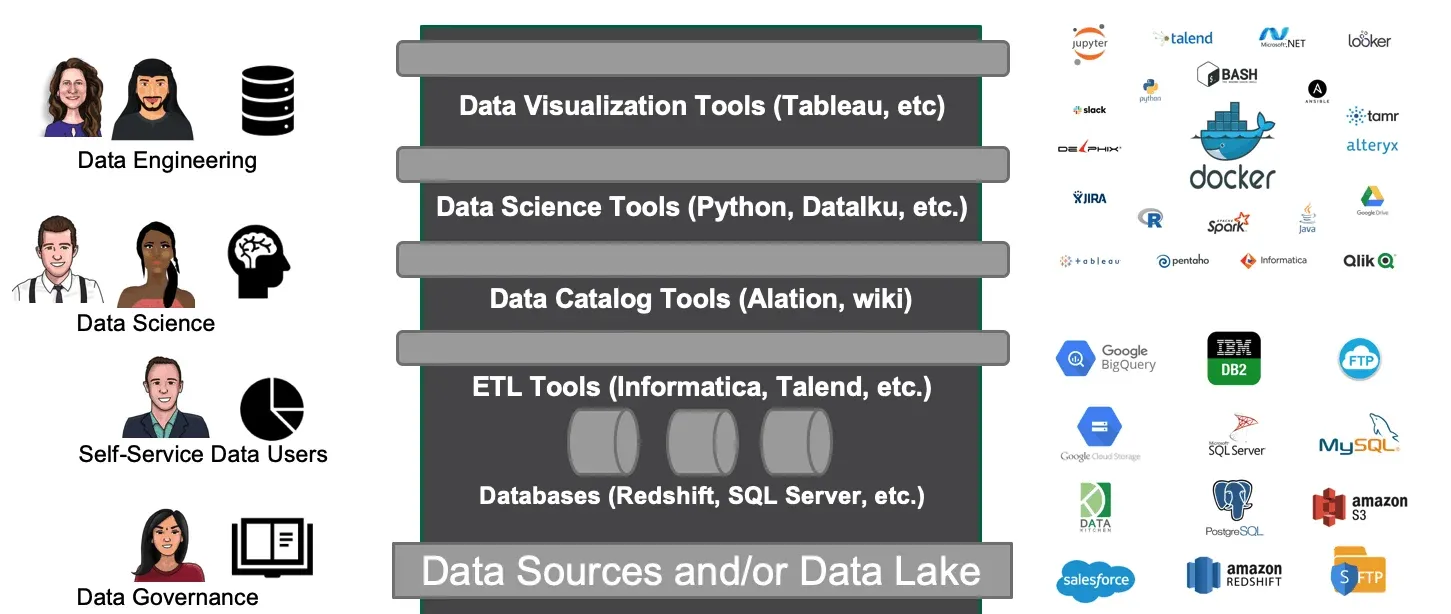
The cacophony of tools and mission-critical deliverables are the reason behind the high complexity of modern-day data organizations. Data groups include a wide range of roles and functions that are intricately woven together by their “Data”. Teams include data scientists, business analysts, data analysts, statisticians, data engineers, and many more people. Each of these roles has a unique mindset, specific goals, distinct skills, and a preferred set of tools. It’s not news that everyone loves their tools and are seldom willing to give them up.
DataOps orchestrates your end-to-end multi-tool, multi-environment pipelines – from data access to value delivery. Using DataKitchen DataOps Automation, you can continue to use the tools you love. For example, one popular tool is StreamSets, which allows teams to build and operate smart data pipelines for data ingestion and ETL. However, an ETL tool on its own will not deliver the benefit of DataOps. Although tools like StreamSets play an important role in the data operations pipeline, they do not ensure that each step is executed and coordinated as a single, integrated, and accurate process or help people and teams better collaborate. A platform like DataKitchen is needed to orchestrate StreamSets (or any ETL tool) as part of your end-to-end data pipeline. StreamSets and DataKitchen are complementary tools. Orchestrating StreamSets with DataKitchen enables you to achieve key elements of DataOps, such as the ability to:
- Manage and seamlessly deploy StreamSets pipelines easily across different release environments (DEV/PROD/QA).
- Automate the testing and monitoring of StreamSets pipelines using the python-sdk or API exposed by StreamSets.
- Easily design data pipelines (Recipes) that include StreamSets along with any of your favorite tools.
- Manage and control different versions of the StreamSets pipeline configuration.
- Facilitate collaboration amongst users by allowing easy sharing of resources (Ingredients) including the StreamSets pipeline in their respective isolated work environments (Kitchens).
How It Works
For the infrastructure setup, StreamSets runs inside of a docker container on an AWS EC2 instance. DataKitchen interacts with StreamSets using the StreamSets CLI. StreamSets also has a subscription-based python-sdk which may be leveraged to exchange some information that can later be used to configure some automated QA tests in DataKitchen DataOps Automation.
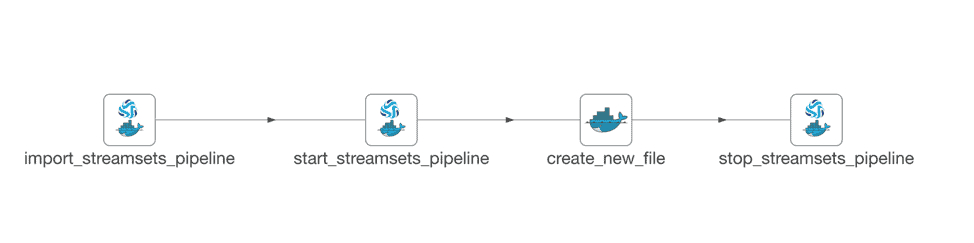
The picture below shows a basic recipe built in less than a day that imports an existing StreamSets pipeline, starts the pipeline, triggers it by mimicking an event and in the end stops the pipeline. All the tasks mentioned above are performed in individual nodes each of which can be configured to add automated QA tests that can either pass/fail or issue a warning upon execution.
Step 1: Import the StreamSets pipeline
This step is performed by the node import_streamsets_pipeline as shown in the picture above. It uses a docker container to log into the AWS EC2 machine and import the StreamSets pipeline as defined by the JSON extract provided by the user using the StreamSets CLI. The JSON extract can be exported from StreamSets and passed into the docker node as a source file. This step also makes sure that the StreamSets pipeline is versioned in Github.
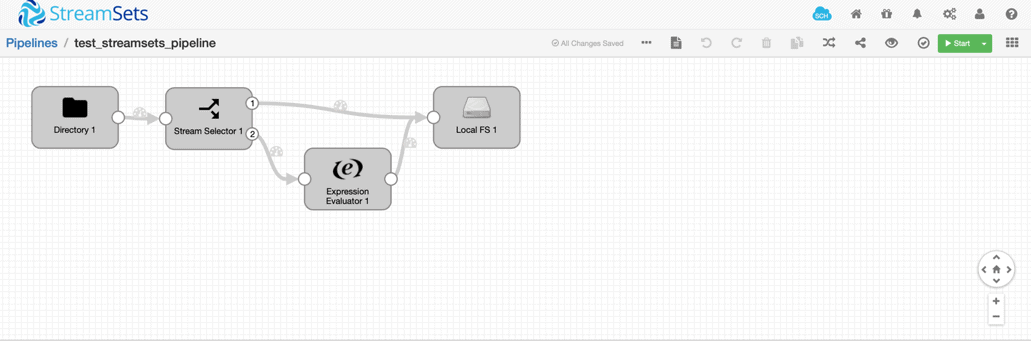
bin/streamsets cli -U https://localhost:18630 store import -n “$pipelineID” -f <file_name>.jsonThe sample StreamSets pipeline we designed for demo (as shown in picture below) moves a file from local directory (local directory on the ec2 instance) to an Amazon S3 bucket.
Step 2: Start the StreamSets Pipeline
The start_streamsets_pipeline node uses a docker container to log into the AWS EC2 machine and interact with StreamSets using the StreamSets CLI to start the StreamSets pipeline.
bin/streamsets cli -U https://localhost:18630 manager start –name <pipelineID>Step 3: Create a new file
The create_new_file node mimics the arrival of a new file in the local directory by creating a new file in the ec2 instance to test if the StreamSets pipeline is operating as expected
Step 4: Stop the StreamSets Pipeline
The stop_streamsets_pipeline node uses a docker container to log into the AWS EC2 machine and interact with StreamSets using the StreamSets CLI to stop the StreamSets pipeline.
bin/streamsets cli -U https://localhost:18630 manager stop –name <pipelineID>By following similar steps, any tool can be easily orchestrated with DataKitchen DataOps Automation. To learn more about how orchestration enables DataOps, please visit our blog, DataOps is Not Just a DAG for Data.
FAQ
What are the key points in this blog?
In the integration described in March 2020, DataKitchen DataOps Automation orchestrated StreamSets as steps inside a larger end-to-end pipeline rather than replacing it. StreamSets ran in a Docker container on an AWS EC2 instance and was driven through its command-line interface. A demonstration Recipe built in less than a day imported a pipeline, started it, mimicked a new file arriving, and stopped it, with automated tests available at every node.
How did DataKitchen orchestrate StreamSets pipelines?
Through the StreamSets command-line interface, called from nodes inside a DataOps Automation Recipe. In the March 2020 setup described in this post, StreamSets ran in a Docker container on an AWS EC2 instance, and separate nodes logged into that instance to import a pipeline definition from JSON, start the pipeline, create a file that triggered it, and stop it again.
Why is an ETL tool on its own not enough for DataOps?
Because moving data is only part of the work. An ETL tool builds and runs pipelines, but on its own it does not promote those pipelines across development, QA, and production environments, test every step, version pipeline configuration, or give separate teams isolated places to work. Orchestration above the tool supplies those, which is why the two are complementary rather than competing.
Do you have to replace your existing tools to adopt DataOps?
No. Orchestrating a tool rather than replacing it means teams keep what they already know, and each role keeps its own preferred set. Data scientists, business analysts, statisticians, and data engineers work differently and rarely give up their tools, so a DataOps platform coordinates them into one tested, versioned process instead of standardizing everyone onto a single product.
What is a Recipe in DataKitchen DataOps Automation?
A Recipe is a collection of connected pipeline steps, called nodes, that run together as one order. Each node can call a different tool, so a single Recipe can drive an ETL tool, a container, and a cloud service in sequence. Reusable pieces are saved as Ingredients that teams share, and each team works in an isolated environment called a Kitchen.
How does orchestration add tests to a third-party tool?
By testing at each node of the orchestration instead of inside the tool. Every node in a Recipe can carry automated tests that pass, fail, or raise a warning when the node runs. In the March 2020 setup, values pulled from StreamSets through its command-line interface or its software development kit could feed those tests, and the pipeline configuration was versioned in GitHub.