This page is the Oracle setup. If you’re moving off Oracle, the migration answer covers the procedure and the cloud migration answer covers the tests.
Oracle tables tend to be old, wide, and full of decisions nobody wrote down. Nobody hand-writes checks for every column of a decades-old order table, which is the case for generated tests.
Connect: a read-only user and a service name
TestGen authenticates to Oracle with a username and password. Access Requirements lists three things the user needs:
| Permission | Why TestGen needs it |
|---|---|
| SELECT on the tables in the target schema | Profile data, run tests, and collect monitor metrics |
| SELECT on ALL_TAB_COLUMNS | Discover tables, columns, and data types |
| SELECT on ALL_TABLES | Read table metadata and approximate row counts |
The two catalog views come free with CREATE SESSION and only show objects the user can already select, so the table grants are the real work:
CREATE USER testgen IDENTIFIED BY "choose-a-password";
GRANT CREATE SESSION TO testgen;
GRANT SELECT ON sales.orders TO testgen;
GRANT SELECT ON sales.order_lines TO testgen;
In the connection form, enter Host, Port, and the Service Name. There’s no SID field. Keep the user read-only: a custom SQL test runs whatever you write.
Profile: what Oracle’s types do to a profile
Profiling captures 55 characteristics per column and flags 32 kinds of hygiene issues. Data Profiling explains what each one means. Three Oracle habits show up fast.
A NUMBER column often stores codes, flags, or dates as digits. TestGen compares the declared type with what the values look like and suggests a better one. A CHAR column pads every value with spaces to its declared length, which matters the day you compare it with a copy on another database. And wide tables take longer to profile.
So schedule profiling off-hours, every two weeks to a month, as Scheduling recommends. Since 5.134.0 you can pause a long run during business hours and resume it later. Synonyms aren’t covered in the docs; point the table group at the schema that owns the tables.
Test: generated first, written second
TestGen generates 34 test types from the profile and gives you 19 business-rule and custom SQL types to configure yourself. Every test runs as SQL inside Oracle. Schedule runs in TestGen, or call POST /api/v1/test-suites/{test_suite_id}/test-runs from your own scheduler, as shown in Run Profiling and Tests. Personal access tokens are Enterprise. In open source, the call authenticates with an OAuth 2.1 client: a one-hour access token traded from a 30-day refresh token, which you renew by authorizing again in a browser.
Observe: monitors and the pipeline around them
Monitors watch freshness, volume, and schema on every table in the group, and you can add Metric monitors with your own SQL. Volume and Metric monitors learn thresholds from history. Alerts go to email, Slack, Microsoft Teams, or a webhook through Notifications. To see test results next to the jobs that loaded Oracle, connect TestGen to DataOps Observability.
Dashboard
Each table group gets a scorecard with a total score and a separate score for critical data elements (CDEs). Each hygiene issue has an Issue Report: a PDF with a summary, sample rows, and the SQL to reproduce it. Send that to the application team.
Walkthrough: the general steps
DataKitchen has no Oracle quickstart. These are the general steps from Manage Connections:
- Select Connections, click Add Connection, and pick Oracle.
- Enter Host, Port, Service Name, and the read-only user. Click Test Connection.
- Create a table group with the schema and table masks, then click Verify Access.
- Leave Run profiling, Generate and schedule tests, and Configure monitors on, set a schedule, then click Finish Setup.
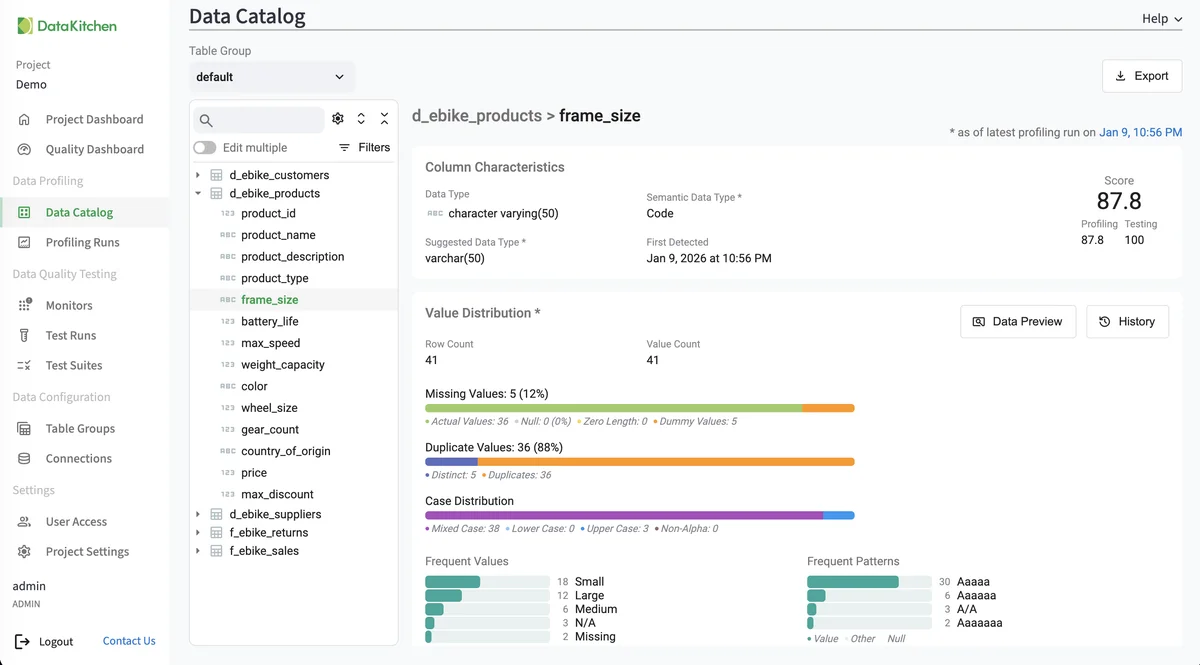
That’s the Data Catalog on TestGen’s demo data, not an Oracle schema: one column’s profile, with the suggested data type next to the declared one.
TestGen vs Oracle Enterprise Data Quality
| DataOps TestGen | Oracle Enterprise Data Quality | |
|---|---|---|
| Where the work happens | SQL inside Oracle | EDQ’s own repository, which Oracle’s docs say holds data along with gathered statistics |
| Tests | 34 types generated from the profile | Validation rules you build in the Director client |
| Matching and cleansing | None | Profiling, auditing, cleansing, and matching, plus an Address Verification Server add-on |
| License | Apache 2.0 | Commercial, pricing on request |
Sources checked October 21, 2026. Pick EDQ when the job is matching customers, standardizing addresses, or building a golden record; TestGen doesn’t do those. Pick TestGen when the job is finding out what’s wrong in the tables you already have and catching it again tomorrow. DataKitchen’s EDQ comparison estimates EDQ at $150,000 to $400,000 a year for 10 users and 1,000 tables (DataKitchen’s estimate).
Pricing
The core profiling, testing, and monitoring engine is free and open source. Enterprise adds team access, security, Commercial Pharma tests, source-data controls for AI, and support. Open source covers one user, one database connection, one project, and unlimited tables. Enterprise is $100 per user per month plus $100 per database connection per month. Install open source TestGen, or see every database it supports.
Documentation: Access Requirements, Manage Connections, Data Profiling, Monitor Tables, Run Profiling and Tests, Verify a Data Migration, Oracle 5.9.4 release notes