Ask a governance lead how to organize data quality tests and you get dimensions: validity, completeness, timeliness. Ask the engineer on call and you get symptoms: the schema changed, the row count fell off a cliff, the table went stale. The person who wrote the SQL thinks in algorithms. The person who has to configure the test wants to know how much it needs from them.
They’re all right. That’s the trouble with a folder tree. A test lives in one folder and belongs in four.
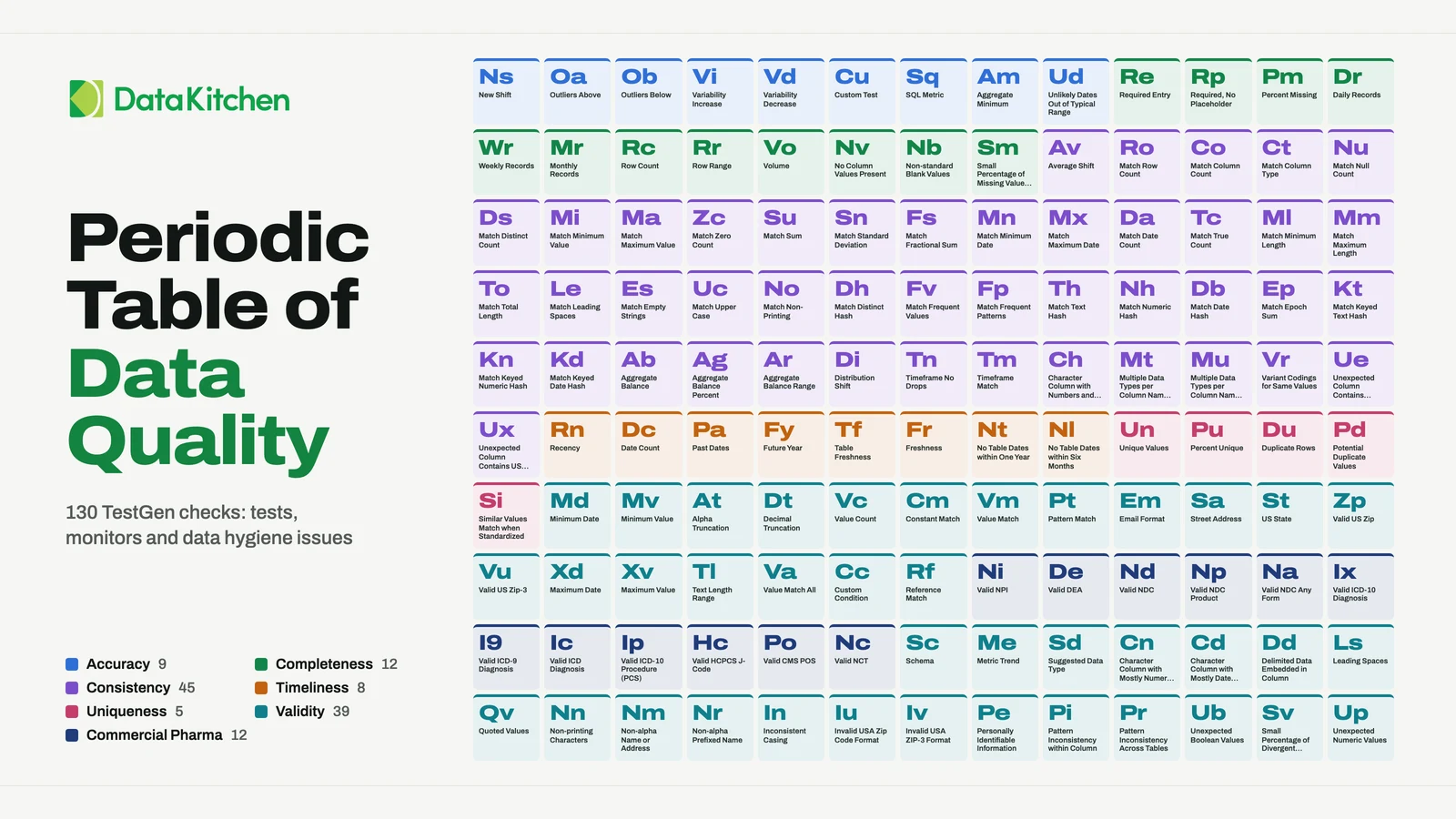
So shop for tests the way you shop on Amazon. Nobody scrolls every product in Electronics. You tick a brand, a price range and a rating, and the list shrinks to something a person can read. Tests have facets the same way products do, which is why we rebuilt TestGen’s Add Test screen as a faceted picker. Below is the same idea laid over all 130 checks the TestGen documentation lists, every test type, table monitor and data hygiene issue, drawn as a periodic table. Search, or tick a facet on the left, and watch the table rearrange. Every tile opens its entry in the TestGen documentation.
Six ways to sort a data quality test
Quality dimension
The governance vocabulary: accuracy, completeness, consistency, timeliness, uniqueness, validity. It’s the axis everybody reaches for first, and the tile colors use it. It is also the least helpful one at 2am, when what you know is the symptom and not the category.
Impact dimension
The kind of operational risk a failure carries: conformance, reliability, regularity or usability. It’s lopsided: conformance holds 80 of the 130 checks. TestGen’s quality scores break down along this axis too, so it is the one to sort by when you want to know where the risk sits.
Health dimension
The symptom: schema drift, data drift, volume or freshness. Start here when something is already wrong and you want every check that would have seen it coming.
Algorithm
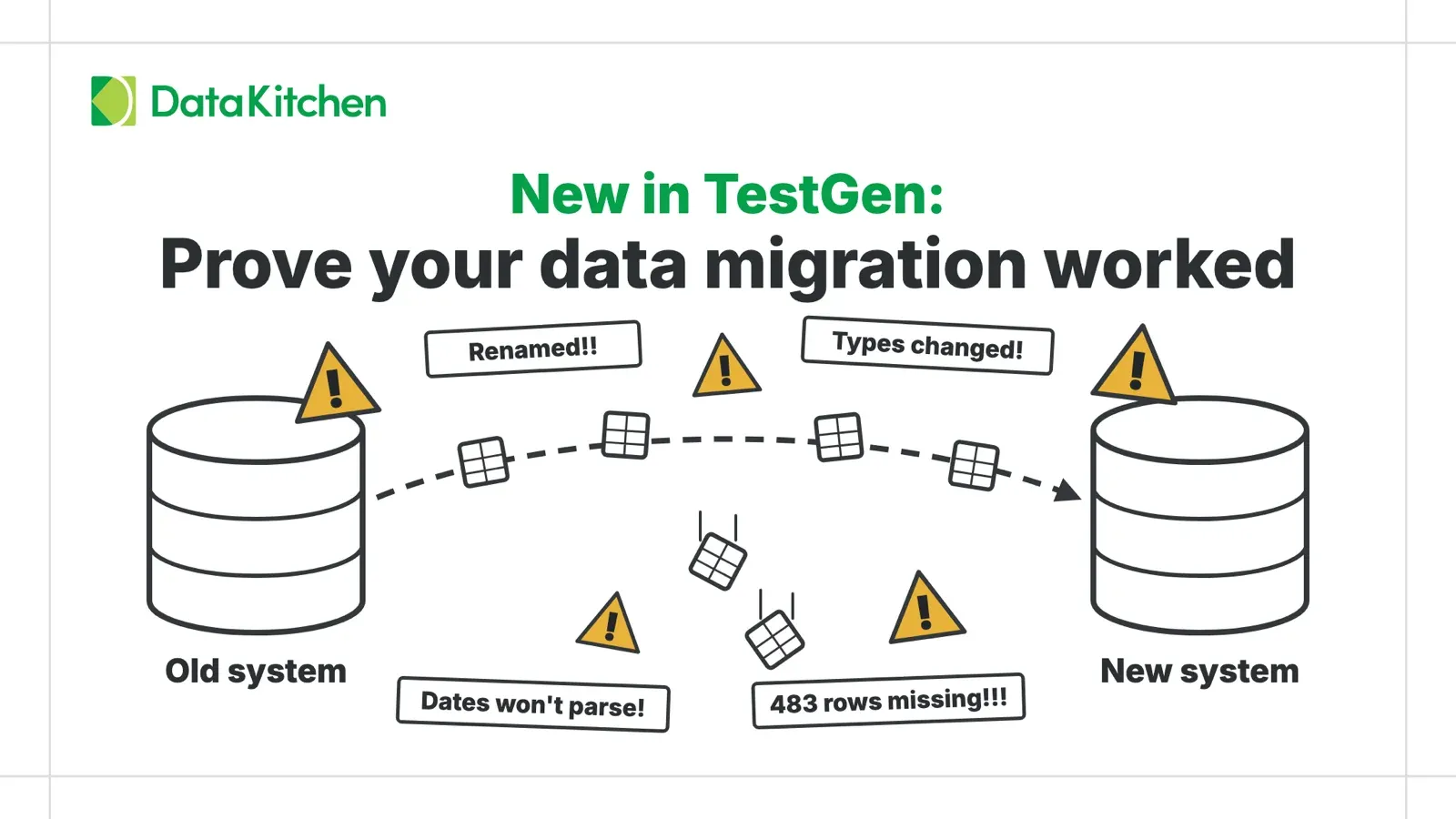
How the check computes its answer. Counting, a boundary check, a regex, a set lookup, a statistical drift measure, an aggregate reconciled against a baseline, or custom SQL. Aggregate reconciliation is the biggest group, 38 tiles, and 33 of them are the Match tests that compare a target table against a source baseline. That is how you prove a data migration worked. Statistical technique goes one level deeper for the drift tests, down to Cohen’s D or Jensen-Shannon divergence.
Test scope
What the check points at. Of the 130, 77 run against a single column. Ten run against a table, eight compare one table to another, and the Schema monitor watches a whole table group.
Criteria
How much you have to tell the test. A defined rule needs nothing but switching on: Duplicate Rows already knows what a duplicate is. A defined threshold needs a number. A reference dataset needs a second table to compare against. The rail lists them in that order, least setup to most.
One tile, six answers
Pick any tile and it answers all six at once. Row Count is a reliability check on completeness. Its symptom is volume, it counts, it runs on a table, and it needs one number from you: the threshold. Filed in one folder, five of those six facts go missing.
How the facets combine
Ticked values inside one facet widen the set: tick Column and Table under Test Scope and you see tests of either scope. Ticked values across facets narrow it: add Counting under Algorithm and only the column and table checks that count stay on the table. A tile with no value on a ticked facet drops out. Profiling finds data hygiene issues, and nobody configures them as tests, so they carry an impact and a quality dimension and nothing else, and they leave the moment you tick an algorithm.
The counts beside each value are tiles. They follow the search but not the other facets, the same as in the product.
The Periodic Table of Data Profiling
Most of the checks above start from a profile. TestGen finds hygiene issues in it and generates tests from it, and the documentation lists 55 characteristics a profile captures. Four of them name the column instead of measuring it: table name, column name, column type and position. The other 51 get their own table.
None of them pass or fail. They are raw material. Sort them by the column type that gets them, by the section TestGen files them under, or by whether they hold raw values, which TestGen redacts for anyone not allowed to see a PII column.
Where to start
You don’t need all 130. You need the few that would have caught last month’s incident, and facets are how you find them. Start from the symptom you already lived through under Health Dimension. Narrow to the scope you can actually test. Then let Criteria show you which checks cost nothing but a click to switch on.
After that, point TestGen at the table and let the profile write the first draft of the suite. The periodic table is for the tests a profile can’t guess.
FAQ
What are the key points in this blog?
TestGen documents 130 data quality checks: 94 test types, four table monitors and 32 data hygiene issues. This post lays them out as an interactive periodic table you filter with the same facets as the TestGen Add Test picker. A second table holds the 51 profiling characteristics TestGen measures. Facets beat folders because one test belongs in several categories at once.
How do you categorize data quality tests?
Sort them by facets, not folders. TestGen tags every test type on seven: quality dimension, impact dimension, health dimension, algorithm, statistical technique, test scope and criteria. One test answers all of them at once. Row Count, for example, is a reliability check on completeness that counts the rows in a table against a threshold you set.
What is the difference between a data quality test, a monitor and a data hygiene issue?
A test checks a column or table against a rule or threshold, either one you configure or one TestGen generates from the profile. A monitor watches a table’s volume, freshness, schema or a custom metric and flags anomalies by learning from historical patterns. A data hygiene issue is a problem profiling finds on its own, such as leading spaces or mixed data types, with nothing to configure.
What are the data quality dimensions in TestGen?
The quality dimension facet uses accuracy, completeness, consistency, timeliness, uniqueness and validity, plus recency for two freshness checks. Validity and consistency are the largest groups, with 49 and 45 of the 130 checks. Impact dimension is a separate axis with four values: conformance, reliability, regularity and usability. TestGen quality scores break down along both.
What does TestGen measure when it profiles a column?
TestGen documents 55 profiling characteristics. Four identify the column: table name, column name, column type and position. The other 51 measure it, from record, null and distinct counts to text length, frequent patterns, percentiles, date ranges and how many distinct days, weeks and months a date column covers. Which ones a column gets depends on whether it holds text, numbers, dates or Booleans.
Which TestGen checks need TestGen Enterprise?
Only the 12 commercial pharma tests, such as Valid NPI, Valid NDC, Valid DEA and Valid ICD-10 Diagnosis. The other 82 test types, the four monitors and all 32 hygiene issues are in open-source TestGen, which is Apache 2.0. Tick Commercial Pharma under Domain in the table to show only the pharma tests.
- New Shift Accuracy (documentation, opens in a new tab)
- Outliers Above Accuracy (documentation, opens in a new tab)
- Outliers Below Accuracy (documentation, opens in a new tab)
- Variability Increase Accuracy (documentation, opens in a new tab)
- Variability Decrease Accuracy (documentation, opens in a new tab)
- Custom Test Accuracy (documentation, opens in a new tab)
- SQL Metric Accuracy (documentation, opens in a new tab)
- Aggregate Minimum Accuracy (documentation, opens in a new tab)
- Unlikely Dates Out of Typical Range Accuracy (documentation, opens in a new tab)
- Required Entry Completeness (documentation, opens in a new tab)
- Required, No Placeholder Completeness (documentation, opens in a new tab)
- Percent Missing Completeness (documentation, opens in a new tab)
- Daily Records Completeness (documentation, opens in a new tab)
- Weekly Records Completeness (documentation, opens in a new tab)
- Monthly Records Completeness (documentation, opens in a new tab)
- Row Count Completeness (documentation, opens in a new tab)
- Row Range Completeness (documentation, opens in a new tab)
- Volume Completeness Monitor (documentation, opens in a new tab)
- No Column Values Present Completeness (documentation, opens in a new tab)
- Non-standard Blank Values Completeness (documentation, opens in a new tab)
- Small Percentage of Missing Values Found Completeness (documentation, opens in a new tab)
- Average Shift Consistency (documentation, opens in a new tab)
- Match Row Count Consistency (documentation, opens in a new tab)
- Match Column Count Consistency (documentation, opens in a new tab)
- Match Column Type Consistency (documentation, opens in a new tab)
- Match Null Count Consistency (documentation, opens in a new tab)
- Match Distinct Count Consistency (documentation, opens in a new tab)
- Match Minimum Value Consistency (documentation, opens in a new tab)
- Match Maximum Value Consistency (documentation, opens in a new tab)
- Match Zero Count Consistency (documentation, opens in a new tab)
- Match Sum Consistency (documentation, opens in a new tab)
- Match Standard Deviation Consistency (documentation, opens in a new tab)
- Match Fractional Sum Consistency (documentation, opens in a new tab)
- Match Minimum Date Consistency (documentation, opens in a new tab)
- Match Maximum Date Consistency (documentation, opens in a new tab)
- Match Date Count Consistency (documentation, opens in a new tab)
- Match True Count Consistency (documentation, opens in a new tab)
- Match Minimum Length Consistency (documentation, opens in a new tab)
- Match Maximum Length Consistency (documentation, opens in a new tab)
- Match Total Length Consistency (documentation, opens in a new tab)
- Match Leading Spaces Consistency (documentation, opens in a new tab)
- Match Empty Strings Consistency (documentation, opens in a new tab)
- Match Upper Case Consistency (documentation, opens in a new tab)
- Match Non-Printing Consistency (documentation, opens in a new tab)
- Match Distinct Hash Consistency (documentation, opens in a new tab)
- Match Frequent Values Consistency (documentation, opens in a new tab)
- Match Frequent Patterns Consistency (documentation, opens in a new tab)
- Match Text Hash Consistency (documentation, opens in a new tab)
- Match Numeric Hash Consistency (documentation, opens in a new tab)
- Match Date Hash Consistency (documentation, opens in a new tab)
- Match Epoch Sum Consistency (documentation, opens in a new tab)
- Match Keyed Text Hash Consistency (documentation, opens in a new tab)
- Match Keyed Numeric Hash Consistency (documentation, opens in a new tab)
- Match Keyed Date Hash Consistency (documentation, opens in a new tab)
- Aggregate Balance Consistency (documentation, opens in a new tab)
- Aggregate Balance Percent Consistency (documentation, opens in a new tab)
- Aggregate Balance Range Consistency (documentation, opens in a new tab)
- Distribution Shift Consistency (documentation, opens in a new tab)
- Timeframe No Drops Consistency (documentation, opens in a new tab)
- Timeframe Match Consistency (documentation, opens in a new tab)
- Character Column with Numbers and Units Consistency (documentation, opens in a new tab)
- Multiple Data Types per Column Name (major) Consistency (documentation, opens in a new tab)
- Multiple Data Types per Column Name (minor) Consistency (documentation, opens in a new tab)
- Variant Codings for Same Values Consistency (documentation, opens in a new tab)
- Unexpected Column Contains Emails Consistency (documentation, opens in a new tab)
- Unexpected Column Contains US States Consistency (documentation, opens in a new tab)
- Recency Timeliness (documentation, opens in a new tab)
- Date Count Timeliness (documentation, opens in a new tab)
- Past Dates Timeliness (documentation, opens in a new tab)
- Future Year Timeliness (documentation, opens in a new tab)
- Table Freshness Timeliness (documentation, opens in a new tab)
- Freshness Timeliness Monitor (documentation, opens in a new tab)
- No Table Dates within One Year Timeliness (documentation, opens in a new tab)
- No Table Dates within Six Months Timeliness (documentation, opens in a new tab)
- Unique Values Uniqueness (documentation, opens in a new tab)
- Percent Unique Uniqueness (documentation, opens in a new tab)
- Duplicate Rows Uniqueness (documentation, opens in a new tab)
- Potential Duplicate Values Uniqueness (documentation, opens in a new tab)
- Similar Values Match when Standardized Uniqueness (documentation, opens in a new tab)
- Minimum Date Validity (documentation, opens in a new tab)
- Minimum Value Validity (documentation, opens in a new tab)
- Alpha Truncation Validity (documentation, opens in a new tab)
- Decimal Truncation Validity (documentation, opens in a new tab)
- Value Count Validity (documentation, opens in a new tab)
- Constant Match Validity (documentation, opens in a new tab)
- Value Match Validity (documentation, opens in a new tab)
- Pattern Match Validity (documentation, opens in a new tab)
- Email Format Validity (documentation, opens in a new tab)
- Street Address Validity (documentation, opens in a new tab)
- US State Validity (documentation, opens in a new tab)
- Valid US Zip Validity (documentation, opens in a new tab)
- Valid US Zip-3 Validity (documentation, opens in a new tab)
- Maximum Date Validity (documentation, opens in a new tab)
- Maximum Value Validity (documentation, opens in a new tab)
- Text Length Range Validity (documentation, opens in a new tab)
- Value Match All Validity (documentation, opens in a new tab)
- Custom Condition Validity (documentation, opens in a new tab)
- Reference Match Validity (documentation, opens in a new tab)
- Valid NPI Validity Enterprise (documentation, opens in a new tab)
- Valid DEA Validity Enterprise (documentation, opens in a new tab)
- Valid NDC Validity Enterprise (documentation, opens in a new tab)
- Valid NDC Product Validity Enterprise (documentation, opens in a new tab)
- Valid NDC Any Form Validity Enterprise (documentation, opens in a new tab)
- Valid ICD-10 Diagnosis Validity Enterprise (documentation, opens in a new tab)
- Valid ICD-9 Diagnosis Validity Enterprise (documentation, opens in a new tab)
- Valid ICD Diagnosis Validity Enterprise (documentation, opens in a new tab)
- Valid ICD-10 Procedure (PCS) Validity Enterprise (documentation, opens in a new tab)
- Valid HCPCS J-Code Validity Enterprise (documentation, opens in a new tab)
- Valid CMS POS Validity Enterprise (documentation, opens in a new tab)
- Valid NCT Validity Enterprise (documentation, opens in a new tab)
- Schema Validity Monitor (documentation, opens in a new tab)
- Metric Trend Validity Monitor (documentation, opens in a new tab)
- Suggested Data Type Validity (documentation, opens in a new tab)
- Character Column with Mostly Numeric Values Validity (documentation, opens in a new tab)
- Character Column with Mostly Date Values Validity (documentation, opens in a new tab)
- Delimited Data Embedded in Column Validity (documentation, opens in a new tab)
- Leading Spaces Validity (documentation, opens in a new tab)
- Quoted Values Validity (documentation, opens in a new tab)
- Non-printing Characters Validity (documentation, opens in a new tab)
- Non-alpha Name or Address Validity (documentation, opens in a new tab)
- Non-alpha Prefixed Name Validity (documentation, opens in a new tab)
- Inconsistent Casing Validity (documentation, opens in a new tab)
- Invalid USA Zip Code Format Validity (documentation, opens in a new tab)
- Invalid USA ZIP-3 Format Validity (documentation, opens in a new tab)
- Personally Identifiable Information Validity (documentation, opens in a new tab)
- Pattern Inconsistency within Column Validity (documentation, opens in a new tab)
- Pattern Inconsistency Across Tables Validity (documentation, opens in a new tab)
- Unexpected Boolean Values Validity (documentation, opens in a new tab)
- Small Percentage of Divergent Values Validity (documentation, opens in a new tab)
- Unexpected Numeric Values Validity (documentation, opens in a new tab)
No tile matches this search and these facets.
- Average embedded spaces Alpha (documentation, opens in a new tab)
- Average length Alpha (documentation, opens in a new tab)
- Average value Numeric (documentation, opens in a new tab)
- Before 1yr date count Datetime (documentation, opens in a new tab)
- Before 5yr date count Datetime (documentation, opens in a new tab)
- Before 20yr date count Datetime (documentation, opens in a new tab)
- Boolean True count Boolean (documentation, opens in a new tab)
- Data type suggestion All column types (documentation, opens in a new tab)
- Date count Alpha (documentation, opens in a new tab)
- Date days present Datetime (documentation, opens in a new tab)
- Date months present Datetime (documentation, opens in a new tab)
- Date weeks present Datetime (documentation, opens in a new tab)
- Distinct pattern count Alpha (documentation, opens in a new tab)
- Distinct standard value count Alpha (documentation, opens in a new tab)
- Distinct value count All column types (documentation, opens in a new tab)
- Distinct value hash Alpha, Numeric, Datetime (documentation, opens in a new tab)
- Embedded space count Alpha (documentation, opens in a new tab)
- Filled value count Alpha (documentation, opens in a new tab)
- Fractional sum Numeric (documentation, opens in a new tab)
- Functional data type All column types (documentation, opens in a new tab)
- Functional table type All column types (documentation, opens in a new tab)
- Future date count Datetime (documentation, opens in a new tab)
- General type All column types (documentation, opens in a new tab)
- Includes digit count Alpha (documentation, opens in a new tab)
- Lead space count Alpha (documentation, opens in a new tab)
- Maximum date Datetime (documentation, opens in a new tab)
- Maximum length Alpha (documentation, opens in a new tab)
- Maximum text Alpha (documentation, opens in a new tab)
- Maximum value Numeric (documentation, opens in a new tab)
- Minimum date Datetime (documentation, opens in a new tab)
- Minimum length Alpha (documentation, opens in a new tab)
- Minimum text Alpha (documentation, opens in a new tab)
- Minimum value Numeric (documentation, opens in a new tab)
- Minimum value Gr0 Numeric (documentation, opens in a new tab)
- Null value count All column types (documentation, opens in a new tab)
- Numeric count Alpha (documentation, opens in a new tab)
- Percentile 25 Numeric (documentation, opens in a new tab)
- Percentile 50 Numeric (documentation, opens in a new tab)
- Percentile 75 Numeric (documentation, opens in a new tab)
- PII flag All column types (documentation, opens in a new tab)
- Quoted value count Alpha (documentation, opens in a new tab)
- Record count All column types (documentation, opens in a new tab)
- Standard deviation value Numeric (documentation, opens in a new tab)
- Standard pattern match Alpha (documentation, opens in a new tab)
- Top frequent values Alpha (documentation, opens in a new tab)
- Top patterns Alpha (documentation, opens in a new tab)
- Value count All column types (documentation, opens in a new tab)
- Within 1mo date count Datetime (documentation, opens in a new tab)
- Within 1yr date count Datetime (documentation, opens in a new tab)
- Zero length count Alpha (documentation, opens in a new tab)
- Zero value count Alpha, Numeric (documentation, opens in a new tab)
No tile matches this search and these facets.