This page is for teams running their own PostgreSQL, usually small ones. If you haven’t picked which tables to test first, read the two-person-team answer. Aurora PostgreSQL has its own page.
Connect
TestGen signs in with a username and password. Per Access Requirements, checked October 2026, it needs USAGE on the schema and SELECT on its tables. It also reads information_schema and pg_catalog, which every user can read by default.
CREATE ROLE testgen LOGIN PASSWORD '<password>';
GRANT USAGE ON SCHEMA sales TO testgen;
GRANT SELECT ON ALL TABLES IN SCHEMA sales TO testgen;
GRANT ... ON ALL TABLES covers only the tables that exist today. For tables created later, run ALTER DEFAULT PRIVILEGES as the role that creates them.
A connection names one database. A table group names one schema. So two schemas in one database means two table groups, and that fits in the open-source edition’s single connection.
Profile
TestGen profiles 55 column characteristics and runs 32 hygiene detectors, then stores the results in its catalog. Two Postgres features need a decision.
Partitioned tables: the parent stores no rows itself (PostgreSQL docs), and each partition is also a table in the catalog. Profile the parent and exclude the partitions with the table group’s exclude mask, or TestGen profiles the same rows twice: once through the parent, again through each partition.
JSONB: TestGen sorts each column into Alpha, Numeric, Datetime, or Boolean, and DataKitchen’s docs don’t describe how a JSONB column profiles. Test the keys that matter with a custom SQL test.
Test and observe
Generation picks from 34 test types and sets thresholds from the profile. You add the rules only you know from 19 business-rule and custom SQL types. Every test runs as SQL inside Postgres. That’s fast: in the NYC taxi exercise, 69 tests on 2,964,624 rows ran in 6 seconds. Profiling took 1 minute 48 seconds, mostly Postgres reading rows off disk.
Monitors learn freshness, volume, schema, and custom metric patterns. Notifications go to email, Slack, Microsoft Teams, or any HTTPS endpoint.
Dashboard
Each table group gets a scorecard on the Quality Dashboard. Score Explorer builds a dashboard around your critical data elements. The Open Payments analysis ran this loop on Postgres: profile, generate 353 tests, add 16 rule tests written from the regulation, run.
Walkthrough
From DataKitchen’s Postgres quickstart, which uses AdventureWorks in Docker:
- Select Connections, click Add Connection, and choose PostgreSQL.
- Enter a name, host, database, user, and password. Click Test Connection.
- Create a table group and open the Test tab to confirm the table list.
- Run profiling, then review hygiene issues. Click Source Data to see sample rows.
- Add a test suite, click Generate Tests, then Run Tests.
- Open the Quality Dashboard and Score Explorer.
The quickstart’s feature counts predate the current release. The counts on this page are current as of October 2026.
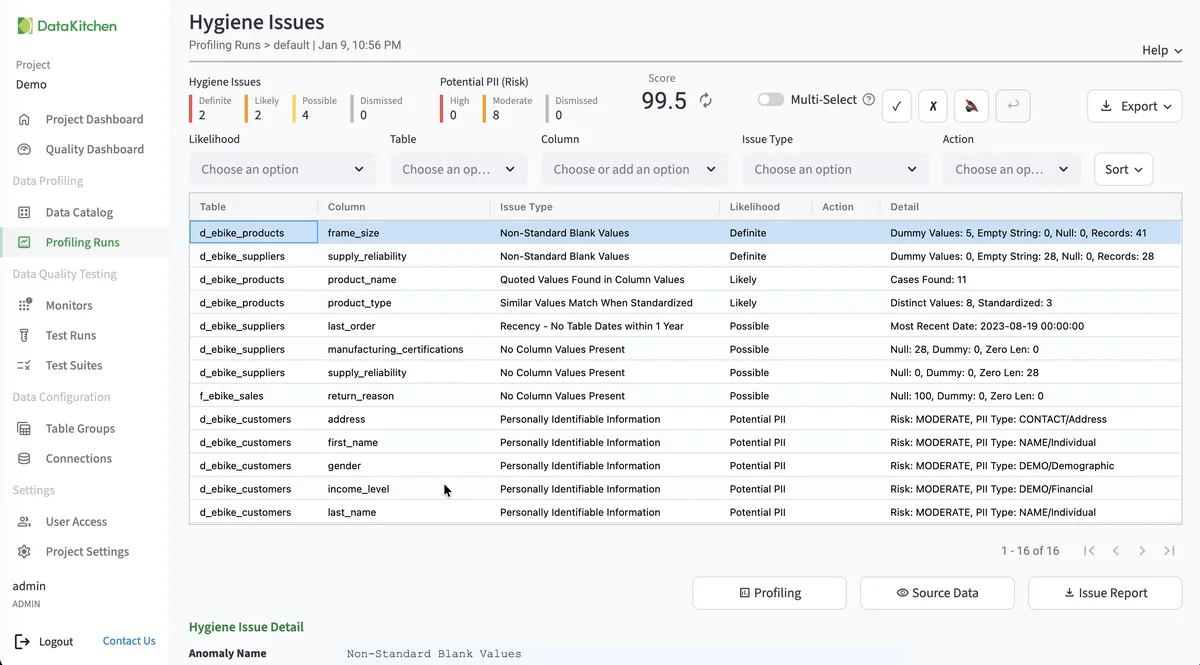
The screenshot shows TestGen’s hygiene issues list, step 4 above. It is not from a specific Postgres database.
TestGen vs native PostgreSQL
| Constraints | pg_stats | DataOps TestGen | |
|---|---|---|---|
| What it does | Rejects bad rows at write time | Null fraction, distinct count, most common values from ANALYZE | 55-characteristic profile, 32 hygiene detectors |
| Generates tests | No | No | 34 test types |
| Catches late or missing loads | No | No | Freshness and volume monitors |
| Alerts | Error to the writer | None | Email, Slack, Teams, webhook |
Source: pg_stats, PostgreSQL 18 docs, checked October 2026.
Keep your constraints and read pg_stats when you’re curious. Pick TestGen when you need the tests written, run on a schedule, and somebody told when a table goes quiet.
The core profiling, testing, and monitoring engine is free and open source. Enterprise adds team access, security, Commercial Pharma tests, source-data controls for AI, and support. Start with the install. Moving Postgres somewhere else? See the migration answer and which databases TestGen supports.
Documentation: Postgres quickstart, Connect your Data, Access Requirements, Manage Connections, Monitor Tables, Notifications.