This page is the Aurora setup. Aurora PostgreSQL profiles and tests the same way as PostgreSQL, so the PostgreSQL page covers JSONB and partitions; for the wider AWS choice, see the AWS answer.
Aurora is usually an application’s database first and an analytics source second. That order matters. A DataKitchen customer profiled five tables of under a million rows each against its live transactional database and slowed the application for 20 minutes. On Aurora, the fix is built in: the reader endpoint.
Connect: a read-only role on the reader endpoint
Access Requirements groups Aurora PostgreSQL with PostgreSQL. Authentication is username and password. IAM database authentication isn’t listed. The grants:
| Permission | Why TestGen needs it |
|---|---|
| USAGE on the target schema | Access the schema that holds your tables |
| SELECT on tables in the target schema | Profile data, run tests, and collect monitor metrics |
| SELECT on information_schema.columns and tables | Discover tables, columns, and data types |
| SELECT on pg_catalog.pg_namespace and pg_class | Approximate row counts |
Every user can read the catalog views already, so two grants do it:
CREATE ROLE testgen LOGIN PASSWORD 'choose-a-strong-password';
GRANT USAGE ON SCHEMA sales TO testgen;
GRANT SELECT ON ALL TABLES IN SCHEMA sales TO testgen;
For Host, use the cluster’s reader endpoint, the one with cluster-ro in its name. AWS says it balances read-only connections across Aurora Replicas. If the cluster has no replicas, it connects to the primary, so schedule profiling off-hours there.
Profile and test
Profiling captures 55 characteristics per column and flags 32 kinds of hygiene issues. TestGen 5.134.0 profiles PostgreSQL money columns as numbers and bit(1) columns as booleans, and fixed profiling errors on json and xml columns. TestGen generates 34 test types from the profile, and you configure 19 business-rule and custom SQL types yourself. Every test runs as SQL inside Aurora.
Profile every two weeks to a month, per Scheduling. Run tests daily to weekly, after your loads finish. To trigger runs from Step Functions or your CI, call the REST API.
Observe and score
Monitors track freshness, volume, and schema, and learn thresholds from history. Alerts go to email, Slack, Microsoft Teams, or a webhook. Each table group gets a scorecard with a total score and a critical data element (CDE) score, and every hygiene issue has a PDF Issue Report.
Walkthrough: the general steps
DataKitchen has a PostgreSQL quickstart but no Aurora one. These are the general steps from Manage Connections:
- Select Connections, click Add Connection, and pick PostgreSQL.
- Enter the reader endpoint as Host, port 5432, the database, and the read-only role. Click Test Connection.
- Create a table group for the schema, then click Verify Access.
- Leave Run profiling, Generate and schedule tests, and Configure monitors on, then click Finish Setup.
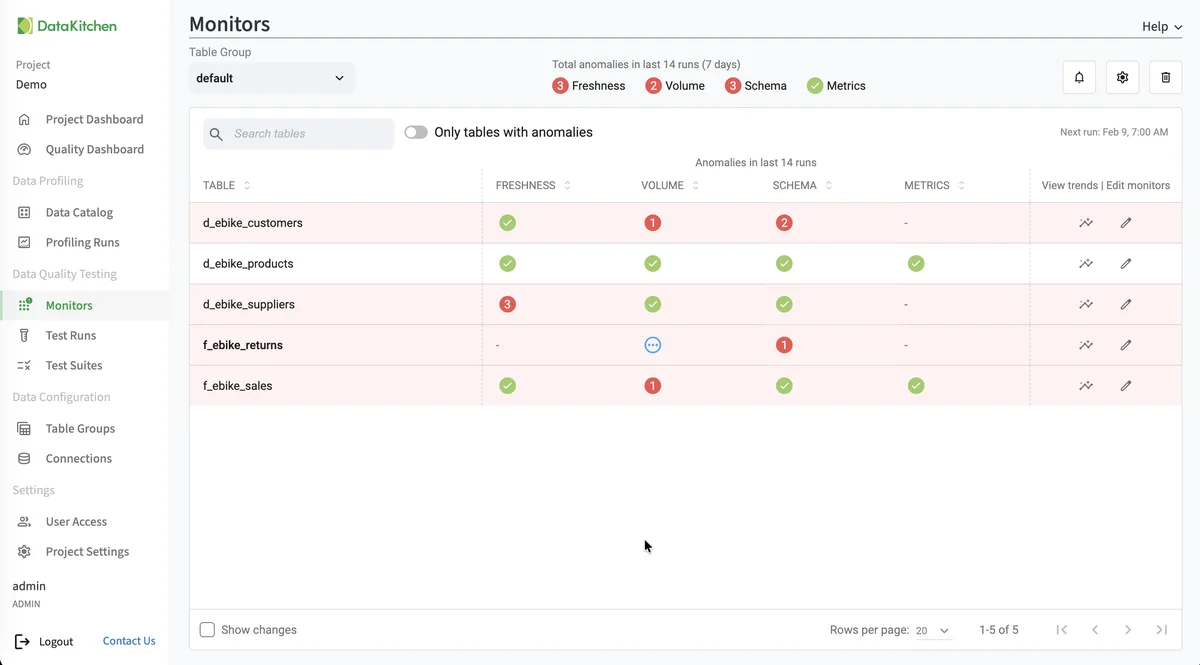
That’s the Monitors page on TestGen’s demo data, not an Aurora cluster: one row per table, with anomaly counts for freshness, volume, schema, and metrics over the last 14 runs.
TestGen vs AWS Glue Data Quality on Aurora
| DataOps TestGen | AWS Glue Data Quality | |
|---|---|---|
| Aurora support | Direct connection | RDS and Aurora table type not supported; reached through a JDBC table or a Glue ETL job |
| Where it runs | SQL inside Aurora | Serverless Glue workers |
| Rules | 34 types generated from the profile | DQDL rules, with recommendations and ML anomaly detection |
| Price basis | Per user and connection | Pay as you go |
Sources: AWS’s Glue Data Quality overview and supported source types, checked October 21, 2026. Glue wins if your data already lives in S3 and the Data Catalog, and it’s fully managed. TestGen wins when the table you care about is in Aurora. DataKitchen’s Glue comparison estimates Glue at $5,000 to $30,000 a year, usage-based (DataKitchen’s estimate).
Pricing
The core profiling, testing, and monitoring engine is free and open source. Enterprise adds team access, security, Commercial Pharma tests, source-data controls for AI, and support. Open source covers one user, one database connection, one project, and unlimited tables. Enterprise is $100 per user per month plus $100 per database connection per month. Install open source TestGen, or watch it test 3 million taxi rides on Postgres. Aurora is one of 14 databases TestGen supports. Migrating into Aurora? The migration answer and migration post cover it.
Documentation: Access Requirements, Manage Connections, PostgreSQL quickstart, Data Profiling, Monitor Tables, Scheduling, Run Profiling and Tests