TestGen connects to Amazon Redshift as a database, with no agent inside the cluster. If you’re still choosing a tool, start with the best tool for Redshift. Running Aurora PostgreSQL too? It has its own page.
Connect: a read-only user
TestGen authenticates to Redshift with a username and password. Per the Access Requirements page, it needs:
| Grant | Why |
|---|---|
| USAGE on the target schema | Reach the tables |
| SELECT on tables in the schema | Profile, test, and collect monitor metrics |
| SELECT on information_schema.columns | Discover tables, columns, and types |
| SELECT on pg_catalog.pg_namespace, pg_class | Approximate row counts, visible to every user by default |
For Spectrum, grant USAGE on the external schema and SELECT on its tables. TestGen discovers those columns through svv_external_columns.
CREATE USER testgen_reader PASSWORD '<strong password>';
GRANT USAGE ON SCHEMA analytics TO testgen_reader;
GRANT SELECT ON ALL TABLES IN SCHEMA analytics TO testgen_reader;
TestGen never runs INSERT, UPDATE, DELETE, CREATE, ALTER, or DROP. Keep the user read-only anyway, because a custom test runs SQL you write.
Profile: every column, as SQL in Redshift
Profiling records 55 characteristics per column and runs 32 hygiene detectors: numbers stored as text, unexpected dates, PII in a “clean” table. Two Redshift details matter. TestGen reads approximate row counts from pg_class to plan its queries, and that shortcut doesn’t exist for Spectrum tables. And profile sampling applies only to pattern and character analysis and the list of frequent values. Record counts, distinct counts, minimums, maximums, and percentiles always cover the full table.
Profiling is the heavy job. The scheduling guide recommends it every two weeks to a month. On a provisioned cluster, add TestGen’s user to a user group and route that group to its own WLM queue. On Redshift Serverless, every query bills per second with a 60-second minimum, Spectrum queries included.
Test: generated first, business rules second
TestGen generates tests from 34 test types using the profile, then runs them as SQL in Redshift. Uniqueness and referential tests matter more here than elsewhere: Redshift doesn’t enforce primary, unique, or foreign keys, but the planner assumes they hold. Add your own rules from 19 business-rule and custom SQL test types. Lock a tuned test so regeneration leaves it alone.
Schedule tests daily to weekly, after your loads finish, or trigger them from the pipeline through the REST API. The CI/CD answer has a working script.
Observe: freshness, volume, schema
Monitors watch tables over time. Volume and schema monitors start when you configure them. Freshness monitors follow the first profile, because profiling picks the key columns they fingerprint. Add metric monitors for numbers you track yourself. Anomalies reach you by email, Slack, Microsoft Teams, or webhook through notifications.
TestGen watches the tables. DataOps Observability watches the jobs that fill them. TestGen exports test results to it, and its Amazon S3 agent covers files landing before a COPY. There is no Observability agent for Redshift itself.
Dashboard: one score per table group
Each table group gets a scorecard on the Quality Dashboard. The score multiplies a profiling score by a testing score, weighted so a bad key on a dimension table counts more than a bad flag on a fact table. A separate CDE score covers only critical data elements.
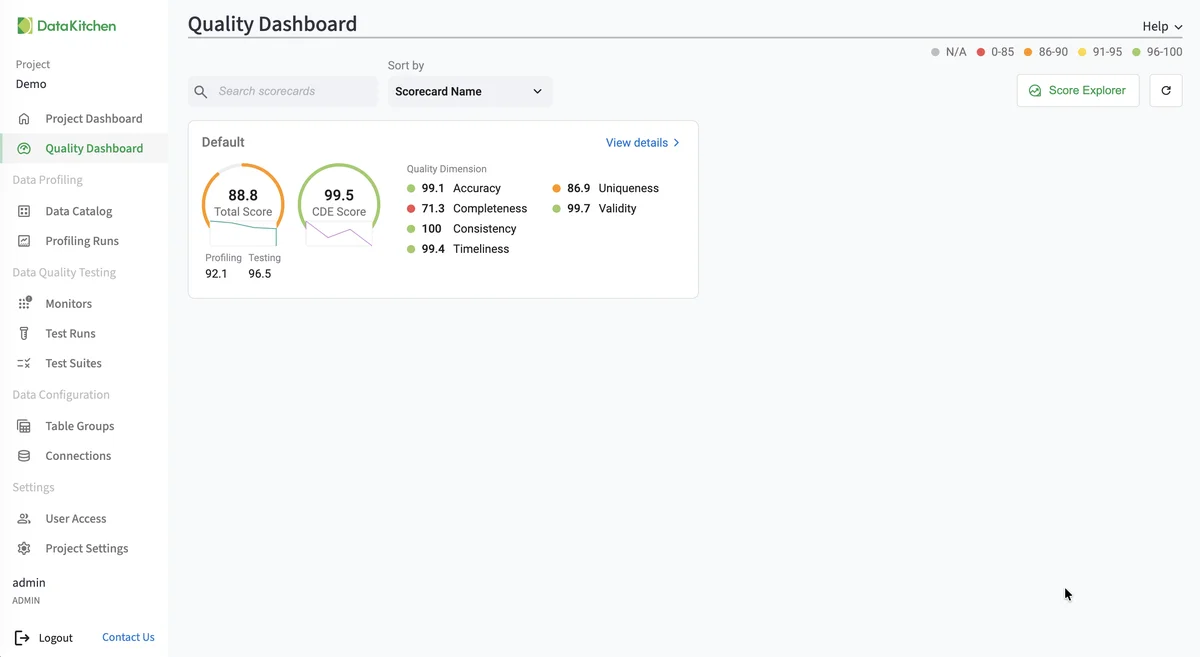
The screenshot is TestGen’s demo project, not a Redshift database. The layout is the same for every source.
Walkthrough: Redshift in about ten minutes
DataKitchen’s AWS Redshift quickstart loads AdventureWorks into Redshift and runs these steps:
- Install TestGen.
- Open Connections, click Add Connection, and pick Amazon Redshift.
- Enter a name, host, database, user, and password. Click Test Connection.
- Create a table group: the schema and the tables to include. Preview the tables to confirm access.
- Run profiling, then review hygiene issues and the Data Catalog.
- Create a test suite, generate tests, and run them.
- Open the Quality Dashboard.
Newer releases add setup wizard steps for scheduling tests and monitors. The quickstart’s feature counts predate them; the numbers on this page are current.
TestGen vs Redshift’s native features
| Job | Redshift native | TestGen |
|---|---|---|
| Unique and primary keys | Declared, not enforced | Uniqueness tests on every run |
| Foreign keys | Declared, not enforced | Referential tests |
| NOT NULL | Enforced at load | Null-rate tests and hygiene checks on every column |
| Profiling | Not built in | 55 characteristics per column |
| Freshness, volume, schema | Not built in | Monitors with notifications |
| Quality score | Not built in | Scorecards with CDE score |
The core profiling, testing, and monitoring engine is free and open source. Enterprise adds team access, security, Commercial Pharma tests, source-data controls for AI, and support. Open source covers one user, one database connection, and one project, with unlimited tables. Enterprise is $100 per user per month plus $100 per database connection per month.
TestGen reads Redshift and 13 other databases, which also makes it a check on a migration into or out of Redshift. For the wider vendor field, see DataKitchen’s count of data quality vendors, and for Spectrum, the Iceberg release post.
Documentation: AWS Redshift quickstart, Connect your Data, Access Requirements, Manage Connections, Manage Table Groups, Manage Test Suites, Scheduling, Monitor Tables, Quality Scores, Run Profiling and Tests