This page is the SAP HANA setup. For moving data into or out of HANA, the migration answer covers the procedure.
On HANA, the data quality question is usually blunt: is the table the finance report reads complete and correct today?
Connect: one SQL user, three grants
TestGen authenticates with a username and password. Access Requirements lists the grants:
| Permission | Why TestGen needs it |
|---|---|
| SELECT on the tables in the target schema | Profile data, run tests, and collect monitor metrics |
| SELECT on SYS.TABLE_COLUMNS | Discover tables, columns, and data types |
| SELECT on SYS.M_TABLES | Table metadata and row counts for in-memory tables |
The catch on HANA: SYS.TABLE_COLUMNS needs an explicit grant. On most databases the catalog views come free. Here they don’t, so grant both system views along with the schema.
Calculation views vs tables
TestGen discovers what’s in SYS.TABLE_COLUMNS, which is a catalog of table columns. The docs say nothing about calculation views. Point the table group at the schema that holds the physical tables, then click Verify Access in the setup wizard to see exactly which objects TestGen found. Testing the tables under a view catches problems before the view rolls them up.
Profile, test, observe
Profiling captures 55 characteristics per column and flags 32 kinds of hygiene issues. TestGen generates 34 test types from that profile and gives you 19 business-rule and custom SQL types to configure. All of it runs as SQL inside HANA.
Monitors track freshness, volume, and schema on every table in the group, and alerts go to email, Slack, Microsoft Teams, or a webhook. Each table group gets a scorecard with a total score and a critical data element (CDE) score. Each hygiene issue has a PDF Issue Report with sample rows and the SQL to reproduce it.
One HANA limit to plan around. The Profile for table comparison setting isn’t shown for SAP HANA, so Verify a Data Migration skips the hash tests there.
Walkthrough: the general steps
DataKitchen has no SAP HANA quickstart. These are the general steps from Manage Connections:
- Select Connections, click Add Connection, and pick SAP HANA.
- Enter Host, Port, and the read-only user. Click Test Connection.
- Create a table group with the schema and table masks, then click Verify Access.
- Leave Run profiling, Generate and schedule tests, and Configure monitors on, then click Finish Setup.
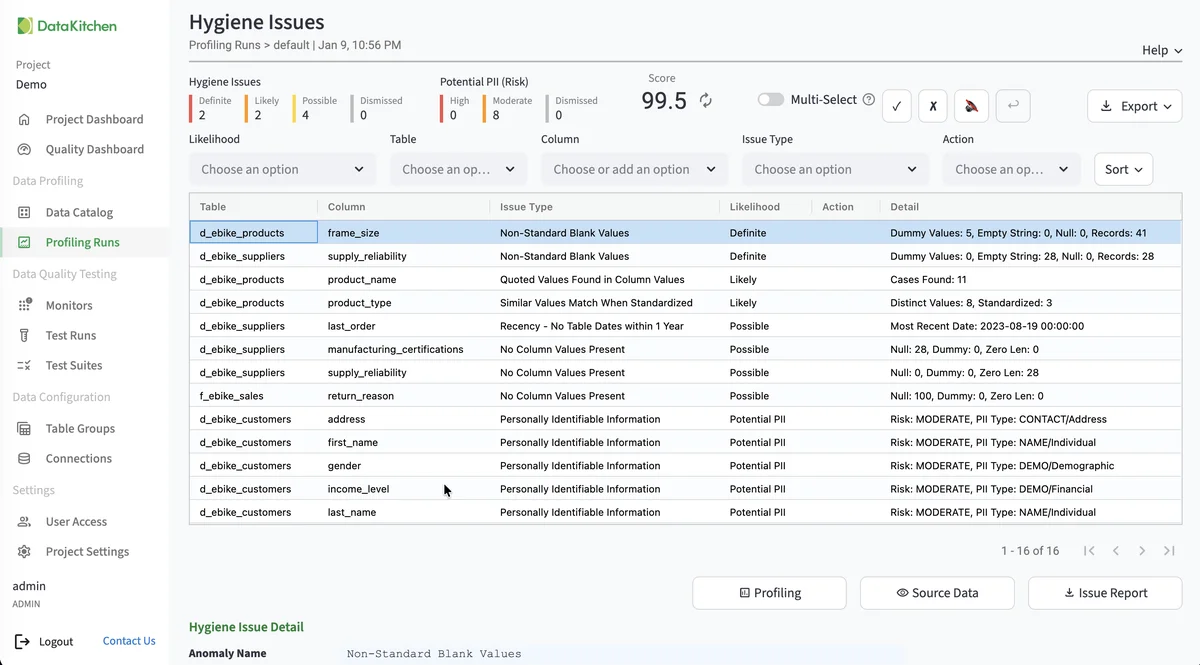
That’s the Hygiene Issues page on TestGen’s demo data, not a HANA schema. Each row names a table, a column, an issue type such as non-standard blank values, and how likely it is to be a real problem.
TestGen vs SAP’s own tools
| DataOps TestGen | SAP Information Steward | SAP Data Services | |
|---|---|---|---|
| Job | Profile, generate tests, monitor | Profiling, validation rules, scorecards, metadata | ETL with embedded data quality and cleansing |
| Tests | 34 types generated from the profile | Rules you define | Transforms you build |
| Cleansing | None | Cleansing package builder | Yes |
| DataKitchen’s price estimate | $0 open source | $100,000 to $300,000 a year | $150,000 to $400,000 a year |
Sources: SAP’s Information Steward page, checked October 21, 2026, and DataKitchen’s Information Steward and Data Services comparisons, whose prices are DataKitchen estimates for 10 users and 1,000 tables. SAP’s tools fix data. TestGen doesn’t. Pick TestGen when you want coverage on every HANA table without writing the rules first.
Pricing
The core profiling, testing, and monitoring engine is free and open source. Enterprise adds team access, security, Commercial Pharma tests, source-data controls for AI, and support. Open source covers one user, one database connection, one project, and unlimited tables. Enterprise is $100 per user per month plus $100 per database connection per month. Install open source TestGen, or see every database it supports. The March 2026 release post covers the setup wizard, and the migration post covers the comparison tests.
Documentation: Access Requirements, Manage Connections, Data Profiling, Monitor Tables, Verify a Data Migration, SAP HANA 5.9.4 release notes