TestGen connects to your files: no database in front, no load step, and no connector to install beyond TestGen itself. This page is the setup walkthrough. For choosing between tools, see the best tool for DuckDB, Parquet, and CSV files. For the vendor-delivery routine, see how to check vendor files.
A healthcare team DataKitchen works with asked for exactly this in 2026. Their trouble arrived as partner CSV files whose layout changed between deliveries, and they wanted TestGen to read the CSV before anyone loaded it. That shipped on October 14, 2026, in TestGen 5.134.0.
Connect
Each source needs read access and nothing more, per the Access Requirements page.
| Source | What you give TestGen | Access it needs |
|---|---|---|
| Local files | An absolute base path to a directory | Read access for the operating system user TestGen runs as |
| Amazon S3 | A base URI, plus access keys or an IAM role | s3:ListBucket and s3:GetObject |
| Azure Blob Storage | A storage account and container, plus a managed identity, service principal, or account key | Storage Blob Data Reader on the container |
| DuckDB | The path to a .duckdb file | Read access to the file, opened read-only |
On Docker, a local path resolves inside the container. Mount the folder read-only (:ro) and enter the path the container sees. Keep every credential read-only too: a custom test runs SQL you write, and TestGen can’t stop that SQL from writing if the credentials allow it. An Azure account key always allows writes, so prefer a managed identity.
Declare the tables
A file connection has no schema to scan, so you name the tables in a table group (Manage Table Groups). Each table is one file, such as sales/orders.csv, or a pattern, such as sales/*.csv, or sales/**/*.csv to include subfolders. A pattern is one table whose rows span every matching file, and TestGen reads the union of their columns. That’s how a folder of daily drops becomes one table with history.
Pick the format for each table: CSV, Parquet, or JSON. TestGen detects a CSV’s delimiter, header, quote, and escape characters when you leave them blank. Get the format right. A JSON file declared as CSV gives you nonsense columns, not an error, and the table preview is where you catch it.
Profile
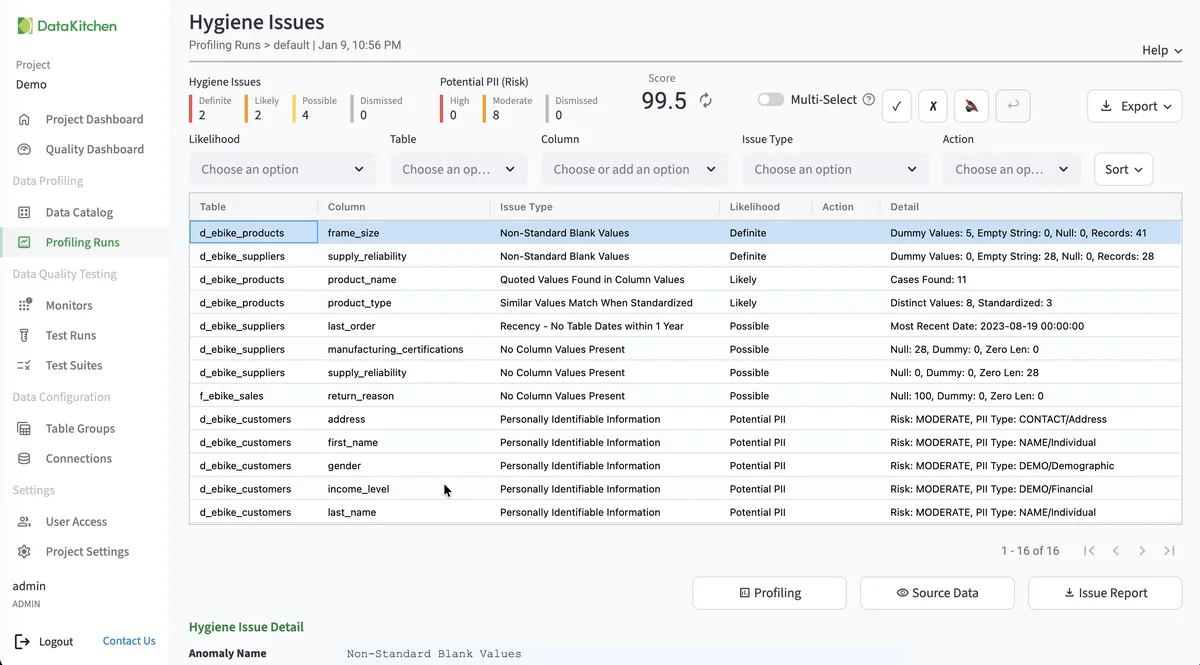
Profiling captures 55 column characteristics and runs 32 hygiene detectors. Two matter most for files.
PII. Profiling flags potential PII as high, moderate, or low risk, from SSNs and tax IDs down to user IDs. Find a Social Security number in a file that wasn’t supposed to carry one, and you’ve found it before it reached the warehouse.
Types. CSV and JSON carry no declared types, so TestGen infers them from the values. A ZIP code column of all digits comes back as a number. Parquet carries its own types. When the type matters, ask the vendor for Parquet.
Test
TestGen generates tests from the profile, drawing on 34 test types. For files, the timeliness tests catch stale data. Recency fails when a date column’s newest value falls further behind the test date than the profile allows. Past Dates fails when dates show up in the future. Recency is the one that catches a vendor resending last month’s extract under today’s filename.
The 19 business-rule and custom SQL test types are yours to configure: required fields present, codes on the agreed list, totals that reconcile. Those are the terms of a data contract, and a failing test is the evidence you send back. Tests run inside TestGen’s DuckDB session, on a schedule you set or from a pipeline through the REST API.
Observe
Monitors track freshness, volume, and schema on each table and learn its normal pattern from history. On a pattern table, a delivery that’s half the usual rows, or a renamed column, shows up at the file.
For the pipeline around the files, DataOps Observability has Amazon S3 and Azure Blob Storage agents that report file events, and TestGen can export test results into the same Observability journey, so a bad file and the job that loaded it sit side by side.
Dashboard
Each table group gets a scorecard on the Quality Dashboard, with a total score, a score for critical data elements (CDEs), and scores by dimension. The Issue Report on profiling results exports the hygiene findings to hand to whoever owns the file.
Walkthrough
There’s no file-specific quickstart in DataKitchen’s docs, so these are the general steps from Connect your Data and Manage Connections.
- Install TestGen. On Docker, mount your file folder into the container read-only.
- Add a connection and pick Local Files, Amazon S3, Azure Blob Storage, or DuckDB. Test Connection reports how many files it found.
- Create a table group and declare each table: name, file or pattern, format.
- Expand each declared table in the preview and check the inferred column types.
- Run profiling, review hygiene issues and PII flags, then generate tests.
- Turn on monitors and schedule test runs. Set a notification to email, Slack, or Microsoft Teams.
Size the machine first. File runs use TestGen’s memory and disk, and by default only one runs at a time. Size TestGen for DuckDB and File Data Sources has the numbers and the TG_MAX_CONCURRENT_IN_PROCESS_RUNS setting.
TestGen vs DuckDB on its own
| Need | DuckDB alone | TestGen |
|---|---|---|
| Column statistics | SUMMARIZE, one snapshot | 55 characteristics, kept per run |
| Hygiene and PII findings | Write the queries | 32 detectors, PII flags by risk |
| Tests | Write the SQL | Generated from the profile, plus your business rules |
| History across deliveries | Build it | Freshness, volume, and schema monitors |
| Alerts and scorecards | Build them | Email, Slack, Teams; scorecards by table group |
Pricing
The core profiling, testing, and monitoring engine is free and open source. Enterprise adds team access, security, Commercial Pharma tests, source-data controls for AI, and support. Open source covers one user, one connection, one project, and unlimited tables. Enterprise is $100 per user per month plus $100 per database connection per month. Files sit alongside 14 databases on the list of sources TestGen supports.
Documentation: Connect your Data, Access Requirements, Manage Connections, Manage Table Groups, Size TestGen for DuckDB and File Data Sources, Onboard a Dataset, Monitor Tables, Notifications