A healthcare data team we work with runs its warehouse on Azure SQL. Most of its trouble arrives before the warehouse, as CSV files from outside partners, and the layout of those files changes from one delivery to the next. This summer the ask was blunt: let TestGen read the CSV directly, before anybody loads it.
They weren’t the only ones asking. And the answer we kept giving was a little embarrassing. Stand up a database, load the file into it, then point TestGen at the table. Data quality software that won’t look at a file until you’ve built it a home is asking you to do the risky part first.
So now TestGen reads the file.
What shipped on October 14
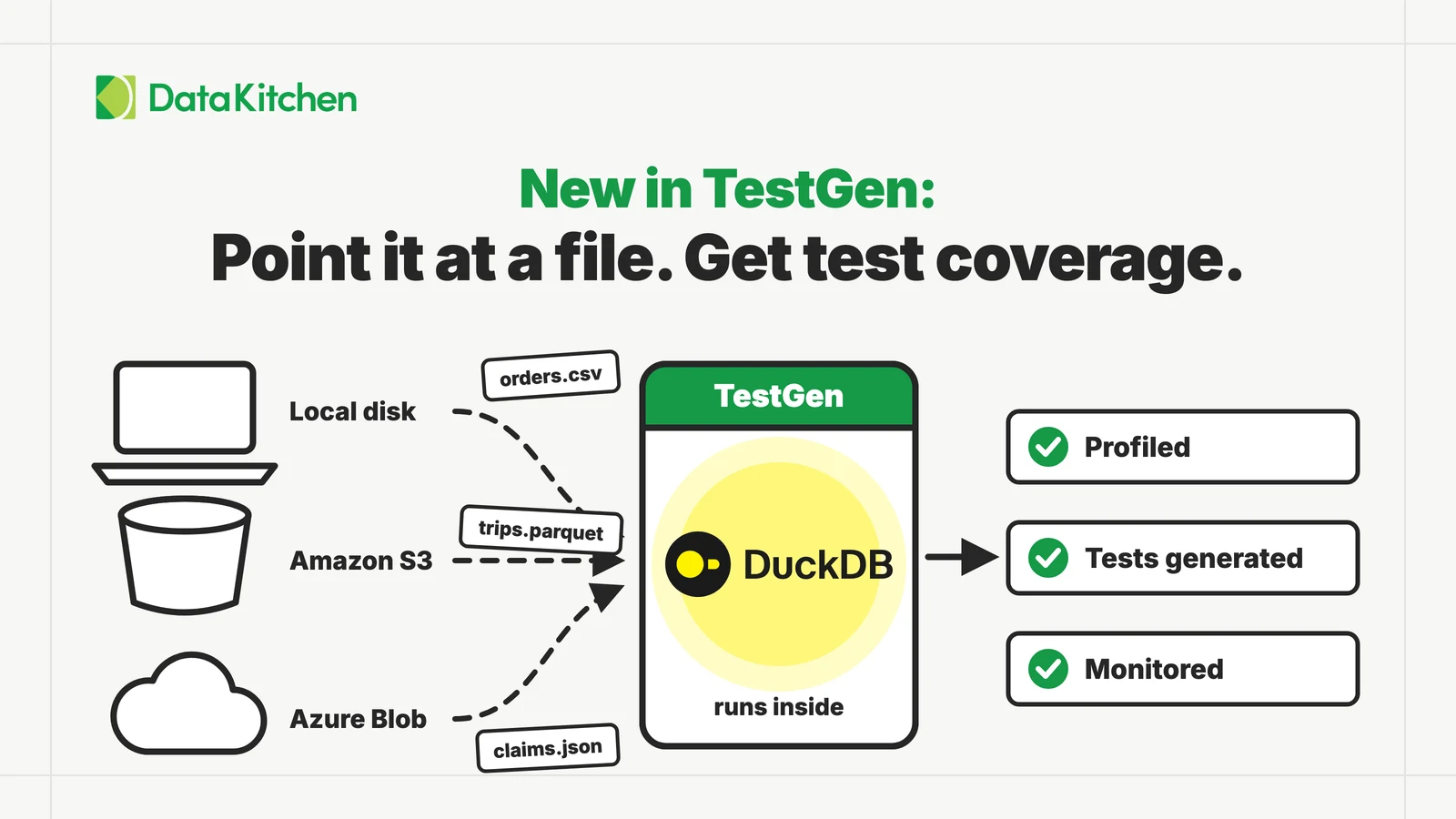
TestGen 5.134.0, in both the open source and Enterprise editions, profiles, tests and monitors files with no database in front of them:
| Source | What you give TestGen | Access it needs |
|---|---|---|
| Local files | An absolute base path to a directory | Operating system read access, mounted read-only |
| Amazon S3 | A base URI, plus access keys or an IAM role | s3:ListBucket and s3:GetObject |
| Azure Blob Storage | A storage account and container, plus a managed identity, service principal or account key | Storage Blob Data Reader |
| DuckDB | The path to a .duckdb file | Read access to the file, which TestGen opens read-only |
The formats are CSV, Parquet and JSON. You point a connection at a location, then declare tables inside it: one file, such as sales/orders.csv, or a pattern, such as sales/*.csv. A pattern is one table whose rows span every file it matches, which is how a folder of daily drops becomes a single table with history. Test Connection tells you how many files it found before you profile anything. The access requirements page lists the details for each source.
That pattern is also the answer to the healthcare team’s moving layouts. TestGen reads the union of the columns across every file a pattern matches, so a column that shows up in only some deliveries is still in the table, empty for the rows from files that lack it. When a partner adds or renames a field, the next profile shows it, at the file, before anyone loads it.
One setup note, because it’s the first thing people trip on. Most TestGen installs run in Docker, and a Local Files base path is resolved inside the container, not on your machine. Mount the folder into the container first, read-only, and enter the path as the container sees it. In docker-compose.yml that’s a volume such as /data/drops:/data/drops:ro. The same goes for a .duckdb file. And if that database has views over CSV, Parquet or JSON files, keep those files in the database file’s directory or below it, because TestGen reads nothing outside it.
What you get back is everything a warehouse table gets. The full profile, hygiene issues, a generated test suite, monitors on volume and schema, quality scores. A CSV is no longer a second-class citizen that has to be promoted to a table first.
Why DuckDB
DuckDB is a SQL database that runs inside another program instead of as a server. There is nothing to install and no port to open. It reads CSV, Parquet and JSON natively, and it reads them out of S3 and Azure Blob Storage through extensions its own team maintains. For a tool that has to look at a file somebody just dropped in a bucket, that is exactly the shape you want.
It’s also where the industry went. DuckDB 1.0 shipped on June 3, 2024. As of today, October 15, 2026, the DuckDB repository has 42,171 GitHub stars, and the Python package was downloaded 54.9 million times in the last month. In the Stack Overflow Developer Survey, its share of respondents went from 1.4% in 2024 to 3.3% in 2025.
Then, on August 26, 2026, Amazon announced it would acquire DuckLabs, the Amsterdam company whose engineers build DuckDB (SiliconANGLE’s report). The precise wording matters, so here it is: Amazon said it is not acquiring the DuckDB open source project, which stays free under the MIT license and governed by the independent DuckDB Foundation. MotherDuck, the separate company selling a DuckDB cloud service, was not part of it. When a cloud vendor pays for the team behind an embedded database, the embedded database has stopped being a hobbyist’s tool.
How it works inside TestGen
TestGen 5.134.0 ships with DuckDB 1.5.5 inside it. When you profile a file connection, TestGen opens an in-process DuckDB session, attaches your files or your .duckdb file read-only, and runs the profiling queries, the tests and the monitor checks there. For S3 it loads DuckDB’s httpfs extension and for Azure Blob its azure extension. Credentials go in as a DuckDB secret for that one session and are never written to disk.
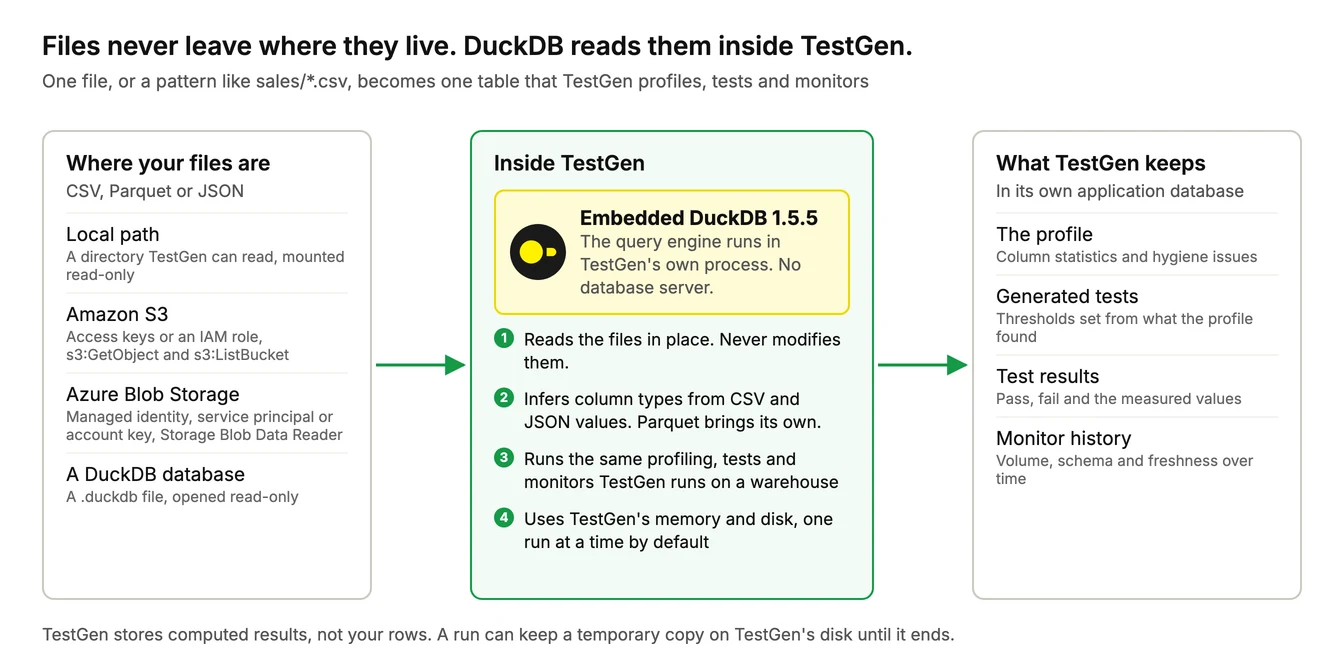
TestGen stores what it computes, the statistics, test outcomes and monitor metrics, in its own application database. It never writes to your files. A large run can spill a temporary copy to TestGen’s disk while it works, and that copy is gone when the run ends.
Remember our 3 million NYC taxi rides post? The source was one 48 MB Parquet file, and before TestGen could see a single row, we had to load it into Postgres. Now that step is a Local Files connection pointed at the folder the Parquet sits in.
What this won’t do for you
Files have no server, so the work lands on TestGen’s machine. Every run on a file or DuckDB connection uses TestGen’s own memory and disk, sized to the largest table you read. By default only one such run happens at a time and the rest queue. Raise TG_MAX_CONCURRENT_IN_PROCESS_RUNS once you’ve given TestGen the memory for it. The sizing guide has the numbers, including the extra disk CSV and JSON need when they come from S3 or Azure.
CSV and JSON don’t declare types, so TestGen infers them from the values. A text column of ZIP codes that happen to be all digits comes back as a number. When the exact type matters, use Parquet, which carries its own. And the format you declare is the format TestGen reads: a JSON file declared as CSV gives you a table of nonsense columns, not an error. The preview before profiling is where you catch that.
Excel isn’t on the list of formats, so a workbook has to be saved as CSV first.
And grant read-only access. A custom test runs SQL you write, and TestGen can’t stop that SQL from writing if the credentials allow it. Mount local folders read-only, and prefer a managed identity or service principal over an Azure account key, which always allows writes.
Everything else in the October 14 release
| Feature | What it does |
|---|---|
| Verify a data migration | The Table Comparison generation set builds tests from the source’s profile and runs them on the migrated copy, even when tables are renamed or the target is a different database |
| New test types | SQL Metric, Maximum Value, Maximum Date, Text Length Range, and Required, No Placeholder |
| Pause and resume profiling | Stop a long profiling run’s queries during business hours and continue it later from where it stopped |
| Slack, Teams and webhook notifications | Set a destination up once in Project Settings and use it in any notification rule |
| Onboard datasets through the REST API | A pipeline can create table groups and test suites, schedule profiling and test runs, and configure monitoring |
| Change a table group’s schema | Point a table group at a new schema and keep the tests’ history and predicted thresholds |
| Hide source data from AI clients (Enterprise) | Keeps values from your data out of everything the MCP server returns, while counts, structure and configuration stay visible |
Smaller changes ride along. Profile sampling now applies only to pattern and character analysis and frequent values, so counts, minimums, maximums, lengths and percentiles always cover the whole table. PostgreSQL money columns are profiled as numbers. The MCP server gained a delete_tests tool. The release notes have the rest, including two upgrade notes for people who run TestGen from their own Docker Compose file or Helm chart.
The healthcare team’s partners will keep changing their file layouts. That part we can’t fix. What changes is when anybody finds out: at the file, the day it lands, instead of three joins downstream in a report.
Related reading
| Resource | What it is | Reach for it when |
|---|---|---|
| New in TestGen: Prove Your Data Migration Worked | Blog post | You are moving data to a new database and need proof it arrived intact |
| Access Requirements: file data sources | Documentation | You are setting up a Local Files, S3 or Azure Blob connection and need the exact permissions |
| Size TestGen for DuckDB and File Data Sources | Documentation | Your files are large and you need to plan memory, disk and concurrent runs |
| Data Quality Tests on 3 Million NYC Taxi Rides in Five Minutes | Blog post | You want to see what TestGen finds in a real public Parquet file |
| TestGen release notes, 14 October 2026 | Release notes | You want every change in 5.134.0, including the upgrade notes |
DuckDB is a trademark of the DuckDB Foundation.
FAQ
What are the key points in this blog?
On October 14, 2026, DataKitchen released TestGen 5.134.0, which profiles, tests and monitors CSV, Parquet and JSON files on a local path, in Amazon S3 or in Azure Blob Storage, plus DuckDB database files. An embedded DuckDB engine reads the files inside TestGen, so there is no warehouse to stand up and no load step. The same release adds data migration testing, five new test types and pause-and-resume profiling.
Can TestGen profile a CSV file without a database?
Yes. Since TestGen 5.134.0, released October 14, 2026, a Local Files connection reads CSV, Parquet and JSON files from a directory, and Amazon S3 and Azure Blob Storage connections read them from object storage. TestGen runs full profiling, hygiene detection, generated tests and monitors on them, in both the open source and Enterprise editions.
Does TestGen use DuckDB internally?
Yes. TestGen 5.134.0 embeds DuckDB 1.5.5 as a query engine that runs inside TestGen’s own process. It reads your files, or a .duckdb database file in read-only mode, with no database server. Amazon S3 is read through DuckDB’s httpfs extension and Azure Blob Storage through its azure extension, and the files are never modified.
Did Amazon buy DuckDB?
Not the project. On August 26, 2026, Amazon announced an agreement to acquire DuckLabs, the Amsterdam company whose engineers build DuckDB. Amazon said it is not acquiring the open source project, which stays free under the MIT license and governed by the independent DuckDB Foundation. MotherDuck, a separate DuckDB company, was not part of the deal.
How does TestGen handle a folder of many files?
You declare a table as a single file, such as sales/orders.csv, or as a pattern, such as sales/*.csv or sales/**/*.csv to include subfolders. A pattern becomes one table whose rows span every matching file, and TestGen reads the union of their columns. To profile each file separately, declare one table per file.
What are the limits of file data sources in TestGen?
Runs on files use the memory and disk of the machine running TestGen, and only one runs at a time unless you raise TG_MAX_CONCURRENT_IN_PROCESS_RUNS. CSV and JSON carry no declared types, so TestGen infers them, and a text column of digits is read as a number. The supported formats are CSV, Parquet and JSON, from a local path, Amazon S3 or Azure Blob Storage.