Almost every data analytic tool can be used in DataOps, but some don’t enable the full breadth of DataOps benefits.
DataOps views data-analytics pipelines like a manufacturing process that can be represented by directed acyclic graphs. Each node in the graph represents an operation on data as it flows through the pipeline (integration, preprocessing, ETL, modeling, rendering, etc. ). In Figure 1 below, we see that the “check_data_quality” node accepts an input (data), performs some processing (quality tests) and produces an output (test results).
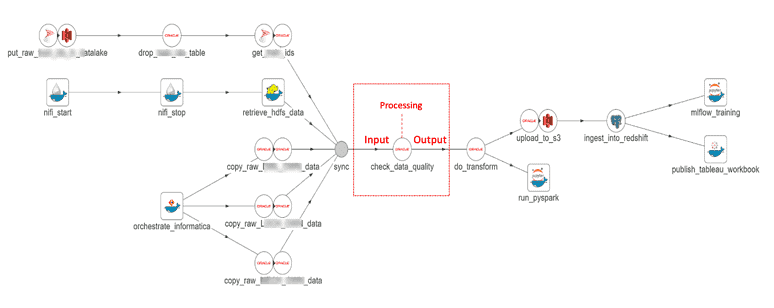
Figure 1: Each step in the data pipeline usually involves an input and processing to create a result or output.
If we view the data pipeline from a tools perspective, we see how data flows from one tool to another (Figure 2). The typical enterprise uses many different tools, so tool integration becomes vitally important. DataKitchen DataOps Automation employs two basic tool integration strategies.
- Native Support – Integration is achieved through dedicated Data Sources and Data Sinks. The tool supports a direct connection to DataKitchen DataOps Automation.
- Container Support – Integration is achieved using Containers. Containers are a lightweight form of machine virtualization which encapsulates an application and its environment. For more on the ease of using containers with DataKitchen DataOps Automation, see our containers blog.
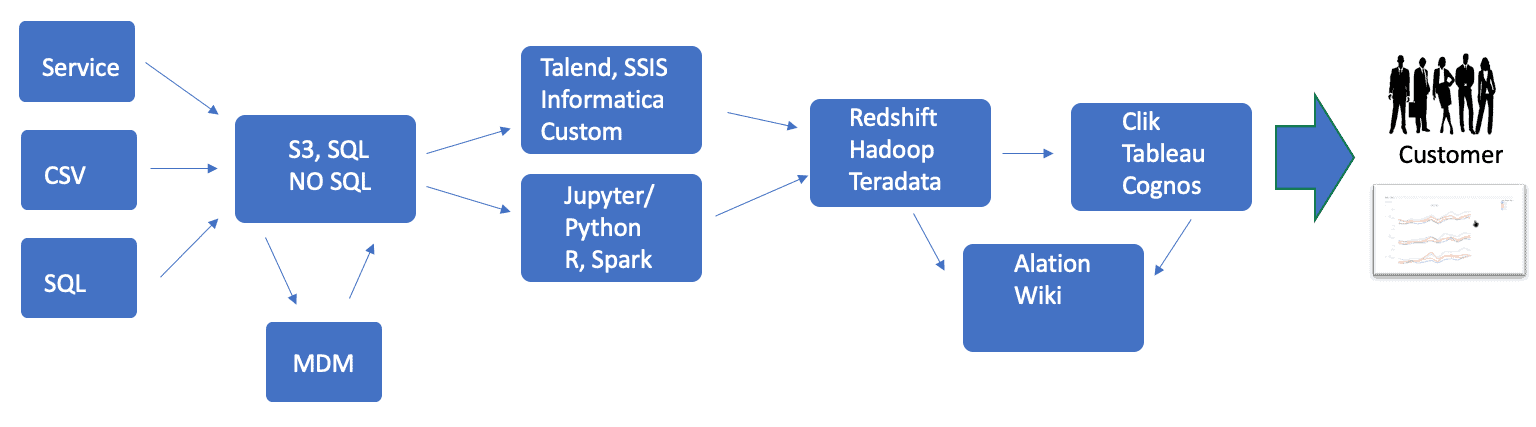
Figure 2: The DataOps pipeline shown from a tools perspective illustrates the importance of tool integration (multiple tool alternatives shown in steps).
Using native-supported or container-supported integration, a DataOps Platform like DataKitchen can interface with any tool. However, DataOps touches on many aspects of workflow, and some tools are better suited to DataOps than others. To further illustrate, we have created a simple rubric that scores the receptiveness of a tool to integration in a DataOps orchestrated pipeline.
A high-scoring tool offers support and functionality in four important areas:
- Source code – A tool that produces source code enables many aspects of DataOps. Source code can be version controlled, allowing change management, parallel development, and static testing (debugging via automated analysis of source code prior to execution).
- Environments – DataOps supports multiple environments, for example, development, staging. and production environments. A tool should be able to support segmented access. For example, a Redshift database may be partitioned using clusters, databases and schemas so that users are isolated from one another.
- API – A tool with an API is easy to orchestrate. An API that is machine callable and supports the loading of code/parameters works well in the continuous deployment methodology that DataOps seeks to create.
- DevOps – The tool supports being spun-up/shutdown under automated orchestration, and it can scale to the desired number of instantiations.
In addition to these four main areas, there are some other characteristics that the rubric scores. The rubric is shown below. The higher a tool scores, the easier it will be to integrate to a DataOps Platform.
Rubric for DataOps Ease of Integration
Step 1:
If your tool is a programming language or produces code as an artifact, check all that apply.
| Category | Sub-Category | Match | Points | DataOps Benefit |
|---|---|---|---|---|
| Source Code | Saves or exports binary, XML, JSON, or source code (e.g., SQL, Python) | ▢ | +8 | Version Control, Reuse |
| Source Code | Produces source code that can be checked into version control, but cannot be auto merged (e.g., binary-format, XML) | ▢ | +4 | Version Control |
| Source Code | Produces source code that is line mergeable (e.g., SQL, Python) | ▢ | +8 | Version Control, Branch And Merge |
| Source Code | Code supports static analysis | ▢ | +2 | Testing |
Step 2:
Check all that apply from these sub-categories.
| Category | Sub-Category | Match | Points | DataOps Benefit |
|---|---|---|---|---|
| Environments (e.g., Prod, QA, Dev) | The tool can be parameterized or partitioned | ▢ | +8 | Supports Release Environments, Parameterize Processing |
| DevOps | Provides a way to spin up the tool, i.e., create (in a VM, Container, or Machine Image) | ▢ | +8 | Environments, Containers, Reuse, Orchestration |
| DevOps | Able to be scaled to the number of instances required | ▢ | +4 | Environments, Reuse, Orchestration |
| API | Offers an API to start the tool | ▢ | +4 | Orchestration |
| API | Supports an API to stop the tool | ▢ | +4 | Orchestration |
| API | Supports an API to save and load source code | ▢ | +8 | Reuse, Orchestration |
| API | Provides the ability to check its status | ▢ | +2 | Testing, Monitoring |
| API | Enables data to be utilized in tests | ▢ | +16 | Testing |
Tools that Measure Up
We’ve found that the rubric is most useful when comparing two tools of the same type or category, for example, differentiating between a traditional on-prem database and a cloud database. Cloud databases like Amazon Redshift, Google Big Query, Azure Synapse, or Snowflake can be spun-up on demand for sandboxes and scales to the number of instances required. Cloud databases therefore score higher than alternative databases which lack these features.
The tools that score more favorably on the rubric do a better job enabling aspects of DataOps. For example, tools such as Pentaho and SQL Workbench do not support an API and focus on interactive use. SQL Workbench scores higher than Pentaho because it saves SQL that is line mergeable. Pentaho exports XML, which can be stored in source control, but does not easily enable version control, branching and merging, which are essential to parallel development. Pentaho and Tableau are examples of popular tools that support saved/exported files that do not support version control auto-merge. Almost every tool can be used in a DataOps pipeline, but some don’t enable the full breadth of DataOps benefits.
Programming languages, such as Python, R, and SQL, are a special case. They score well in the source code category, but can’t be evaluated in the environment, DevOps or API categories, unless considered in the context of a toolchain or environment. We would say that programming languages are ideally suited to DataOps because they are line mergeable.
The good news is that tool vendors increasingly understand that integrating into an orchestrated data pipeline is becoming more important as DataOps automation grows. If a tool that you use (or wish to purchase) scores low on the rubric, you may want to share your observations with the tool vendor.
We welcome comments about our rubric. Please email us at info@datakitchen.io or reach out to us on Twitter at @datakitchen_io.
FAQ
What are the key points in this blog?
Almost every data analytics tool can be used in DataOps, but some do not enable the full breadth of its benefits. A rubric scores four areas — source code, environments, API, and DevOps — and the heaviest single item, at 16 points, is letting a tool’s data be used in tests. Cloud databases and line-mergeable languages score well; interactive tools with no API score low.
Are my existing data tools compatible with DataOps?
Almost certainly yes. Using native integration or containers, a DataOps platform can interface with any tool, so compatibility is rarely the question. What varies is how much of DataOps a tool lets you reach: version control, isolated environments, orchestration, and automated testing. A tool that only supports interactive use still runs in the pipeline, it just enables less.
What makes a tool easy to integrate into a DataOps pipeline?
Four things. It produces source code that can be version controlled, ideally line mergeable so branches merge automatically. It can be parameterized or partitioned so development, staging, and production stay separate. It offers a machine-callable API to start, stop, save code, and report status. And it can be spun up in a container or image and scaled on demand.
How does a DataOps platform integrate with a tool that has no API?
Through containers. A container is a lightweight form of machine virtualization that packages an application together with its environment, so an orchestrator can start it, pass parameters, and collect results even when the tool exposes no interface of its own. The alternative is native support, where the platform connects directly through dedicated data sources and data sinks.
Why do cloud databases score higher than on-premises databases for DataOps?
Because they can be spun up on demand and scaled to the number of instances required. Amazon Redshift, Google BigQuery, Azure Synapse, and Snowflake all support creating a sandbox for a single developer and tearing it down afterwards, which is what makes isolated environments practical. Alternative databases that lack those features score lower on the same rubric.
Why does line-mergeable source code matter for DataOps?
Because it is what allows two people to change the same pipeline at once. A tool that saves SQL or Python produces text a version control system can merge line by line, so branching and parallel development work. A tool that exports XML or a binary file can be checked in but not auto-merged, which is why it scores lower.