In a previous blog, we talked about aligning technical environments to facilitate the migration of analytics from development to production. In this post, we will introduce the concept of “Kitchens” and illustrate how they simplify the deployment of data analytics.
In DataKitchen DataOps Automation, Kitchens are workspaces where data professionals work. They contain everything that analytics builders and developers need, including all the components that constitute a complete DataOps innovation and management environment. This includes hardware, software, tools, data, security, sharable services, monitoring and more. We plan to dive into all the features and functions of Kitchens, but first, we need to establish the seamless relationship between Kitchens and technical environments.
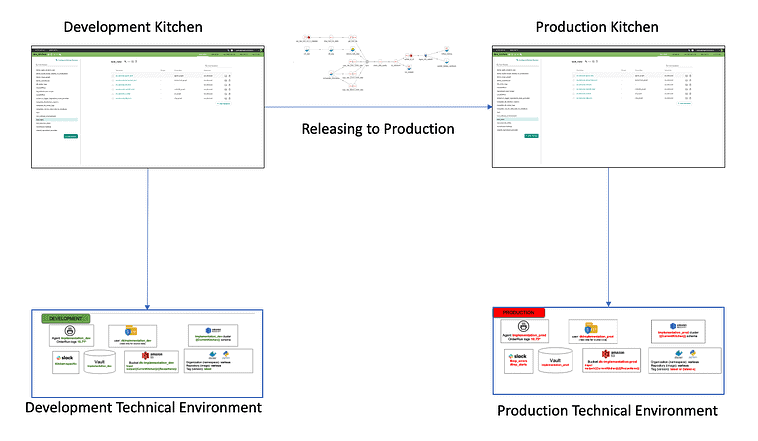
Figure 1: When technical environments match, Kitchens enable analytics to migrate seamlessly – with minimal keyboarding on the part of the data team.
In Figure 1, we show one Kitchen associated with development and one Kitchen pointed at production. As analytics are “released to production” they move from the Kitchen on the left to the right. When executed, the analytics access the technical environment underneath the Kitchen.
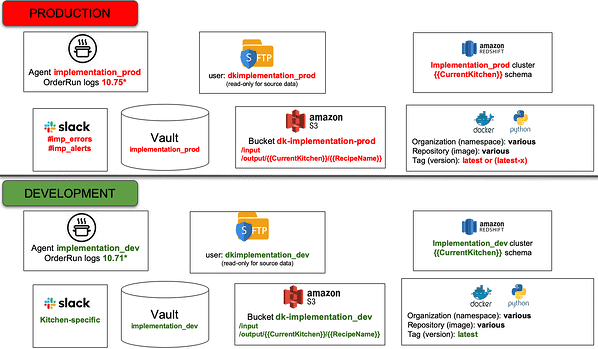
Figure 2: Production and development release environments are aligned to ease the migration of analytics.
Kitchens enable analytics to run and access the toolchain without incorporating non-portable references to the technical environment. References to toolchains are parameterized and can be redirected to point to different target environments. We see in Figure 2 that the production technical environment is referenced as “implementation_prod” and the development technical environment is referenced as “implementation_dev.” Kitchens incorporate references associated with a specific technical environment and decouple the environment association from analytics code. Agents assigned to each technical environment ensure that analytics run on the correct target toolchain.
When analytics run in a development Kitchen, references to the technical environment access “implementation_dev” (bound at compile time). When these analytics move to production, the references are redirected to the “implementation_prod” technical environment. Since the “implementation_dev” and “implementation_prod” technical environments are aligned from a toolchain perspective, no changes to the analytics source files are required. Whether you are working with a single analytics component or a complex series of steps spanning many tools, Kitchens greatly simplify the migration of analytics between technical environments. This is helpful when releasing from dev to production or, when dev needs to reproduce an error encountered in production.
Supporting Multiple Users
Every analytics builder or developer needs a workspace so that they may work productively without impacting or being impacted by others. A Kitchen can be persistent, like a personal workspace, or temporary, tied to a specific project. When multiple Kitchens share a single technical environment, tools are automatically segmented to avoid multi-user conflicts. For example, the technical environments in the figure above contain a Redshift cluster. The Redshift cluster is segmented so that each Kitchen has its own database schema. Kitchens are parameterized so they address the correct Redshift schema.
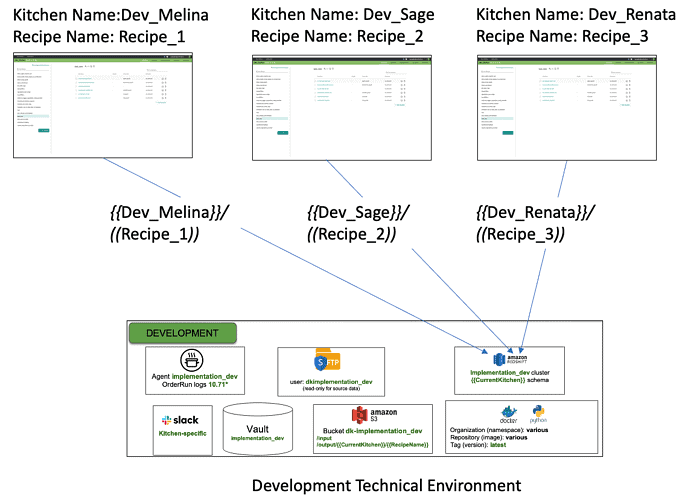
Figure 3: Analytics developers using Kitchens to work separately while sharing a technical environment.
Figure 3 shows three Kitchens for the data scientists Melina, Sage and Renata, who are working on different Recipes (orchestrated data pipelines). The three Kitchens share the “DEVELOPMENT” technical environment. They each have a dedicated database schema within the Redshift cluster, which is accessed using their respective Kitchens. The three users can be productive separately without having to coordinate with each other. All the other tools in the technical environment are similarly segmented. An agent embedded in the technical environment interfaces to the Kitchens, assisting with this segmentation.
Self-Service Environments
In many organizations, workspaces are created individually in response to workspace request tickets. In many organizations, this process can take several weeks (or months). The person tasked with this job often also bears the responsibility for enforcing rules and policies. In an enterprise that uses DataKitchen, Kitchen creation can be set-up as an automated orchestration that instantiates a machine, software, tools, data and all the other resources required for a complete workspace. Policy enforcement can be made more efficient or better yet, just built into the automated workflow. With automated orchestration of Kitchens, team members create workspaces on demand. This “self-service” aspect of DataOps eliminates the time that developers used to wait for systems, data, or approvals. DataOps empowers developers to hit the ground running. This can yield a significant improvement in analytics team responsiveness.
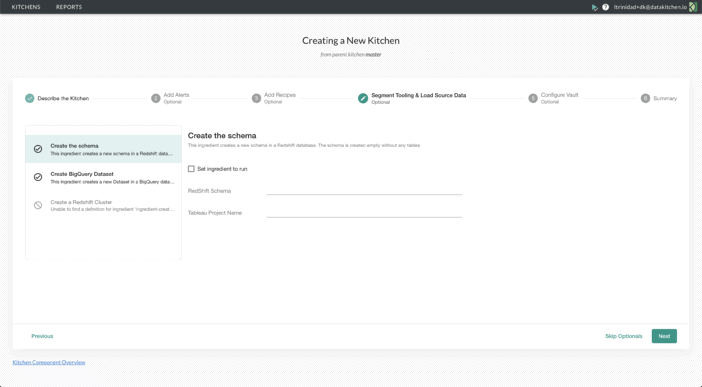
Figure 4: DataKitchen enables builders and developers to create new Kitchens autonomously using a UI.
Next Up in our Kitchen Series
We’ve discussed the relationship between Kitchens and environments and described how multiple Kitchens can share a single technical environment. In our next series of blogs, we will talk about how Kitchens integrate revision control and improve intra-team and inter-team coordination by automating manual steps that detract from productivity.
FAQ
What are the key points in this blog?
Analytics move cleanly from development to production when the two technical environments are aligned and every reference to the toolchain is parameterized, so no source file changes on release. Each developer gets an isolated workspace; several workspaces can share one technical environment as long as its tools are segmented, for example a separate database schema per workspace. Creating those workspaces on demand replaces a ticket queue that often runs weeks.
Why does each data developer need their own workspace?
So they can work productively without impacting or being impacted by others. A workspace holds everything a builder needs — hardware, software, tools, data, security, shared services, and monitoring — and it can be persistent, like a personal sandbox, or temporary and tied to one project. Without that separation, developers in a shared environment collide with each other’s work.
How do analytics move from development to production without code changes?
By keeping the environment binding out of the analytics code. References to the toolchain are parameterized and can be redirected to point at a different target environment, so releasing to production swaps the reference rather than editing the pipeline. Because the development and production environments are aligned from a toolchain perspective, no changes to the analytics source files are required, and an agent assigned to each environment runs the work on the correct toolchain.
Can several developers share one technical environment?
Yes, provided the tools inside it are segmented. Three developers working on different orchestrated pipelines can share one development environment while each holds a dedicated database schema in the same Redshift cluster, addressed through their own workspace. The other tools in the environment are segmented the same way, and an embedded agent handles the segmentation, so the three stay productive without coordinating with each other.
What is a self-service data environment?
One a team member can create on demand instead of filing a request ticket. Workspace requests handled individually can take several weeks or months, and the person doing the work usually also enforces the rules and policies. Automated orchestration instantiates the machine, software, tools, data, and other resources, with policy enforcement built into the workflow, so developers stop waiting on systems, data, or approvals.
What is a DataOps Kitchen?
In DataKitchen DataOps Automation, a Kitchen is the workspace where a data professional works. It contains what a builder needs to develop and run analytics: hardware, software, tools, data, security, shareable services, and monitoring. Kitchens carry the references tied to a specific technical environment, which is what decouples the environment association from the analytics code, and they can be persistent or temporary, private or shared.