TestGen runs from your dbt pipeline. It is not a dbt package, and there is no connector to install: TestGen connects to the warehouse dbt builds into and tests the tables there. Your orchestrator or CI job calls the TestGen API after dbt build. This page is the setup. For whether you need more than dbt tests, see when dbt tests are enough; for the tool comparison, see the best tool for a dbt project.
Where TestGen sits
dbt owns the models and the tests you wrote for them. dbt build runs them in DAG order, and a failed test with error severity skips everything downstream. Keep that gate.
TestGen owns everything else about the tables dbt produced: the columns no one wrote a test for, the history, the monitors. DataKitchen’s Medallion testing post calls this a tripwire: a test step between two transformation steps that stops the line on failure. dbt tests are tripwires you write. TestGen adds tripwires you don’t have to.
Connect
TestGen needs its own read-only user on the warehouse, separate from the user dbt runs as. On PostgreSQL that’s USAGE on each schema and SELECT on its tables; Access Requirements lists the grants for every supported database. TestGen never runs INSERT, UPDATE, DELETE, CREATE, ALTER, or DROP.
Map dbt layers to table groups
A table group is a schema, or part of one, that TestGen profiles and tests together. If your dbt project writes staging, intermediate, and mart models to separate schemas, make one table group per schema. Each layer then gets its own test suite, monitors, and scorecard. Start with staging. That’s where source surprises land, and the Medallion post makes the same case for bronze.
If every model writes to one schema, use the include and exclude masks to split it by prefix, such as stg_% and fct_%.
Profile
Profiling captures 55 column characteristics on every table in the group and runs 32 hygiene detectors. It reads what dbt built without touching your dbt code. You don’t need to profile on every run. Profiling feeds test generation and refreshes the baseline.
Test
TestGen generates tests from the profile, drawing on 34 test types, and you configure the 19 business-rule and custom SQL types yourself. Here’s how the work splits with dbt.
| Check | dbt test | TestGen |
|---|---|---|
| Primary key unique and present | unique, not_null | Unique Values and Required Entry, generated; keep the dbt ones as the gate |
| Allowed codes | accepted_values | Value Match, generated for Boolean, code, and category columns with 2 to 10 distinct values |
| Foreign keys | relationships | A referential test you configure |
| Value ranges, date sanity, text patterns | Write each one | Generated from the profile |
| Row count, freshness, schema change between runs | Source freshness only | Monitors that learn from history |
| Business rules | Write them | Write them, as custom conditions or SQL |
Run it after dbt build
The Run Profiling and Tests page documents three calls. Submit the run, poll the job, read the summary.
dbt build

# 1. Start the test run. Returns 202 with the job id in "id".
JOB_ID=$(curl -s -X POST \
  -H "Authorization: Bearer $TOKEN" \
  -H "Content-Type: application/json" \
  -d '{"metadata": {"system": "dbt build"}}' \
  "$TESTGEN_API/api/v1/test-suites/$SUITE_ID/test-runs" | jq -r .id)

# 2. Poll until status is completed, error, or canceled.
curl -s -H "Authorization: Bearer $TOKEN" "$TESTGEN_API/api/v1/jobs/$JOB_ID"

# 3. Read result.result_counts and result.score.
curl -s -H "Authorization: Bearer $TOKEN" "$TESTGEN_API/api/v1/test-runs/$JOB_ID"
$TESTGEN_API is the API server, port 8530 by default on Docker, not the UI. Fail the step when failed or error in result_counts is above zero, and the orchestrator stops before the BI refresh. Give the poll a timeout. $TOKEN is an access token. Open-source TestGen gets one from an OAuth 2.1 client: the access token lasts one hour, and the refresh token behind it lasts 30 days, after which a browser sign-in issues a new one. TestGen Enterprise adds personal access tokens. The authentication page recommends the OAuth client for automation.
The same pattern works from any scheduler. See how to run TestGen from Airflow and data tests in CI/CD for a pull request check. DataKitchen’s April 2026 Databricks tripwire post did this over SSH before the REST API existed. The API replaces that.
Observe
Monitors track freshness, volume, and schema on every table in a group, and you can add metric monitors of your own. Schema changes flag from the first run. Volume and metric monitors learn each table’s pattern and need roughly 30 runs before they flag anomalies. They catch what dbt tests don’t: a model that ran green and wrote half the usual rows.
DataOps Observability extends this across the pipeline. Its dbt Core agent parses run_results.json and manifest.json after each run, and TestGen exports test results to the same project. You see the dbt run, the TestGen results, and the Airflow or Fivetran jobs around them in one place. Table lineage can’t tell you that the dbt job finished after the dashboard loaded; process lineage can.
Dashboard
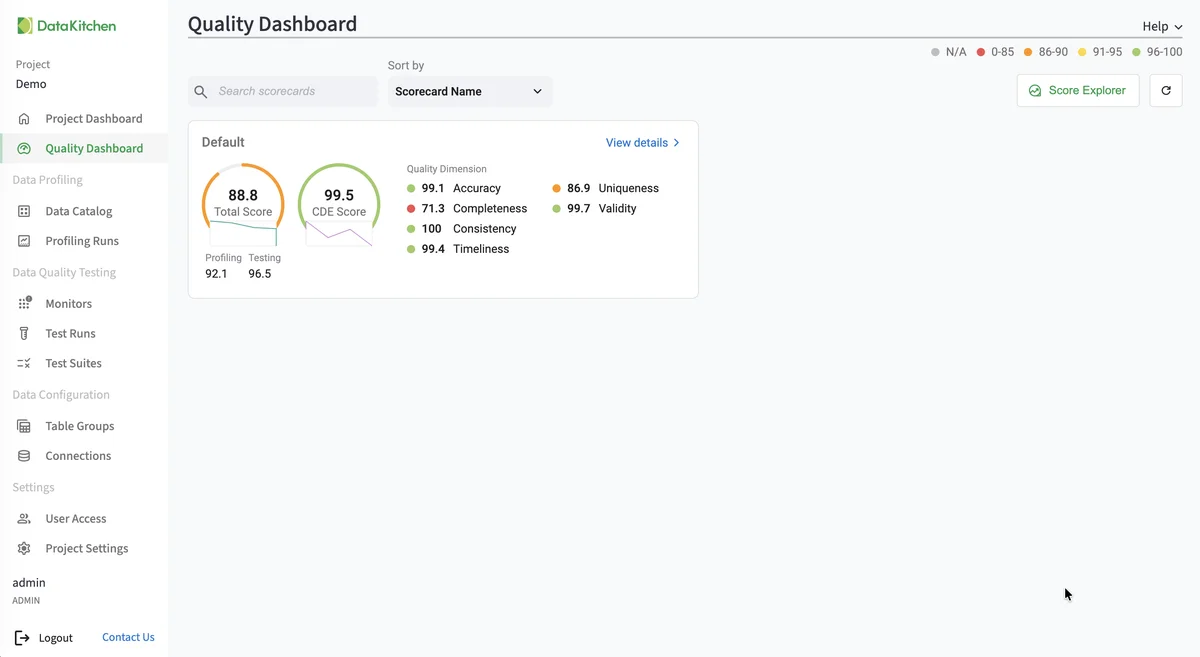
Give each table group its own scorecard on the Quality Dashboard (the Add Table Group wizard can create one), so staging, intermediate, and marts each show a total score, a CDE score, and scores by dimension.
Walkthrough
DataKitchen’s docs have no dbt quickstart, so these are the general steps from Connect your Data. Warehouse quickstarts for Snowflake, Databricks, Redshift, Postgres, and Azure SQL or Synapse cover step 2 in detail.
- Install TestGen.
- Create a read-only warehouse user and a TestGen connection with it.
- Create a table group per dbt layer schema and profile it.
- Review hygiene issues, then generate tests into a suite per group.
- Turn on monitors. Set a notification to email, Slack, or Microsoft Teams.
- Add the API step after
dbt buildand fail it on failed or error counts.
Pricing
The core profiling, testing, and monitoring engine is free and open source. Enterprise adds team access, security, Commercial Pharma tests, source-data controls for AI, and support. Open source covers one user, one database connection, one project, and unlimited tables, which covers every layer of a dbt project in one warehouse. Enterprise is $100 per user per month plus $100 per database connection per month.
Documentation: Connect your Data, Access Requirements, Manage Table Groups, API, API Authentication, Run Profiling and Tests, Monitor Tables, Connect to Observability, Observability dbt Core agent