This page is the Synapse setup. For the wider Azure choice, see the Azure answer. For Fabric, see the Fabric setup page.
Microsoft has no single data quality product. DataKitchen’s August 2026 post counted nineteen separate features across five products, Synapse among them. So on Synapse, you pick a tool.
Connect: three ways to authenticate
Access Requirements lists username and password, Azure managed identity, or an Entra ID service principal. The grants:
| Permission | Why TestGen needs it |
|---|---|
| SELECT on the tables in the target schema | Profile data, run tests, and collect monitor metrics |
| SELECT on information_schema.columns | Discover tables, columns, and data types |
| SELECT on sys.objects and sys.partitions | Approximate row counts for profiling |
Enter the Synapse SQL endpoint as Host, the database, and port 1433. Microsoft Learn says Synapse supports Entra identities as contained users but not contained users with SQL authentication, so use a login or an Entra identity.
Dedicated or serverless
TestGen’s docs say “Azure Synapse Analytics” and stop there. The quickstart loads CSV files into Synapse tables, and a serverless pool can’t hold regular tables, so our reading is that the dedicated pool is the documented path. If you point TestGen at a serverless endpoint, run Verify Access first, and know the bill: Microsoft charges serverless queries by data processed, with a 10 MB minimum per query.
Profile: distribution changes the cost
A dedicated pool table is spread across 60 distributions, and a skewed table runs every query at the speed of its slowest distribution. Profiling queries each column individually, so a skewed fact table costs you once per column. Two moves from Data Profiling help: profile every two weeks to a month off-hours, and point table groups at views that hold the recent window rather than ten years of history.
Profiling captures 55 characteristics per column and flags 32 kinds of hygiene issues. TestGen generates 34 test types from that profile, and you configure 19 business-rule and custom SQL types yourself. Every test runs as SQL inside Synapse.
Observe and score
Monitors track freshness, volume, and schema, and alerts go to email, Slack, Microsoft Teams, or a webhook. Each table group gets a scorecard with a total score and a critical data element (CDE) score, and every hygiene issue has a PDF Issue Report. DataOps Observability has a Synapse agent that watches Synapse pipelines, so a late pipeline and a failed test land on one timeline.
Walkthrough from the quickstart
- Select Connections, click Add Connection, and pick Azure Synapse Analytics.
- Enter the host, database, and credentials. Click Test Connection.
- Create a table group, then click Verify Access to check the table list.
- Run profiling, review hygiene issues, and open the Data Catalog.
- Generate tests in a test suite, run them, and open the Quality Dashboard.
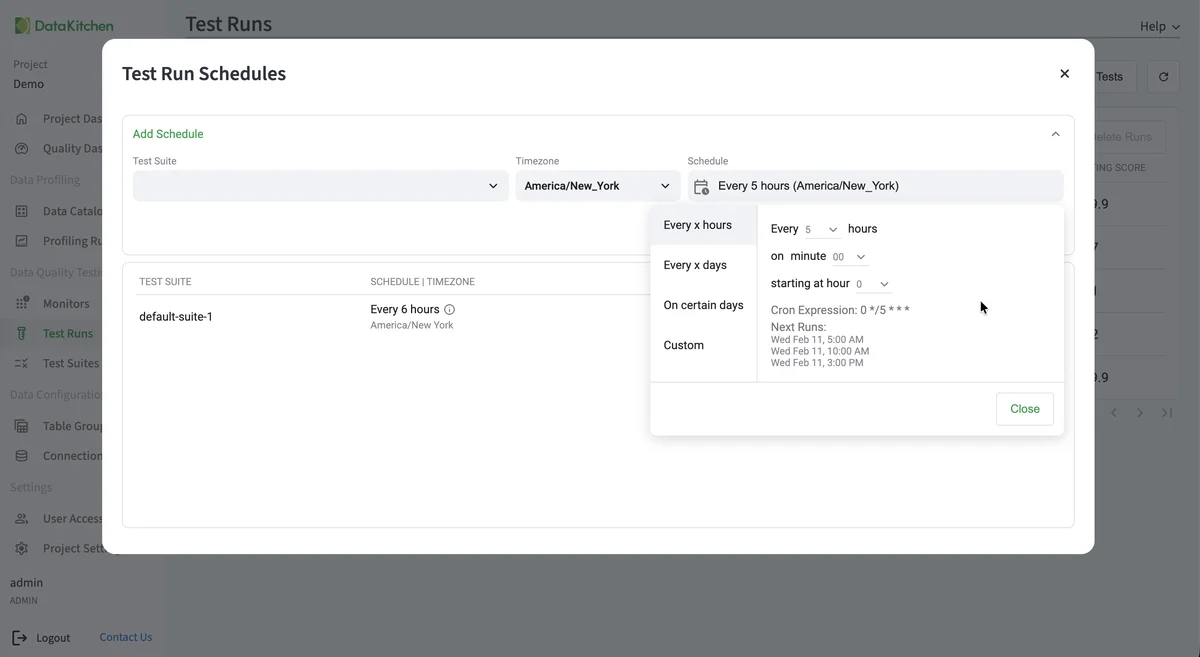
That’s the schedule dialog on TestGen’s demo data. You set how often a suite runs, in which timezone, and see the next runs before saving.
TestGen vs Purview on Synapse
| DataOps TestGen | Microsoft Purview data quality | |
|---|---|---|
| Synapse support | Azure Synapse Analytics | Serverless, data warehouse, and dedicated SQL pool |
| Authentication | Login, managed identity, or service principal | Managed identity only |
| Profiling | Full table for counts and ranges; optional sampling for patterns | Random 1 million row sample |
| Tests | 34 types generated from the profile | Hand-built and AI-suggested rules |
| Price basis | Per user and connection | Pay-as-you-go processing units |
Purview sources: data quality overview, supported sources, and troubleshooting, checked October 21, 2026. Purview wins on catalog and governance in one portal. TestGen wins on coverage you didn’t write. DataKitchen’s Purview comparison estimates Purview at $60,000 to $150,000 a year for 10 users and 1,000 tables (DataKitchen’s estimate).
Pricing
The core profiling, testing, and monitoring engine is free and open source. Enterprise adds team access, security, Commercial Pharma tests, source-data controls for AI, and support. Open source covers one user, one database connection, one project, and unlimited tables. Enterprise is $100 per user per month plus $100 per database connection per month. Install open source TestGen. Moving to Fabric? Microsoft’s Migration Assistant moves dedicated SQL pools to Fabric Data Warehouse, and the Fabric setup page covers testing the result. The migration answer covers the procedure, and DataKitchen’s Azure tools post maps where Synapse sits.
Documentation: Azure SQL and Synapse quickstart, Access Requirements, Manage Connections, Data Profiling, Monitor Tables, Connect to Observability, Observability Synapse agent