This is the setup page. The Fabric tool comparison covers whether to use TestGen at all.
Connect through the SQL analytics endpoint
Every lakehouse in OneLake gets a SQL analytics endpoint, a read-only T-SQL view of its Delta tables over TDS, the same protocol SQL Server uses. TestGen connects there. Since 5.92.1 it’s in open source and Enterprise.
The Access Requirements page lists what it takes:
| Requirement | Where |
|---|---|
| Entra ID service principal or managed identity | The endpoint doesn’t accept SQL logins |
| Contributor or higher | The Fabric workspace |
| ”Service principals can use Fabric APIs”: Enabled | Tenant settings, Fabric admin portal |
Ask your Fabric admin for the tenant setting first. It’s the step that stalls people for a week, and the data team can’t flip it. Make the principal TestGen’s alone and grant it only the workspaces you test.
TestGen runs no INSERT, UPDATE, DELETE, CREATE, ALTER, or DROP. The endpoint is read-only for table data anyway.
Lakehouse or warehouse
The endpoint takes its schema and data from the underlying lakehouse or warehouse, per TestGen’s docs, so both are testable. That matters because one of the two patterns in Microsoft’s medallion guidance puts gold in a Fabric Warehouse. Our OneLake release post walks through both patterns. If gold is a SQL Server your finance team won’t give up, TestGen connects to that too, alongside Azure SQL and Synapse.
Map medallion layers to table groups
A table group is one schema, and a connection names one database. So the layout you picked decides the setup. Microsoft’s materialized lake views tutorial builds the three layers as schemas in one lakehouse; its architecture guidance recommends a lakehouse per layer, ideally each in its own workspace.
| Your layout | TestGen setup |
|---|---|
| Bronze, silver, gold as schemas in one lakehouse | One connection, three table groups |
| A lakehouse per layer | A connection per lakehouse, each with its own table group |
| Gold in a Fabric Warehouse | Its own connection |
The second and third rows are our reading of those two documented facts, not a tested DataKitchen recipe. Open source allows one connection, so those layouts need Enterprise. Each layer gets its own scorecard either way.
Profile
Profiling captures 55 characteristics per column and flags 32 kinds of hygiene issue: placeholder blanks like “N/A”, text columns full of dates, possible PII. Profile sampling, if you turn it on, applies only to pattern, character, and frequent-value analysis; counts, minimums, maximums, and percentiles read every row. Purview’s profiler reads a 1-million-row sample.
Profile bronze; don’t gate it. Shortcuts and mirroring bring data in with no ETL you wrote, so there’s no pipeline log to read. The profile is how you see what arrived. For a large Delta table, profile a view over the recent window, as the docs recommend.
Test
Test generation writes tests from 34 test types against the latest profile. You add 19 business-rule and custom SQL types by hand. Every test runs as T-SQL through the endpoint.
Watch the sync lag. Microsoft says a lakehouse write normally reaches the endpoint in under a minute, sometimes minutes, and the sync stops after 15 minutes idle. A test that fires the moment a notebook finishes can read the old data. From a Fabric pipeline, call the endpoint’s metadata refresh API, then trigger TestGen through its REST API (POST /api/v1/test-suites/{test_suite_id}/test-runs) and poll GET /api/v1/jobs/{job_id}. Open source authenticates with an OAuth 2.1 client: one-hour access tokens from a refresh token that lasts 30 days, then a browser sign-in to issue a new one. Personal access tokens are Enterprise. Fail the pipeline on a failed test and you have a tripwire between bronze and silver.
Observe
Monitors learn each table’s update schedule, train volume models over about 30 runs, and report every schema change. Alerts go to email, Slack, Microsoft Teams, or a webhook through notifications.
DataOps Observability has documented agents for Azure Data Factory and Power BI dataset refreshes. It has no documented agent for Fabric pipelines or notebooks as of October 2026. Export TestGen results to see them next to the refresh that read them.
Dashboard
Each table group gets a scorecard, so bronze, silver, and gold each carry a quality score and a CDE score for critical columns. Issue reports go to whoever owns the fix.
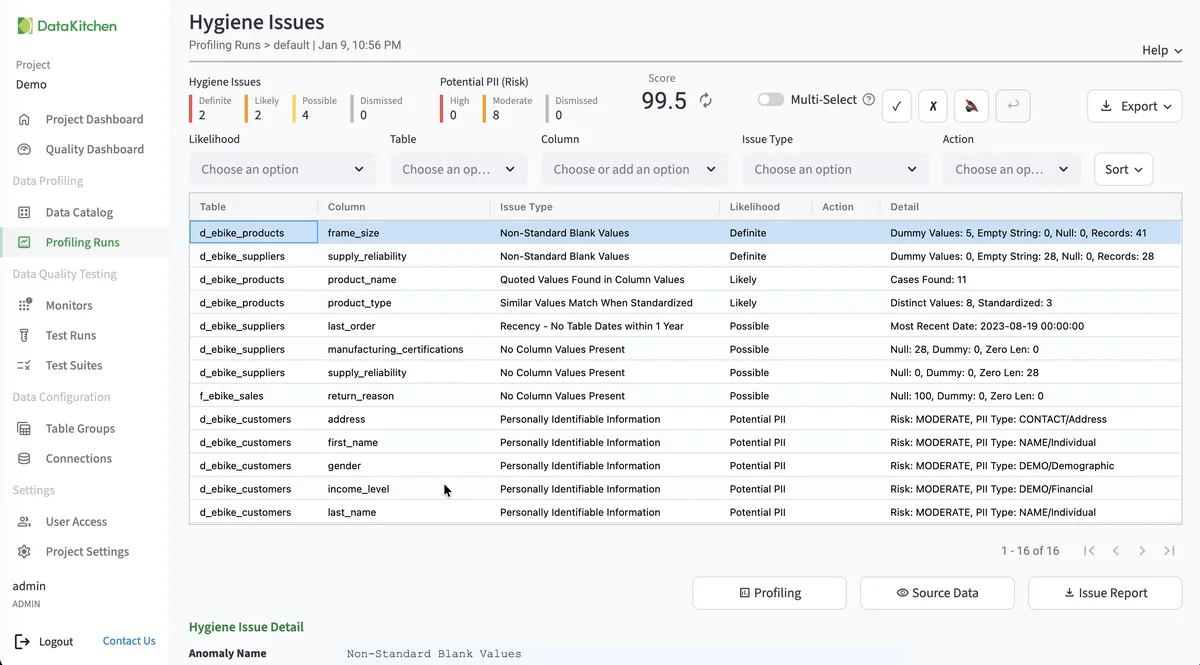
The screenshot shows TestGen’s hygiene issues list. It isn’t from a Fabric tenant, and it looks the same on every database.
Walkthrough: the general steps
DataKitchen has no Fabric quickstart yet, so these are the general Connect your Data steps applied to OneLake.
- Have a Fabric admin enable “Service principals can use Fabric APIs.”
- Create the service principal and add it to the workspace as Contributor.
- Install TestGen.
- Add a Microsoft OneLake connection with the endpoint’s SQL connection string and the principal’s credentials. Click Test Connection.
- Create a table group per layer schema. Leave CDE and PII detection on. Run profiling.
- Generate and schedule tests, configure monitors, and click Finish Setup.
TestGen vs Fabric’s native data quality
| DataOps TestGen | Purview data quality | Materialized lake view constraints | |
|---|---|---|---|
| Rules | 34 generated types, plus 19 hand-configured | AI-suggested and hand-attached, 200 per asset | Hand-written CHECK constraints |
| Profiling | Full table | 1M-row random sample | None |
| Freshness, volume, schema | Learned monitors on every table | One freshness rule | None |
| Covers | Lakehouse and warehouse via the endpoint | Lakehouse, shortcuts, mirroring | One view, at refresh |
| Cost | Free for one connection | Pay-as-you-go processing units | Spark refresh |
Microsoft details checked October 21, 2026. The Microsoft roundup covers the rest of Microsoft’s options. The four test points post covers where tests go in a medallion. For the full list, see supported sources and the Azure overview.
The core profiling, testing, and monitoring engine is free and open source. Enterprise adds team access, security, Commercial Pharma tests, source-data controls for AI, and support. Open source covers one user, one database connection, and one project, with unlimited tables. Enterprise is $100 per user per month plus $100 per database connection per month.
Documentation: Connect your Data, Access Requirements, Manage Connections, Manage Table Groups, Manage Test Suites, Run Profiling and Tests (API), OAuth 2.1 Clients, Notifications, Connect to Observability.