This is the setup page. The BigQuery tool comparison covers whether to use TestGen at all.
Connect
TestGen reads BigQuery through a service account. Per the Access Requirements page, it needs two roles:
| Role | Where | Why |
|---|---|---|
roles/bigquery.dataViewer | The target dataset | Read table data, metadata, and the dataset’s INFORMATION_SCHEMA views |
roles/bigquery.jobUser | The project | Run query jobs |
You upload the service account’s JSON key when you create the connection. That’s the only authentication method the docs list for BigQuery. TestGen discovers tables through INFORMATION_SCHEMA.COLUMNS and estimates row counts from the __TABLES__ metadata view. Grant dataViewer dataset by dataset, not on the project, and the service account sees only what you meant it to.
TestGen runs no INSERT, UPDATE, DELETE, CREATE, ALTER, or DROP. It’s still worth keeping the account read-only: a custom test runs SQL you write.
Profile, and watch the bill
Profiling captures 55 characteristics per column and flags 32 kinds of data hygiene issue: blank-looking placeholder values, dates in text columns, possible PII in the wrong place.
Here’s the BigQuery part. TestGen’s docs say profiling queries each column of every table individually. BigQuery’s on-demand pricing charges for the bytes processed in the columns each query reads, $6.25 per TiB in US regions after the first free TiB a month, with a 10 MB minimum per query. A LIMIT doesn’t reduce the charge. Profile a 5 TB event table in full and you pay for it.
TestGen’s profile sampling won’t save you. The table group settings apply sampling only to pattern and character analysis and the frequent-value list. Record counts, distinct values, minimums, maximums, and percentiles still read every row.
What works is scope. TestGen’s docs recommend profiling a homogeneous subset: the trailing 12 months, one product line. Create a view that filters the partition column, and point the table group at the views. Partition pruning keeps skipped partitions out of the bytes scanned. It’s also the only way through a table with Require partition filter enabled, because BigQuery rejects any query without that filter.
Then profile every two weeks or monthly, off-hours, as the docs advise. If you’re on slot reservations, that’s when the slots are idle.
Test
Test generation reads the latest profile and writes tests from 34 test types: value ranges, null rates, uniqueness, patterns, date recency. Generated tests are expected to pass against the profile they came from. You add 19 more business-rule and custom SQL types by hand where a rule needs judgment.
Every test runs as a SQL query job in BigQuery. Schedule runs in TestGen, every few hours, every few days, or by cron, or trigger them from Cloud Composer or any scheduler through the REST API (POST /api/v1/test-suites/{test_suite_id}/test-runs, then poll GET /api/v1/jobs/{job_id}). Open source authenticates those calls with an OAuth 2.1 client: one-hour access tokens from a refresh token that lasts 30 days, after which you authorize in the browser again. Personal access tokens are Enterprise. Regenerate every few weeks so thresholds follow the data.
Observe
Monitors watch tables between test runs. Freshness hashes key columns and learns the update schedule. Volume tracks row counts with a time-series model. Schema reports every added, dropped, or retyped column. Metric monitors track any SQL expression you give them. Volume and metric monitors train for about 30 runs before they flag anything. We wrote up the design in the monitoring release post.
Alerts go to email, Slack, Microsoft Teams, or a webhook, per the notifications page. To see BigQuery tests next to the Airflow or dbt jobs that load the tables, export results to DataOps Observability.
Dashboard
Scorecards roll profiling and test results into one quality score per table group, weighted so a bad key in a dimension table counts more than a bad flag in a fact table. A separate CDE score covers only your critical data elements. Issue reports list the failures for whoever fixes them.
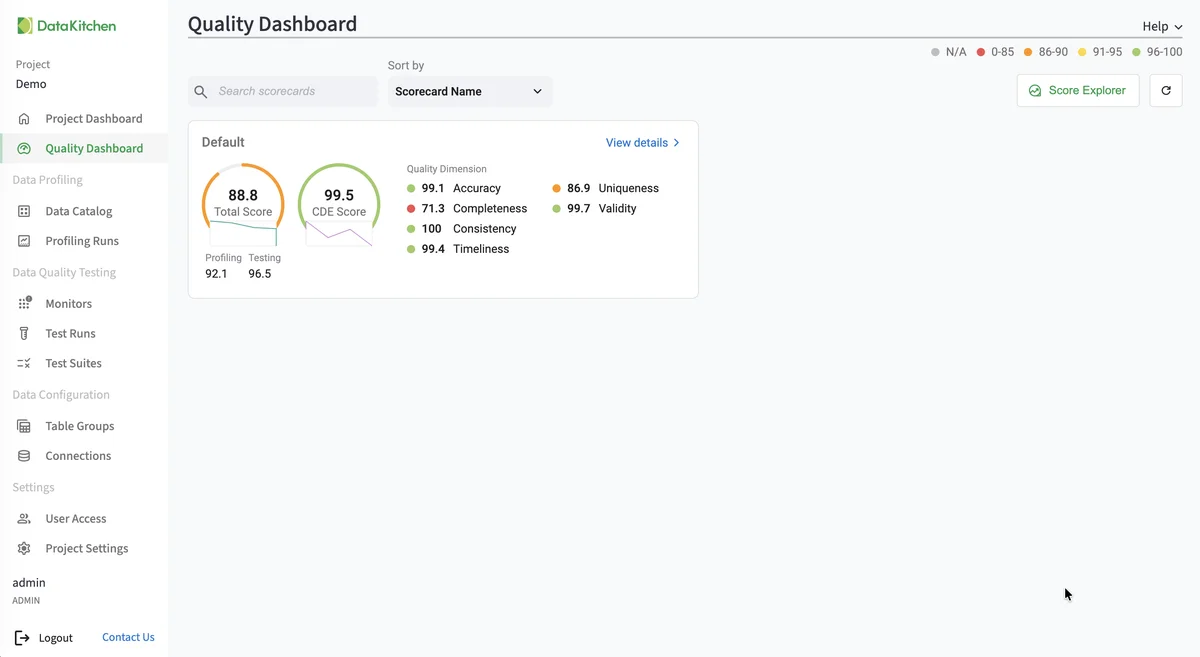
The screenshot is TestGen’s Quality Dashboard. It isn’t from a BigQuery project, and it looks the same on every database.
Walkthrough: the general steps
DataKitchen has no BigQuery quickstart yet, so these are the general Connect your Data steps applied to BigQuery.
- Create a service account, grant it the two roles above, and download its JSON key.
- Install TestGen.
- Open Connections, click Add Connection, choose BigQuery, and upload the key. Click Test Connection.
- Name a table group and enter the dataset as the Schema. Use the include and exclude masks, or list your filtered views.
- Leave CDE and PII detection on. Run profiling.
- Leave Generate and schedule tests on, name the suite, and set a schedule.
- Configure monitors, set a schedule, and click Finish Setup.
TestGen vs BigQuery’s native data quality
| DataOps TestGen | Knowledge Catalog (formerly Dataplex) | |
|---|---|---|
| Rules | 34 test types generated from a profile, plus 19 hand-configured | Built-in and custom SQL rules you attach; profiling recommends some |
| Freshness, volume, schema | Learned monitors on every table | Write rules for each |
| Runs | SQL jobs in BigQuery, app self-hosted | Google-managed scans |
| Cost | Free for one connection, plus BigQuery query cost | Data Compute Units |
| Other databases | 14, plus files | BigQuery, Iceberg REST Catalog, and a few others |
Knowledge Catalog details from Google’s documentation, checked October 21, 2026. If you’re moving a warehouse to BigQuery, TestGen can run the source’s tests against the copy. The full source list and the Google Cloud overview cover the rest.
The core profiling, testing, and monitoring engine is free and open source. Enterprise adds team access, security, Commercial Pharma tests, source-data controls for AI, and support. Open source covers one user, one database connection, and one project, with unlimited tables. Enterprise is $100 per user per month plus $100 per database connection per month.
Documentation: Connect your Data, Access Requirements, Manage Connections, Manage Table Groups, Manage Test Suites, Run Profiling and Tests (API), OAuth 2.1 Clients, Notifications, Connect to Observability.