This page is the Salesforce Data 360 setup. TestGen tests the data in Data 360, not your Salesforce CRM org. Data 360 was called Data Cloud until Salesforce renamed it in October 2025.
Data 360 is where marketing and service teams unify customer data before an agent or a campaign acts on it. Salesforce’s own implementation unit says poor data quality leads to missing or inaccurate insights and an erosion of trust. Then it tells you to review your sources before you integrate them. Reviewing is a one-time act. Feeds break on a Tuesday.
Connect: an external client app and a data space
Access Requirements lists two OAuth flows, JWT Bearer and Client Credentials, against a Salesforce external client app. The scopes:
| OAuth scope | Why TestGen needs it |
|---|---|
| Access Data Cloud Query API (cdp_query_api) | Profile data, run tests, and collect monitor metrics |
| Manage user data via APIs (api) | Get the Salesforce token that’s exchanged for a Data 360 token |
| Perform requests at any time (refresh_token, offline_access) | Renew the Data 360 token during long runs |
Grant the runtime user, the JWT subject or the Client Credentials Run As user, read access to the target tables. In TestGen’s connection form you enter the org’s My Domain login URL and the app’s consumer key, plus a private key for JWT or a consumer secret for Client Credentials. When you create the table group, Manage Connections says to enter the data space in Data Space where other databases take a schema.
Profile: lake objects and model objects
Salesforce’s batch transforms unit gives the two layers. A data lake object (DLO) is the storage container for ingested data. A data model object (DMO) is the structured representation mapped from it. Profile both. A null spike in a DLO is a feed problem. The same spike appearing only in the DMO is a mapping problem, and those go to different people.
Profiling captures 55 characteristics per column and flags 32 kinds of hygiene issues, including potential PII such as emails and phone numbers. TestGen generates 34 test types from the profile, and you configure 19 business-rule and custom SQL types yourself. Every query runs inside Data 360 through its Query API.
Observe and score
Monitors track freshness, volume, and schema on each object, so a stream that stops landing shows up as a freshness anomaly. Alerts go to email, Slack, Microsoft Teams, or a webhook. Each table group gets a scorecard with a total score and a critical data element (CDE) score.
One limit. The Profile for table comparison setting isn’t shown for Data 360, so Verify a Data Migration skips its hash tests here.
Walkthrough: the general steps
DataKitchen has no Data 360 quickstart. These are the general steps from Manage Connections:
- Create the external client app in Salesforce with the three scopes above.
- In TestGen, select Connections, click Add Connection, and pick Salesforce Data 360.
- Enter the login URL, choose JWT Bearer or Client Credentials, and fill in the keys. Click Test Connection.
- Create a table group with the data space, then click Verify Access.
- Leave Run profiling, Generate and schedule tests, and Configure monitors on, then click Finish Setup.
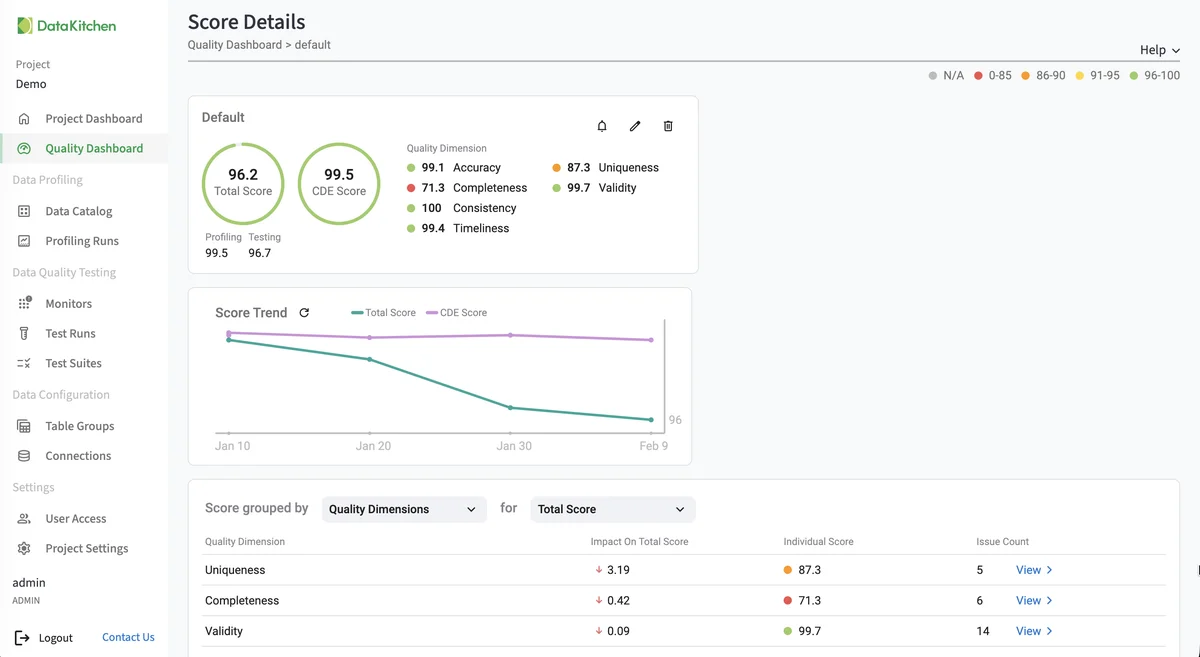
That’s the Score Details page on TestGen’s demo data, not a Data 360 org: the total and CDE scores, their trend, and which quality dimensions pull the score down.
TestGen vs what Salesforce gives you
| DataOps TestGen | Data 360 native | Informatica Data Quality (Salesforce) | |
|---|---|---|---|
| Job | Profile, generate tests, monitor | Batch transforms that standardize values, with formulas and filters | Profiling, cleansing, matching, monitoring |
| Generated tests | 34 types | None documented | Rated in DataKitchen’s comparison |
| Price | $0 open source; Enterprise per user and connection | Data 360 pricing | DataKitchen estimates $200,000 to $500,000+ a year |
Sources: Salesforce’s batch transforms unit, checked October 21, 2026, and DataKitchen’s Informatica comparison, which notes Informatica has been a Salesforce subsidiary since November 2025 and prices it for 10 users and 1,000 tables (DataKitchen’s estimate). We found no native profiling or test-generation feature in Data 360’s documentation. Batch transforms fix values you already know are wrong. TestGen finds the ones you don’t.
Pricing
The core profiling, testing, and monitoring engine is free and open source. Enterprise adds team access, security, Commercial Pharma tests, source-data controls for AI, and support. Open source covers one user, one database connection, one project, and unlimited tables. Enterprise is $100 per user per month plus $100 per database connection per month. Install open source TestGen, or see every database it supports. DataKitchen’s post on the data quality vendor market shows where TestGen sits among the alternatives. For moving data between platforms, see the migration answer and the migration post.
Documentation: Access Requirements, Manage Connections, Data Profiling, Monitor Tables, Verify a Data Migration, Data 360 5.48.0 release notes