DataOps TestGen connects to Snowflake through a read-only role, runs every query as SQL on a warehouse you pick, monitors tables over time, and scores the results. Nothing is written back to your account. This page is the setup. For how TestGen compares with Data Metric Functions, Monte Carlo, and Anomalo, read the Snowflake tool comparison.
Connect
TestGen’s access requirements for Snowflake, as of October 2026, are USAGE on the warehouse, database, and schema, and SELECT on the tables. information_schema comes with USAGE on the database and returns metadata only for objects the role can see.
Authenticate with a key pair. TestGen’s docs recommend it because Snowflake is deprecating single-factor password sign-in. A minimal setup in Snowflake SQL:
CREATE ROLE testgen_reader;
GRANT USAGE ON WAREHOUSE testgen_wh TO ROLE testgen_reader;
GRANT USAGE ON DATABASE analytics TO ROLE testgen_reader;
GRANT USAGE ON SCHEMA analytics.gold TO ROLE testgen_reader;
GRANT SELECT ON ALL TABLES IN SCHEMA analytics.gold TO ROLE testgen_reader;
GRANT SELECT ON FUTURE TABLES IN SCHEMA analytics.gold TO ROLE testgen_reader;
GRANT SELECT ON ALL EXTERNAL TABLES IN SCHEMA analytics.gold TO ROLE testgen_reader;

CREATE USER testgen_svc TYPE = SERVICE
  DEFAULT_ROLE = testgen_reader DEFAULT_WAREHOUSE = testgen_wh
  RSA_PUBLIC_KEY = '<public key>';
GRANT ROLE testgen_reader TO USER testgen_svc;
The future-tables grant keeps new tables in scope without a ticket. Repeat the schema grants for each schema you’ll profile.
Size the warehouse
Every TestGen query runs on that warehouse, so profiling shows up on your Snowflake bill. Give TestGen its own warehouse and you can read the cost off one line.
A DataKitchen customer profiled a Snowflake environment of more than 100 schemas, most tables over 100 million rows, in a 24-hour window before taking it over from a consulting firm. The constraint was the warehouse, not TestGen. On extra-small the work thrashed. Sizing up roughly doubled throughput per step.
Two settings help. Profile sampling estimates pattern and character counts from a sample, while record counts, distinct counts, minimums, maximums, and percentiles still cover the full table. And the scheduling docs recommend profiling biweekly to monthly and testing daily to weekly.
Profile
Profiling collects 55 column characteristics and flags 32 data hygiene issues: type mismatches, unexpected nulls, mixed patterns, suspect dates, and probable PII. A table group is one schema plus include and exclude masks. Snowflake external tables and Apache Iceberg tables are in scope, per the TestGen product page, as long as the role can SELECT them.
Test
Generate tests and TestGen picks from 34 test types, sets thresholds from the profile, and fills the suite. You add any of 19 business-rule and custom SQL test types by hand. Schedule runs in TestGen, or trigger them through the REST API from whatever runs your loads. Running TestGen from Snowflake Tasks covers the in-Snowflake option.
Moving to or from Snowflake? TestGen’s table comparison tests run the same suite against the source and the target.
Observe
Monitors watch each table between test runs. Freshness compares a hash of key columns to the last run and learns the update schedule. Volume tracks row counts. Schema reports every added, dropped, or retyped column. Metric monitors track a value you define. Run them at about twice the rate your tables change.
DataOps Observability has no Snowflake agent. It watches the tools around Snowflake through agents for Airflow, dbt Core, Fivetran, Power BI, and others. Export TestGen results to Observability and a failed Snowflake test sits next to the job run that loaded the table.
Dashboard
Each table group gets a scorecard on the Quality Dashboard. The quality score multiplies a profiling score by a testing score, weighted so an issue on a primary key in a small dimension table can count more than the same issue on a low-cardinality flag in a large fact table. A CDE score covers only columns flagged as critical data elements. The hygiene issue list also exports as a PDF report you can send to whoever owns the source.
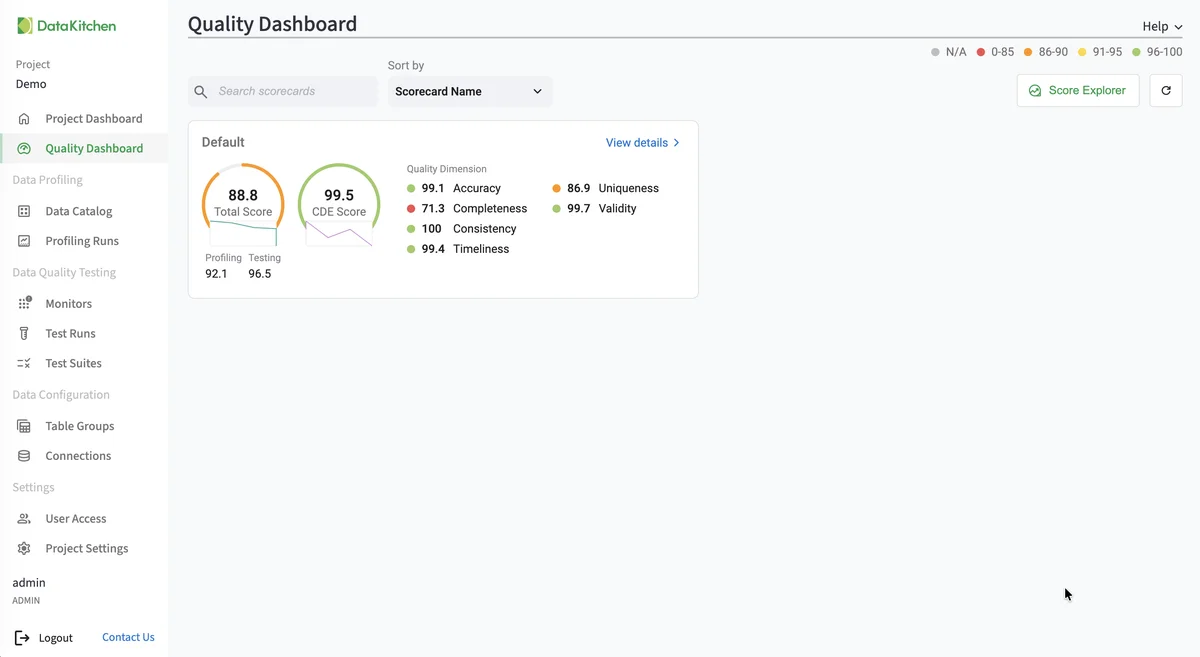
The screenshot shows TestGen’s Quality Dashboard. It is the same on every database TestGen supports.
Walkthrough
These steps follow the Snowflake quickstart and the current Manage Connections page.
- Install TestGen.
- Create the role and service user above.
- In TestGen, open Connections, click Add Connection, and choose Snowflake.
- Enter the host, database, and user, choose key-pair authentication, and click Test Connection.
- Create a table group: name the schema, set the masks, and click Verify Access.
- Leave Run profiling on. Review hygiene issues on the Profiling Runs page.
- Leave Generate and schedule tests on, name the suite, and set a schedule.
- Configure monitors and set their schedule.
- Open the Quality Dashboard.
TestGen and Data Metric Functions
| Snowflake Data Metric Functions | DataOps TestGen | |
|---|---|---|
| What it checks | One attribute per DMF, on tables and columns you attach it to | Every table in a table group, profiled and tested |
| Test authoring | You pick DMFs and expectations; Cortex Data Quality suggests checks | 34 generated test types plus 19 business-rule types |
| Monitoring | Volume and freshness anomaly detection | Freshness, volume, schema, and metric monitors |
| Compute and cost | Serverless credits, hourly by default | Your warehouse; free open source, or Enterprise per user and connection |
| Edition | Enterprise Edition required | Any edition |
Snowflake details come from its data quality overview, checked October 21, 2026. Use both: a DMF on the three tables the CFO watches, and TestGen on the other few thousand.
Pricing
The core profiling, testing, and monitoring engine is free and open source. Enterprise adds team access, security, Commercial Pharma tests, source-data controls for AI, and support. Open source covers one user, one database connection, and one project, with unlimited tables. Enterprise is $100 per user per month plus $100 per database connection per month. Snowflake is one of 14 databases TestGen supports, on the same pricing.
Documentation: Snowflake quickstart, Connect your data, Access requirements, Manage connections, Manage table groups, Monitor tables, Quality scores, Run profiling and tests, Connect to Observability.