This page is the Azure SQL Database setup. Profiling works the same as on SQL Server, so the SQL Server page covers the types; for the wider Azure choice, see the Azure answer.
One DataKitchen customer runs a care management application on about 1,000 tables across Azure SQL databases and managed instances. Clinicians type into it from 8am to 8pm. Birth dates get transposed and newborn weights get entered wrong.
Their first lesson was about load, not data. Profiling five tables of under a million rows each against the live database slowed the application for 20 minutes. Profiling moved to a replicated copy on an overnight schedule. Do that from day one.
Connect: a contained user and a firewall rule
Access Requirements asks for SELECT on the target tables and nothing more. Every database user can already read the information_schema views and sys.partitions. Authentication is a username and password, an Azure managed identity, or an Entra ID service principal.
Use a contained user. It authenticates at the database, with no login in master:
CREATE USER testgen WITH PASSWORD = 'choose-a-strong-password';
ALTER ROLE db_datareader ADD MEMBER testgen;
For an Entra identity, create the user FROM EXTERNAL PROVIDER instead and add it to the same role.
Then the firewall. A new logical server blocks all access to its public endpoint until you add a rule. Add the TestGen host’s outbound IP as a database-level rule with sp_set_database_firewall_rule, or a server-level rule in the portal. Skip Allow Azure services and resources to access this server. Microsoft warns it admits every Azure service, other customers’ included.
Profile and test
Profiling captures 55 characteristics per column and flags 32 kinds of hygiene issues, such as non-standard blank values, data type mismatches, and potential PII. TestGen generates 34 test types from that profile, and you configure 19 business-rule and custom SQL types yourself. Every test runs as SQL inside Azure SQL Database. Schedule it in TestGen, or call the REST API from your CI or from Azure Data Factory.
One collation note from Verify a Data Migration. The default case-insensitive collation counts values that differ only in case as one distinct value, so Distinct Count comparisons against a case-sensitive copy fail on correct data. The same page says the hash tests miss text changes on SQL Server versions without UTF-8 collations. Azure SQL Database has them.
Observe and score
Monitors track freshness, volume, and schema, and alerts go to email, Slack, Microsoft Teams, or a webhook. Each table group gets a scorecard with a total score and a critical data element (CDE) score. Every hygiene issue has a PDF Issue Report with sample rows and the SQL to reproduce it.
Walkthrough from the quickstart
- Select Connections, click Add Connection, and pick Azure SQL Database.
- Enter the server name as Host, the database, and the contained user. Click Test Connection.
- Create a table group for the schema, then click Verify Access.
- Run profiling and review the hygiene issues.
- Generate tests, run them, and open the Quality Dashboard.
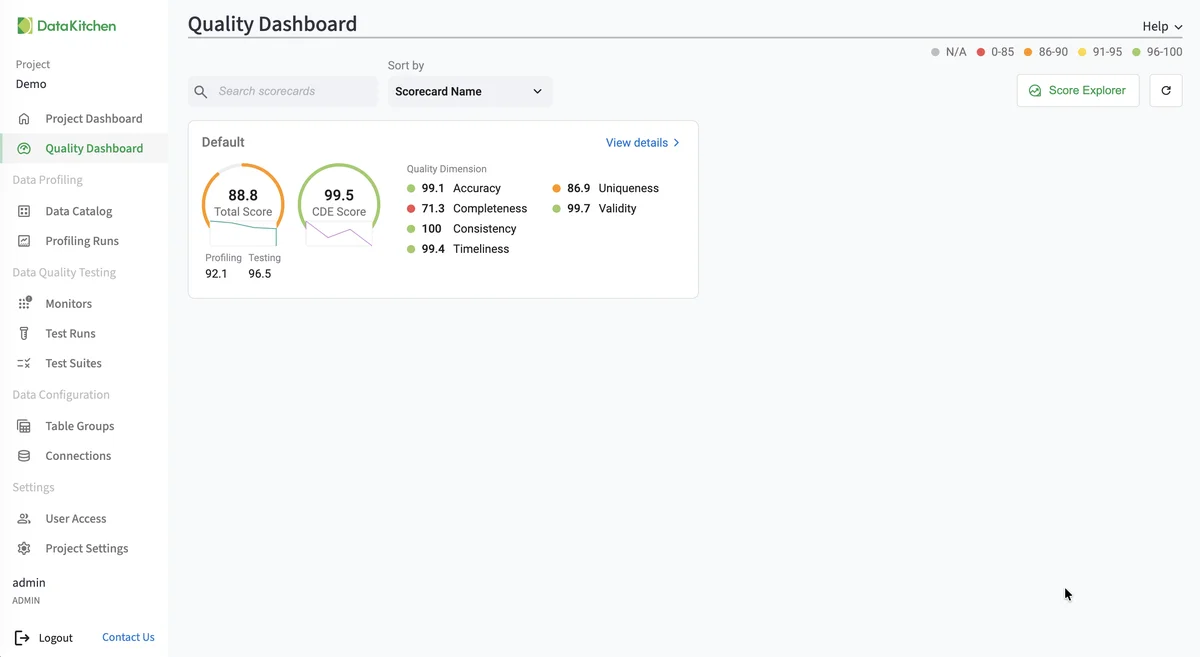
That’s the Quality Dashboard on TestGen’s demo data, not an Azure database: one scorecard with total and CDE scores and a score per quality dimension.
TestGen vs Purview on Azure SQL Database
| DataOps TestGen | Microsoft Purview data quality | |
|---|---|---|
| Azure SQL Database | Profiling, tests, monitors | Profiling and data quality scans |
| Freshness | Freshness monitor learns the update schedule | Freshness rule not available for Azure SQL tables |
| Authentication | Contained user, managed identity, or service principal | Managed identity only |
| Tests | 34 types generated from the profile | Hand-built and AI-suggested rules |
Purview sources: supported sources, overview, and troubleshooting, checked October 21, 2026. Purview is the better fit when governance owns the budget and wants scores rolled up to data products. TestGen is the better fit when the data team owns the problem. DataKitchen’s August 2026 post maps the rest of Microsoft’s options, and the Purview comparison estimates Purview at $60,000 to $150,000 a year for 10 users and 1,000 tables (DataKitchen’s estimate).
Pricing
The core profiling, testing, and monitoring engine is free and open source. Enterprise adds team access, security, Commercial Pharma tests, source-data controls for AI, and support. Open source covers one user, one database connection, one project, and unlimited tables. Enterprise is $100 per user per month plus $100 per database connection per month. Install open source TestGen. Migrating between databases? See the migration answer and the migration post.
Documentation: Azure SQL and Synapse quickstart, Access Requirements, Manage Connections, Data Profiling, Monitor Tables, Run Profiling and Tests, Verify a Data Migration