This page is for SQL Server you run yourself, on premises or on an Azure VM. Azure SQL Database has its own page, and if you’re moving off SQL Server, start with the migration answer.
Connect
Create a SQL login for TestGen. Per Access Requirements, checked October 2026, that’s the only method listed for SQL Server. Windows authentication isn’t.
The grants are short:
| Permission | Why TestGen needs it |
|---|---|
| SELECT on tables in the target schema | Profile, run tests, collect monitor metrics |
| SELECT on information_schema.columns | Discover tables, columns, and types |
| SELECT on sys.objects, sys.partitions | Approximate row counts |
The last two are readable by default. You don’t need VIEW DEFINITION. You can add the login to db_datareader, but that reads every user table and view in the database, so grant SELECT on the schemas you want tested. If TestGen runs in Docker on the same machine as SQL Server, use host.docker.internal as the host.
Profile
TestGen profiles 55 column characteristics and runs 32 hygiene detectors. Every column lands in one of four general types (Alpha, Numeric, Datetime, Boolean), and the data type suggestion catches a varchar column full of dates or amounts.
Two SQL Server habits to know. The default case-insensitive collation counts ACME and acme as one distinct value, and any collation treats trailing-space variants as one (migration docs). And on a busy server, start small. The hotel reservation case study, on a 1.2 TB SQL Server database, says to set TestGen to one or two threads and raise the count once runs are stable.
Test and observe
Generation picks from 34 test types and sets thresholds from the profile. You add the rules only you know from 19 business-rule and custom SQL types. Every test runs as T-SQL inside SQL Server. Schedule runs in TestGen, or trigger them from any scheduler through the REST API.
Monitors learn freshness, volume, schema, and custom metric patterns and flag what breaks them. If SSIS loads the warehouse, DataOps Observability’s SSIS agent shows the package run next to the table it loaded.
Dashboard
Each table group gets a scorecard on the Quality Dashboard. Score Explorer builds a dashboard around your critical data elements, and the issue report exports as PDF for the team that owns the source.
Walkthrough
DataKitchen’s docs have no SQL Server quickstart, so these are the general steps from Manage Connections. The Azure SQL and Synapse quickstart is the closest worked example.
- Select Connections, click Add Connection, and choose SQL Server as the data source.
- Enter the host, port, database, and the TestGen login, then click Test Connection.
- Create a table group: a schema plus include and exclude masks.
- Click Verify Access, leave Run profiling on, and turn on Generate and schedule tests and Configure monitors.
- Review hygiene issues, then open the Quality Dashboard.
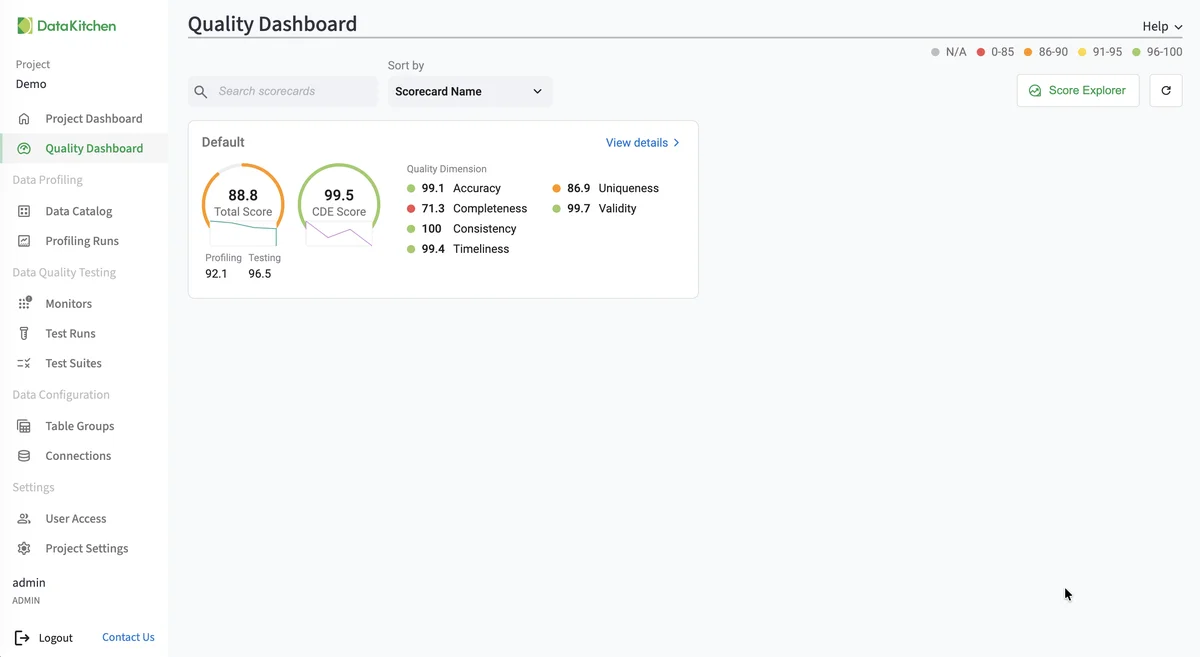
The screenshot is TestGen’s Quality Dashboard, the scorecard view you reach in step 5. It is not from a SQL Server database.
TestGen vs native SQL Server
| Constraints | SSIS Data Profiling Task | DataOps TestGen | |
|---|---|---|---|
| What it does | Rejects bad rows at write time | Eight profiles, written to XML | 55-characteristic profile, 32 hygiene detectors, generated tests |
| Generates tests | No | No | 34 test types |
| Monitors over time | No | No | Freshness, volume, schema, custom metrics |
| Sources | That table | SQL Server only; skips varchar(max) in text profiles | 14 databases plus files |
Sources: Data Profiling Task, checked October 2026. Data Quality Services and Master Data Services are discontinued in SQL Server 2025. Purview runs data quality scans on on-premises SQL Server but doesn’t profile it, per Microsoft’s supported sources. DataKitchen’s nineteen-features post maps the rest of the Microsoft stack.
Keep your constraints. They stop impossible rows. Pick TestGen when the problem is plausible-but-wrong data that no constraint describes, across more tables than anyone will hand-write tests for.
The core profiling, testing, and monitoring engine is free and open source. Enterprise adds team access, security, Commercial Pharma tests, source-data controls for AI, and support. Start with the install, and see which databases TestGen supports and the Azure overview.
Documentation: Connect your Data, Access Requirements, Manage Connections, Monitor Tables, Run Profiling and Tests, Verify a Data Migration, Observability SSIS agent.