TestGen’s MCP server gives an assistant your real profiles, test results, and run history to work from. This page is the how-to. Whether TestGen works with a given assistant is covered in Does TestGen work with AI coding assistants?, and how it compares with other vendors’ servers in the best tool for AI assistants and agents.
Connect your client
You need a running TestGen with at least one profiled table group. Install open-source TestGen, connect a database from the list TestGen supports, and profile it. Then follow the setup guide:
- Find the MCP URL. It is the TestGen API URL plus
/mcp:http://<host>:8530/mcpon a Docker or pip install,https://<API domain>/mcpon Kubernetes. It is not the UI URL. - In your client, add a new MCP connector or server and paste the URL. Claude.ai calls this “Add custom connector”; Cursor calls it “Add MCP Server.”
- The client opens TestGen’s sign-in page in your browser. Sign in with your TestGen account and approve.
- Ask: “List the projects I have access to in TestGen.” Your projects come back if it worked.
The guide names Claude Code, OpenAI Codex, Microsoft Copilot, and Cursor as clients that support this OAuth 2.1 flow. Clients that accept only a static token use a personal access token (Enterprise) sent as Authorization: Bearer <token>. Hosted platforms such as Databricks Genie call TestGen from their own cloud, so add the platform’s host to TG_MCP_EXTRA_ALLOWED_HOSTS.
Three errors cover most failed connections:
| Symptom | Cause | Fix |
|---|---|---|
| 403 Forbidden | You used the UI URL | Use <api-url>/mcp |
| 421 Invalid Host header, or sign-in opens at localhost | TG_BASE_URL isn’t set | Set it to the API URL (access from another machine) |
| Timeout or refused | Port 8530 is closed | Open it to the client |
What the assistant can call
The Supported Tools page lists 112 tools as of October 2026. You don’t name them; the assistant picks them from what you ask.
| Group | Tools | What you’d ask |
|---|---|---|
| Discover what TestGen knows about | 7 | What data do I have, and how healthy is it? |
| Investigate quality issues | 27 | Which tests failed, and show me the rows |
| Browse profiling results | 17 | What changed in this table since the last profile? |
| Trigger profiling, tests, and test generation | 11 | Profile this table group, then generate and run tests |
| Track data quality scores | 6 | Build a scorecard for these critical data elements |
| Work with data contracts | 1 | Export this contract as an ODCS document (contracts arrive in November 2026) |
| Manage TestGen configuration | 27 | Send failures on this suite to our Slack destination |
| Browse monitor health and events | 16 | Which tables are late, short, or reshaped? |
Six prompts wrap common workflows: health_check, investigate_failures, hygiene_triage, compare_runs, table_health, and profiling_overview. In Claude Code they run as slash commands such as /testgen:table_health. The cheat sheet marks every tool that writes with an orange dot. It was published in July 2026, when the server had 96 tools.
Permissions follow your role
The server signs in as you, and each tool runs with your role on that project. In TestGen Enterprise, roles are set per project:
| Role | What an assistant signed in with it can do |
|---|---|
| Admin | Everything, including PII |
| Data Quality | Manage table groups and suites, run profiling and tests, set dispositions; sees PII |
| Analyst | Set dispositions and edit catalog tags; PII redacted |
| Business | Read only; PII redacted |
| Catalog | Read the Data Catalog only; PII redacted |
Open-source TestGen has one user, so the assistant has that user’s full access. To keep source values away from the model, turn on source data protection. Tools such as get_source_data and get_table_sample then stop returning rows, and the rest drop top values, extrema, and percentiles. The REST API can still read those values, so don’t give a compliance-bound agent API credentials.
What the assistant can and cannot see: What data leaves our environment when we use TestGen or connect an AI assistant?
A worked triage session
DataKitchen published this session in the MCP cheat sheet. Claude was connected to a TestGen instance and asked, “What data do I have and how healthy is it?” It returned the inventory and a quality score of 78.9 on a neglected table group. “What’s dragging the score?” surfaced 30 hygiene issues. One table had loaded every column as varchar(65535). The prices were 96% numeric and the dates 97% dates, with strings like ERROR and UNKNOWN in the rest. The “cleaned” table still carried names, emails, zip codes, and income, all flagged as PII.
“Generate tests and run them” returned 12 failures that matched the hygiene findings. “Dismiss the recency issue; it’s historical data. Confirm the rest.” Every disposition landed in TestGen with an audit trail.
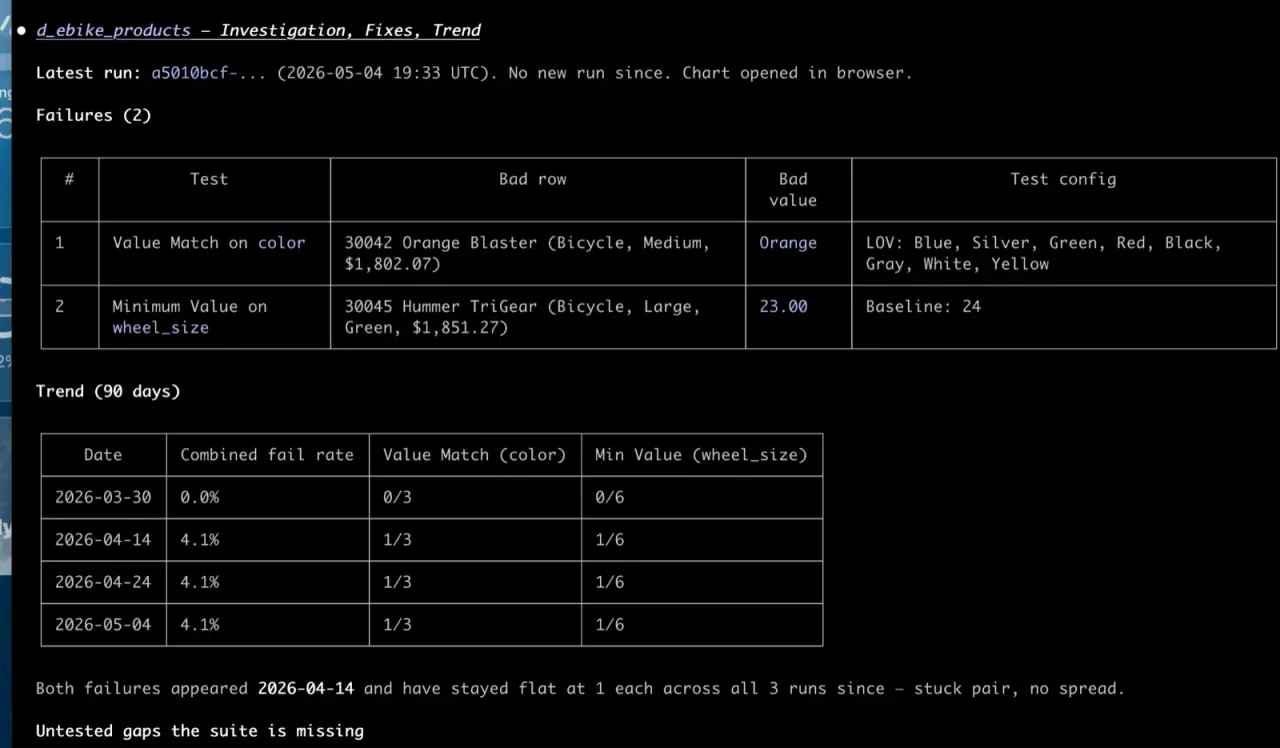
The screenshot is a different investigation, from the TestGen product page. It shows what an investigate_failures answer looks like: each failed test with its bad row and value, then the trend.
Start with triage, as While You Slept advises, so you learn how the model reasons on your data before it changes anything. For fixes, DataKitchen’s design pattern keeps a person in the loop: the agent proposes SQL in a Jira ticket, a person approves, and a second program applies only approved fixes. TestGen never writes to your database itself. Its access requirements allow only read-only SQL.
The assistant alone vs the assistant with TestGen
| Job | Assistant alone | Assistant with TestGen MCP |
|---|---|---|
| Know what a column contains | Guesses from names and pasted samples | Reads 55 profiled characteristics per column |
| Find hygiene problems | Only what you paste | 32 hygiene detectors, run on every profile |
| Write tests | Writes SQL you then run and maintain | Generates from 34 test types, runs them in your database |
| Track history | None between sessions | Run history, monitors, and score trends |
| Leave an audit trail | Chat transcript | Dispositions, notes, and runs recorded in TestGen |
The core profiling, testing, and monitoring engine is free and open source. Enterprise adds team access, security, Commercial Pharma tests, source-data controls for AI, and support. Open source covers one user, one database connection, and one project, with unlimited tables. Enterprise is $100 per user per month plus $100 per database connection per month.
Documentation: MCP Server, Set up the MCP Server, Supported Tools, Access Tokens, Personal Access Tokens, OAuth Clients, User Access, Access Requirements