TL;DR: Fixing corrupt source data by hand is tedious. Letting an AI fix it unsupervised is too risky for production. This design pattern splits the job between two Python programs and Claude: they find the errors and propose the SQL, and you approve each fix before anything runs.
A data quality agent that fixes bad source data and asks first
Your warehouse sits downstream of someone else’s mess. A partner sends a file in which “Price Per Unit” is stored as text, hundreds of “location” values are UNKNOWN, and three rows claim that a customer lives in state XY. You catch it. You write the same UPDATE you wrote last month. You ship it. Next load, it’s back.
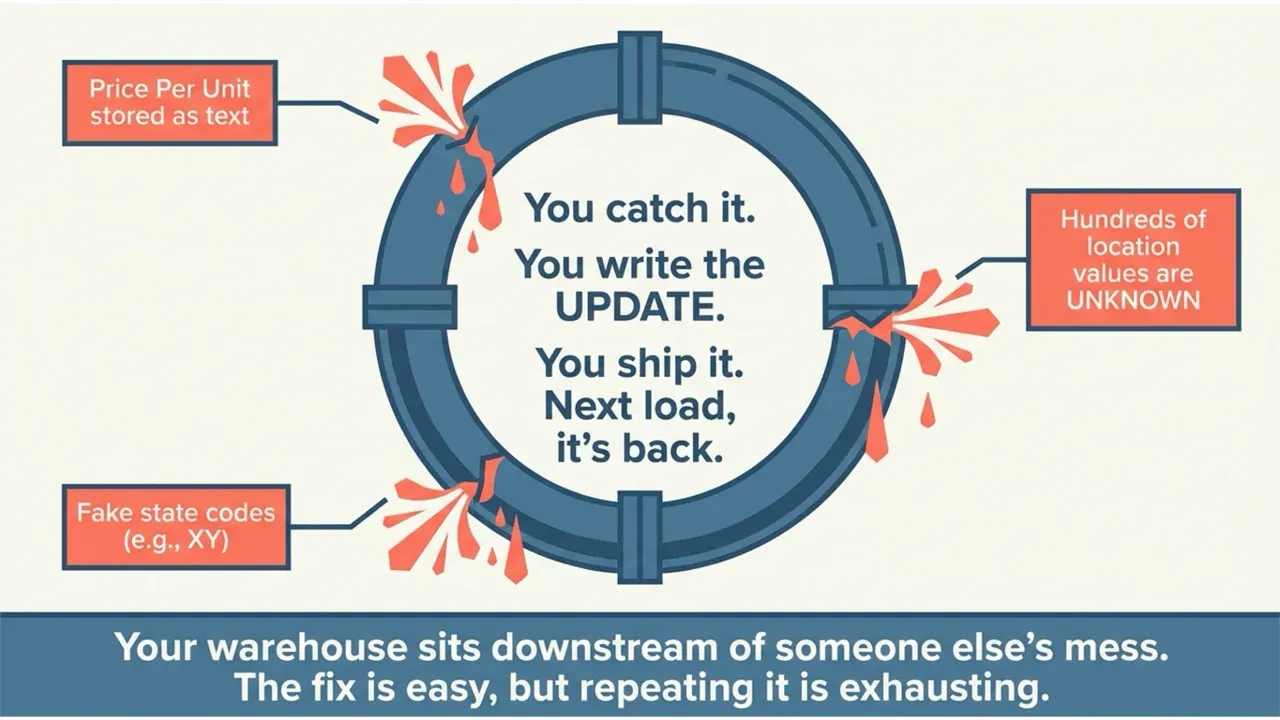
The fix is easy. The control is the hard part. You don’t want an agent rewriting your source tables on its own at 2 am. You want it to find the problem, propose the exact SQL, and wait for a human to say “yes, fix that one” before anything runs.
So I built that. Two small Python programs: TestGen and Claude. One finds problems and proposes fixes. The other applies them, but only the ones you approved.
Why “just automate it” is a trap
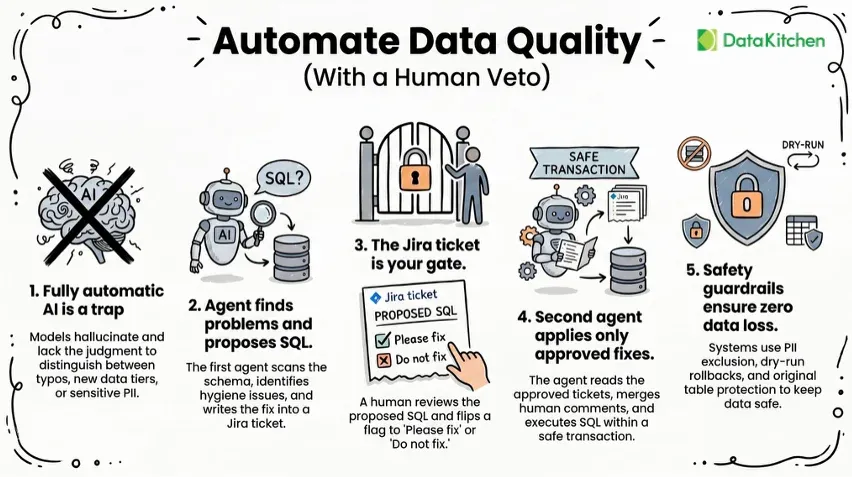
Bad source data is a judgment call. Is “PREMIUM” a new income tier or a typo? Should those 222 fake state codes become NULL, or map to real states? Is that column PII you should never touch? Hand an LLM your source tables and let it decide all of that unsupervised, and it will eventually null a field it shouldn’t or reference a column that doesn’t exist. On source data, a wrong fix is expensive. You don’t catch it until the dashboard number is off, and by then the bad write has already run.
The SQL was never the hard part. The judgment is. You know whether “PREMIUM” is a typo. The model is guessing.
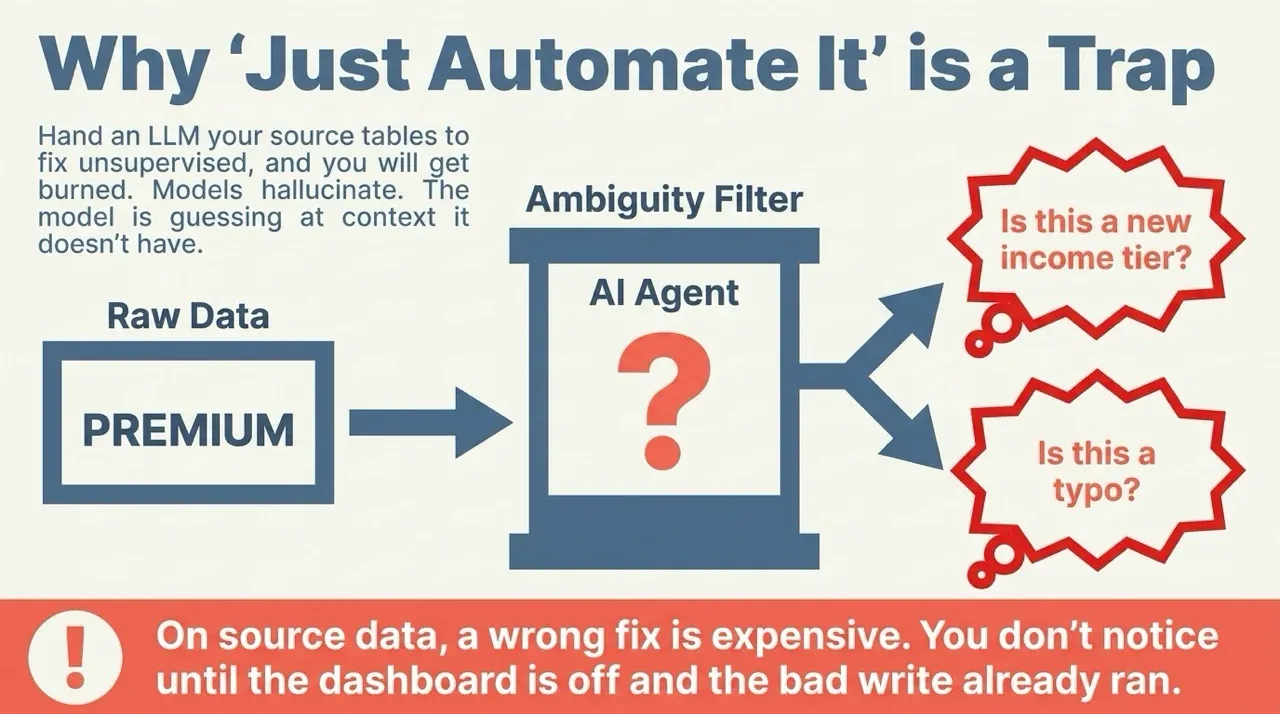
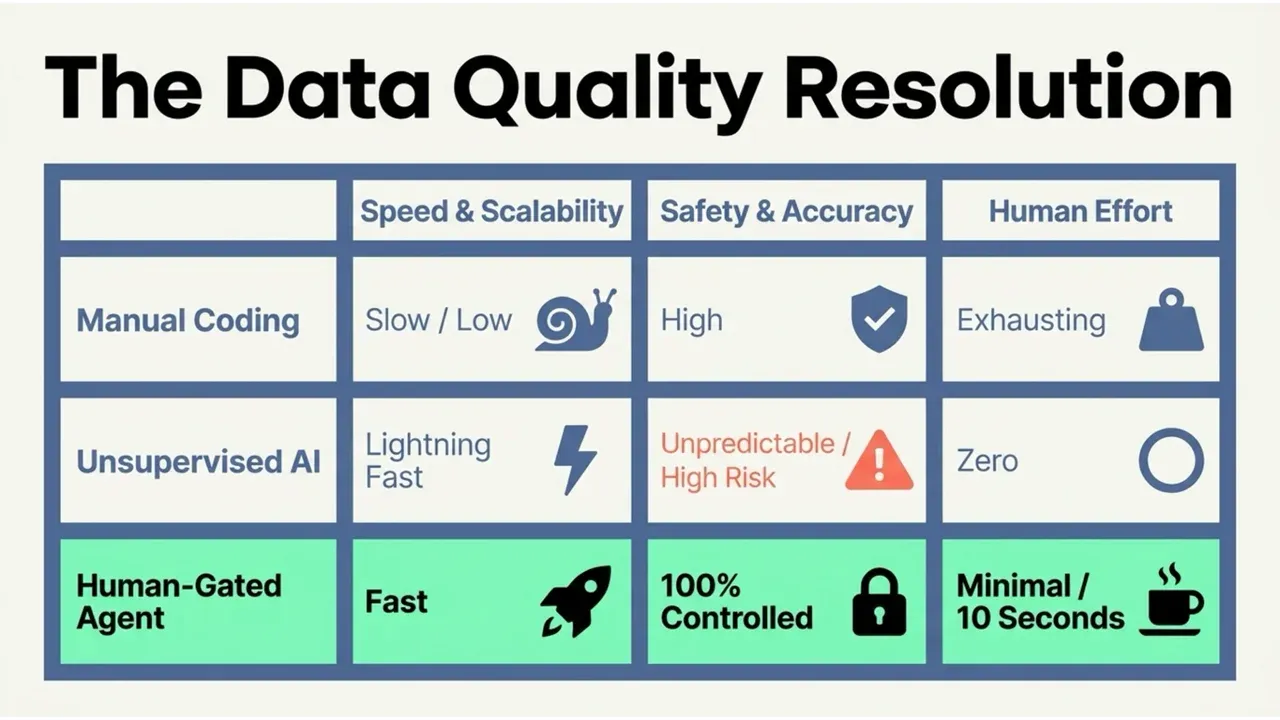
So you don’t save time by taking yourself out of the loop. You save it by handing off the boring work and keeping the one decision that matters. The agent does the boring 90 percent: scans the data and writes the SQL. You make the call. Then the agent handles the other boring part: running the approved SQL and recording what it did.
Put Jira in the middle. The agent writes its proposed fixes into a ticket and stops. You review each one and set a flag, with a comment if you want. Only then does the agent apply, and only what you approved. The ticket is the control plane. The agent proposes, you disposition, and the program logs what ran.
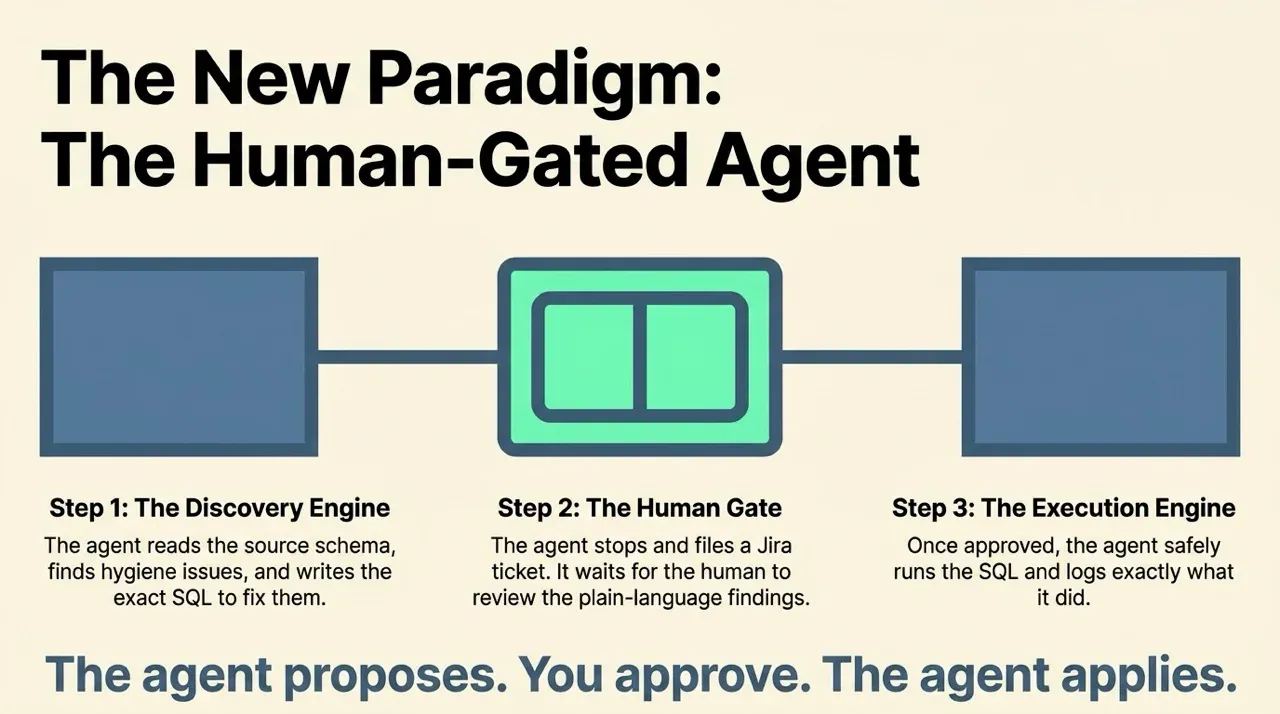
Program one: find the problems, file a ticket
The first program is testgen_to_jira.py. It asks TestGen what’s wrong and turns the answer into a Jira ticket full of recommended fixes.
How testgen_to_jira.py discovers problems and files a ticket:
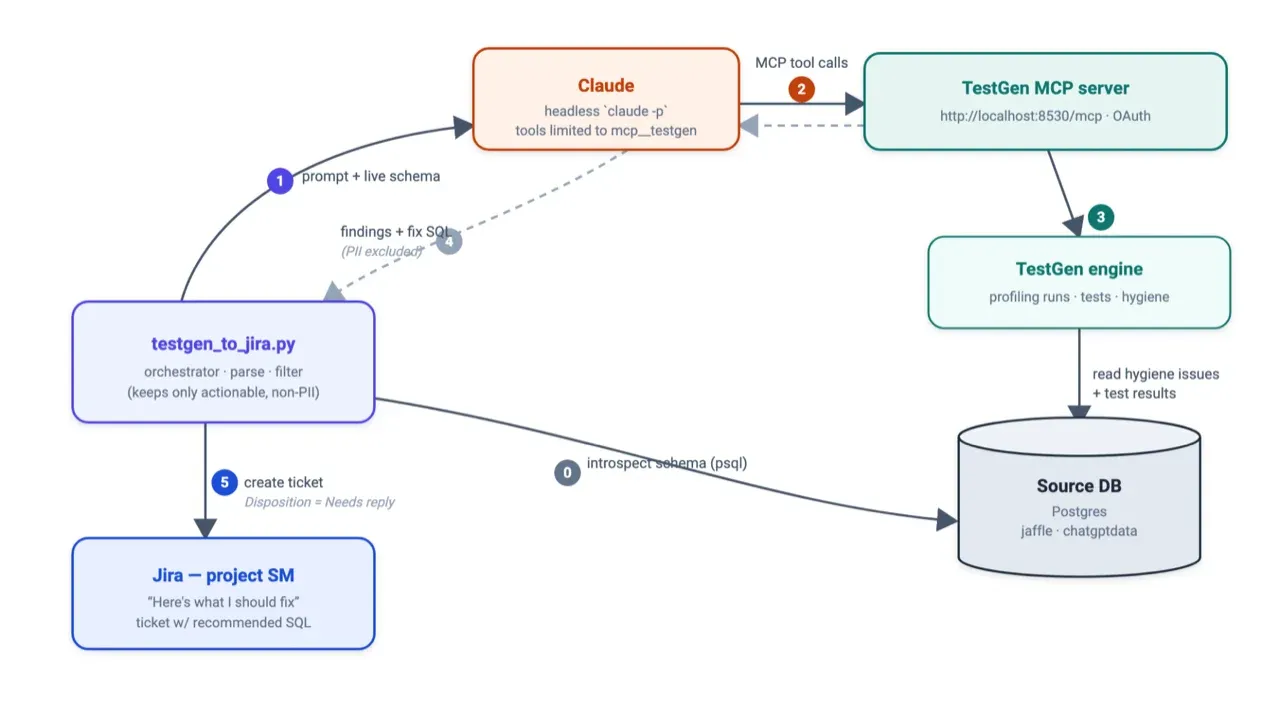
It runs in four moves. First, it reads your source database schema directly, so it knows a column is text before suggesting you retype it. Then it hands Claude a tight prompt and access to the TestGen MCP server. Claude calls TestGen to pull every hygiene issue and failing test, looks up what each test actually checks, and inspects the real failing rows. Claude sends back a list of findings. Each one has a plain-language description and the SQL to fix it.
The program then filters out anything that contains PII and keeps only the fixes it can apply to your tables. It opens a Jira ticket titled “Here’s what I should fix” and sets a disposition flag to Needs reply.
Nothing changed in your database. You have a ticket with concrete SQL and a flag waiting on you.
The human gate
You open the ticket. You read the fixes. You leave a comment if you want one: “only null the placeholder tokens for now, hold the type changes for next release.” You flip the disposition flag to Please fix. Or do not fix. Your call, in the Jira UI, in ten seconds.
That flag is the whole point. The agent never crosses it on its own.
Program two: apply what was approved
The second program is jira_apply_fixes.py. It picks up where you left off.
How jira_apply_fixes.py reads approved tickets and applies the SQL:
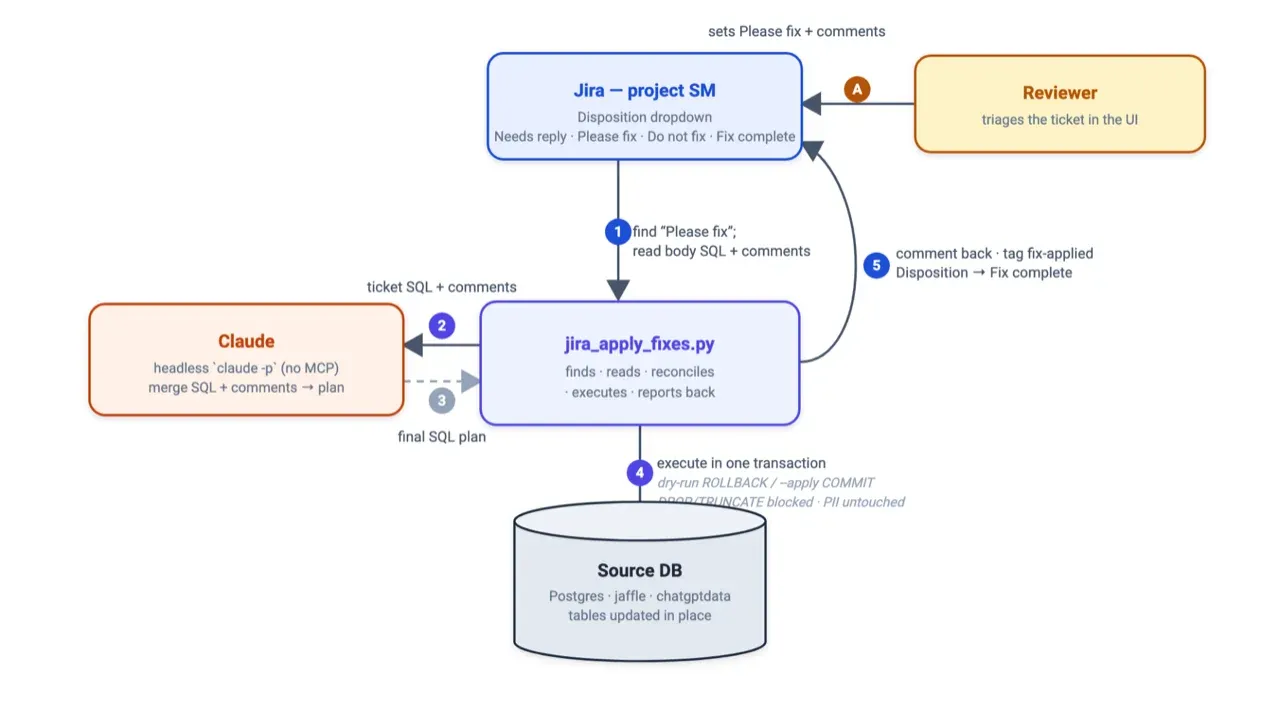
It searches Jira for tickets flagged as “Please fix”. It reads the recommended SQL from the ticket body and every comment you left. It hands both to Claude with one job: merge them into a final, ordered set of SQL statements that honors your comments. If your comment said hold the type changes, Claude drops those statements. If two fixes overlap, they collapse into one.
Then it runs the plan with the guardrails that make this safe to leave running. Everything executes in a single transaction, so any failure rolls back the whole thing. The program blocks DROP and TRUNCATE unless you explicitly allow them. By default, it never writes to your real tables. It rebuilds a fresh copy, table_applied, from the original and applies the fixes there, so the source stays exactly as it was. A dry run executes the SQL and rolls it back, so you can watch it work without committing anything.
When it commits, it comments back on the ticket with what ran, tags the ticket fix-applied, and flips the disposition to Fix complete. The loop closes itself.
Why this works
You get the speed of automation, and you keep the veto. The agent reads your schema, writes the SQL, runs it, and reports back. You decide which fixes happen, and you see exactly what ran. Bad data from the same source stops being a recurring chore and becomes a ticket you approve or reject over coffee.
The control lives in four places: the disposition flag a human sets, the PII exclusion the agent enforces, the copy tables that protect your originals, and the transaction that makes every apply all-or-nothing.
TestGen’s MCP server makes the first half possible. Claude reads your data quality results through it directly, with no glue code and no scraping a UI. If you want to build something like this, start here:
- TestGen MCP server documentation: https://docs.datakitchen.io/testgen/mcp/
- TestGen API reference: https://docs.datakitchen.io/testgen/api/
Your sources will keep sending bad data. Now you fix it once, on your terms, and the agent handles the rest.
Build it yourself
If you want to recreate this in your own environment, I wrote a PRD you can load straight into Claude Code. It names the two programs, the contract between them, the safety gates, and the config, enough for Claude to rebuild the pattern against your stack.
TIP
Download the PRD and load it into Claude Code to build the human-gated data quality fix agent in your own environment.
Keep reading
Want to see the MCP server in action? While you slept, an agent fixed 14 data quality failures is the story of TestGen shipping its MCP server and an agent clearing a backlog of failures overnight.
Want the whole MCP surface on one page? Grab the TestGen MCP cheat sheet: 96 tools grouped by the eight stages of the data quality loop, with connection instructions and starter prompts.
And for the full picture, watch our on-demand webinar, Stop Clicking, Start Asking: The AI Playbook for Data Quality: where the dashboard still wins, where AI dialogue wins, and when it’s safe to turn on agents.
FAQ
What are the key points in this blog?
This is a design pattern for letting an AI agent fix bad source data without giving it write access to your tables. It splits into two programs. The first uses TestGen and Claude to find problems and propose exact SQL, filed as a Jira ticket. A human approves or rejects each fix. The second program applies only what was approved.
Can AI agents fix data quality problems automatically?
They can propose the fix reliably and should not apply it unsupervised. An agent scans the data and writes the SQL well, which is the boring 90 percent of the work. What it cannot decide is intent: whether 222 invalid state codes should become NULL or map to real states is a business call. Split the finding from the applying and a human keeps the veto.
Why not let an agent fix data automatically?
Because you do not want an agent rewriting source tables on its own at 2am. The failure is not that the SQL is wrong but that the intent is ambiguous, and an agent will resolve ambiguity confidently in whichever direction its context suggested. A human gate costs one approval click and prevents a silent, hard-to-reverse rewrite of production data.
What is the human-in-the-loop pattern for data quality agents?
Two programs with a gate between them. Program one detects issues and writes the proposed remediation SQL into a ticket, including the row counts affected. A person reviews the diff and approves or rejects. Program two reads only approved tickets and applies exactly that SQL. Neither program has authority to both decide and execute, which is what makes it safe to run nightly.
What tools do you need to build a data quality agent?
Open-source TestGen for the profiling, test results, and its MCP server, an LLM such as Claude to interpret findings and draft SQL, and a ticketing system to carry the approval step. TestGen’s MCP server exposes 96 tools grouped by the stages of the data quality loop, which is what lets the model read real results rather than guess from a pasted sample.
Is the agent’s SQL safe to run in production?
Only after a human has read it, which is the point of the pattern. The generated SQL is usually correct in mechanics and sometimes wrong in intent, and intent is the part that damages production data. Reviewing the diff and the affected row counts before approval takes a minute and converts an unbounded risk into a bounded one.