NOTE
Update, October 2026: TestGen’s MCP server now has 112 tools in eight groups (TestGen 5.134.0). This cheat sheet covers the 96 tools in TestGen 5.70.2, the release that completed the server. The current list is on the Supported Tools docs page.
Your AI assistant can now run your data quality program: the TestGen MCP server is complete
You have an AI assistant that can write a sonnet about your sales pipeline. It cannot tell you whether the sales table loaded this morning. That gap closed on June 30.
TestGen 5.70.2 completes our Model Context Protocol server. Every workflow in TestGen is now callable by any MCP client: Claude, Claude Code, Cursor, Copilot, or the agent you’re building yourself. That’s 96 tools (now 112 as of October 2026) covering the whole data quality loop, from “what data do I have” to “email me when the score drops.”
What shipped
Earlier releases gave the MCP server profiling, test definitions, hygiene issues, runs, scores, schedules, and notifications. The June 30 release added the setup and management layer that completes the loop. Your assistant can now create and update table groups and test suites, view and test database connections, and manage monitors end-to-end. It can set test-result dispositions in bulk, move test definitions between suites, and edit Data Catalog metadata.
You no longer need the TestGen UI open to run TestGen. You need a chat window.
What a conversation looks like
We connected Claude to a TestGen instance and asked one question: “What data do I have and how healthy is it?” Thirty seconds later, we had the full inventory and a quality score of 78.9 on a table group we’d been ignoring.
The follow-up questions did the work that used to take a morning. “What’s dragging the score?” surfaced 30 hygiene issues, none of which anyone had tested for. One table had loaded every column as varchar(65535). The prices were 96% numeric, the dates were 97% dates, and the remaining 3% were strings like ERROR and UNKNOWN hidden in numeric columns. “Show me the rows behind that” pulled the actual offending records from the source database, not a chart about them.
The finding that made us wince: the cleaned table still carried names, emails, zip codes, and income, all flagged as PII. Someone fixed the values and forgot the identifiers. The “clean” table was a compliance problem, and a five-word question found it.
Then: “Generate tests and run them.” The tests wrote themselves from the profile. Twelve failures came back, and they matched the hygiene story. “Dismiss the recency issue; it’s historical data. Confirm the rest.” Every disposition landed in TestGen with an audit trail. Blind to trusted, one conversation.
The whole surface on one page
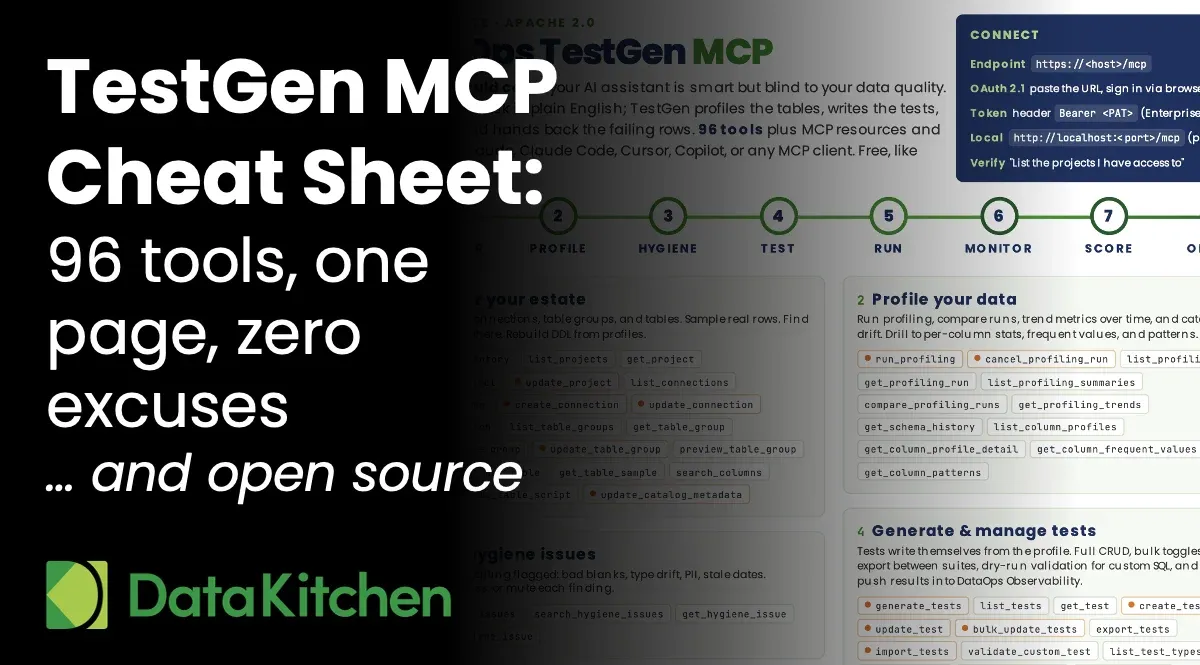
Ninety-six tools is a lot to hold in your head, so we made a cheat sheet. One page. Every tool, grouped by the eight stages of the loop: discover, profile, hygiene, test, run, monitor, score, operate. Connection instructions in the corner, starter prompts at the bottom.
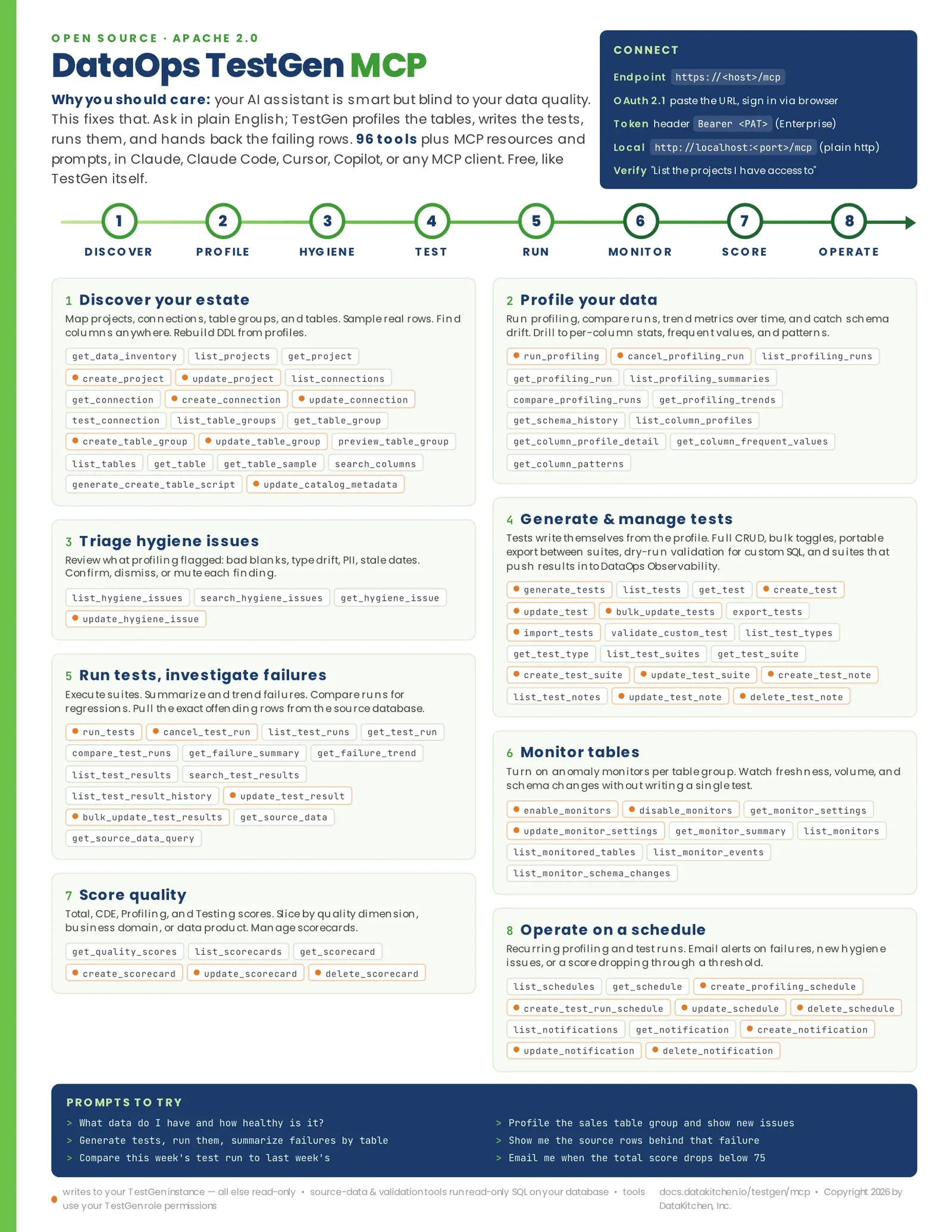
One detail we’re proud of: the orange dots. Every tool that writes to your TestGen instance carries one. Everything else is read-only. When your security team asks what the AI can actually touch, hand them the page and point at the dots. The read/write boundary is visible before anyone clicks “always allow.”
Why MCP and not another chatbot
TestGen has no built-in chat window, on purpose. MCP is a standard, so your assistant of choice uses TestGen as a tool, right next to your Jira and your warehouse.
Permissions hold. The MCP server authenticates as you, and every tool runs with your TestGen role. An analyst’s assistant can read scores; it cannot delete scorecards.
The audit trail survives. Dispositions, test notes, and run history are captured in TestGen in the same way as in the UI. The agent leaves footprints your governance team can follow.
And it composes. Test suites can push results straight into DataOps Observability. Hosted platforms like Databricks Genie can call the same server. The tools you use in a chat today are the tools your autonomous data quality agent uses tomorrow. We’re building that agent too, and this MCP server is its hands.
Get started in five minutes
Point your MCP client at https://<your-testgen-host>/mcp. Modern clients handle sign-in via OAuth in your browser. Give the client the URL, then approve the connection. Then ask: “List the projects I have access to in TestGen.” If you get your projects back, you’re live. The setup guide covers personal access tokens and hosted platforms.
TestGen is open source under the Apache 2.0 license, and so is the MCP server. No SKU, no per-seat agent tax. Install TestGen, connect your database, connect your assistant, and ask it what’s wrong with your data. It will tell you. That’s the uncomfortable part.
Keep reading
Want to see the MCP server in action? While you slept, an agent fixed 14 data quality failures is the story of TestGen shipping its MCP server and an agent clearing a backlog of failures overnight.
Want to see how the agent fixes bad data without going rogue? Agents to fix data quality automatically with control walks through the design pattern: TestGen and Claude find the problem and propose the exact SQL, you approve each fix in a Jira ticket, and a second program applies only what you approved.
And for the full picture, watch our on-demand webinar, Stop Clicking, Start Asking: The AI Playbook for Data Quality: where the dashboard still wins, where AI dialogue wins, and when it’s safe to turn on agents.
FAQ
What are the key points in this blog?
TestGen ships a Model Context Protocol server with 96 tools (now 112 as of October 2026) that span the whole data quality loop, so an AI assistant can profile data, generate and run tests, triage failures, and manage monitors without the TestGen interface open. The server authenticates as the person using it, honours that person’s role, and records every action, and a one-page cheat sheet shows which tools write.
What is the TestGen MCP server?
It is a Model Context Protocol server, bundled with TestGen and open source under the Apache 2.0 license, that exposes 96 tools (now 112 as of October 2026) grouped into eight stages of the data quality loop: discover, profile, hygiene, test, run, monitor, score, and operate. Any MCP client can call them, which makes TestGen a tool your assistant uses rather than another place to log in.
Which AI assistants can connect to TestGen?
Any client that speaks the Model Context Protocol. That includes Claude, Claude Code, Cursor, GitHub Copilot, and an agent you build yourself; hosted platforms such as Databricks Genie can call the same server. Because the protocol is a standard rather than a product integration, TestGen sits alongside the other tools your assistant already reaches for.
What can an AI assistant actually change in TestGen?
Only what the connected person is allowed to change. Every tool runs with that person’s existing TestGen role, so an analyst’s assistant can read quality scores but cannot delete scorecards. On the cheat sheet, every tool that writes to a TestGen instance carries an orange dot and everything else is read-only, which makes the boundary visible before anyone approves a connection.
Why use the Model Context Protocol instead of building a chat window into TestGen?
Because a standard composes and a built-in chatbot does not. TestGen has no chat window on purpose: the assistant a team already uses calls TestGen as a tool, next to its warehouse and its issue tracker. Test results can also be pushed into DataOps Observability, and the tools used in a chat today are the same ones an autonomous agent uses later.
How do you connect an AI assistant to TestGen?
Point the MCP client at your TestGen host and approve the connection; modern clients handle sign-in through your browser, and personal access tokens are available for clients that need them. Then ask the assistant to list the projects you have access to in TestGen. If your projects come back, the connection is live. The whole thing takes about five minutes.