
The Matillion data integration and transformation platform enables enterprises to perform advanced analytics and business intelligence using cross-cloud platform-as-a-service offerings such as Snowflake. DataKitchen DataOps Automation provides a way to extend Matillion’s powerful cloud-native data integrations with DataOps capabilities that span the heterogeneous tools environments characteristic of large enterprises. Adding DataOps to ETL processes is the secret to eliminating errors and dramatically improving analytic cycle times.
Imagine a large enterprise yielding significant value from their Matillion-Snowflake integration, but wishing to expand the scope of data pipeline deployment, testing, and monitoring. Third-party processes and tools frequently cause unexpected errors by altering the database schema upon which Matillion ETL pipelines are built. DataKitchen DataOps Automation enables the data team to introduce tests that can catch schema drifts before the Matillion ETL jobs are even triggered, improving the quality and robustness of data integration and transformation pipelines. Beyond this initial use case, DataKitchen further extends Matillion workflows and pipelines with additional DataOps features and functions. Enterprises live in a multi-tool, multi-language world. DataKitchen acts as a process hub that unifies tools and pipelines across teams, tools and data centers. DataKitchen could, for example, provide the scaffolding upon which a Snowflake cloud data platform or data warehouse could be integrated into a heterogeneous data mesh domain.
We set out to integrate Matillion’s ETL/ELT capabilities with the DataKitchen DataOps process hub to provide process observability, toolchain integration, orchestration (of environments and data pipelines), testing, and monitoring.
Orchestrating Matillion Using DataKitchen
DataKitchen “recipes” (orchestrations) consist of a pipeline of processing steps or ” ingredients.” The DataKitchen-Matillion integration associates DataKitchen ingredients with Matillion jobs giving the user access to DataKitchen UI management of Matillion orchestrations. DataKitchen triggers a Matillion job, then retrieves execution parameters that can be used in DataKitchen tests. For example, after a Matillion job completes, DataKitchen pulls runtime variables like rowCount, invalid orders, and invalid zip codes and can perform historical balance, location balance, and statistical process control on these values. DataKitchen natively stores historical values of runtime variables that feed into process observability – tables and graphs packed with metrics that shed light on every aspect of operations and development workflows – see figure 1.
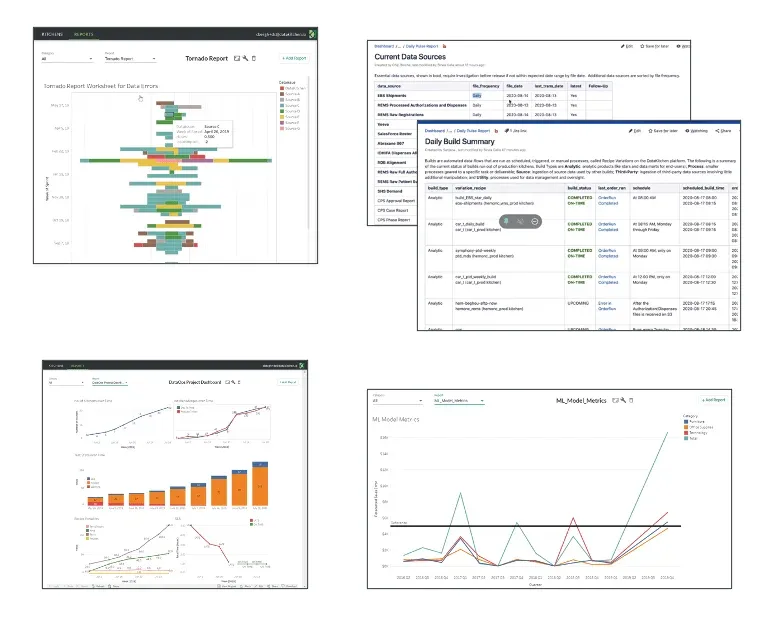
Figure 1: DataKitchen DataOps Automation provides unparalleled transparency into production execution and development workflows.
Unifying Heterogeneous Toolchains
DataKitchen integrates diverse toolchains into a unified environment. Figure 2 shows a DataKitchen graph of an orchestration that spans toolchains. In some data organizations, each team chooses its own tools. DataKitchen DataOps Automation provides a way for data engineers to add tests to any step of any toolchain orchestration without being familiar with every language and tool used across the enterprise, or even how to code. The DataKitchen UI can add a variety of sophisticated tests to a data pipeline through configuration menus.
Parameterizing Matillion JSON Files
DataKitchen can also pass parameters to a Matillion job. Matillion users build jobs using a UI, and these are stored and optionally exported as JSON files. DataKitchen can interact with Matillion JSON files to make them, in effect, parameterized. For example, a DataKitchen orchestration provides a Snowflake schema name to Matillion by updating the JSON, moving the execution of the Matillion job seamlessly across aligned technical environments. DataKitchen uses this capability to automate analytics deployment from development to production, saving significant manual effort.
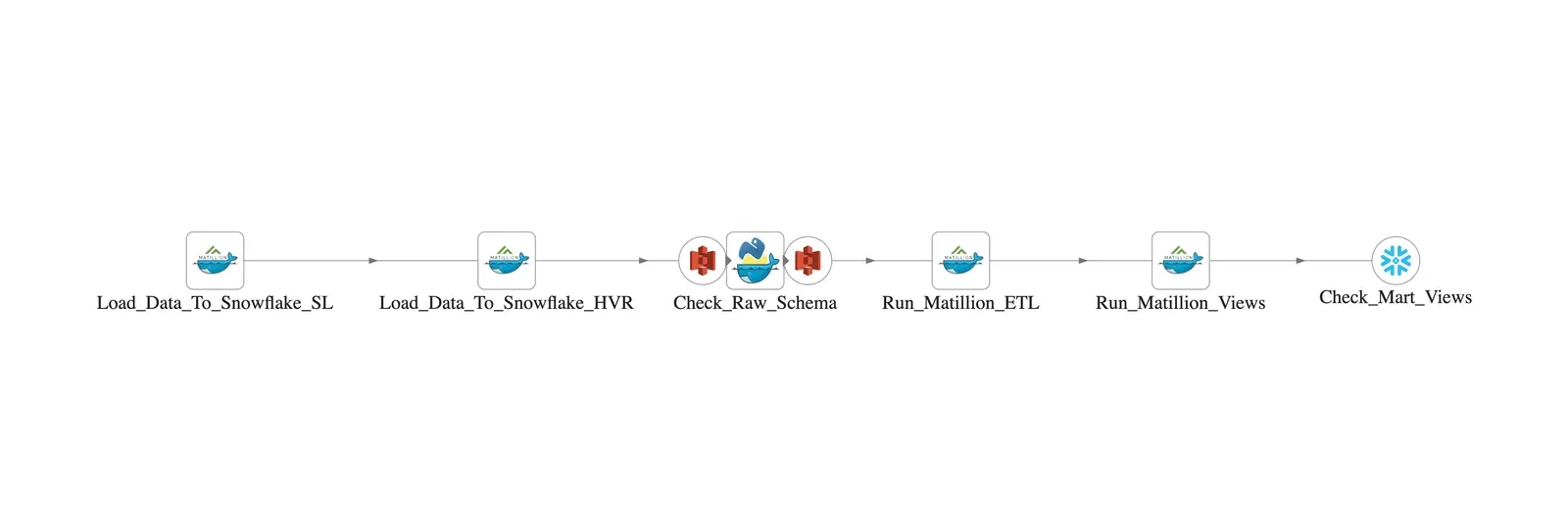
Figure 2: DataKitchen orchestrates Snowflake, Matillion and potentially other tools from a unified environment.
Aligning Matillion Projects with Kitchens
DataKitchen users execute orchestrations to create development sandbox environments (or Kitchens) on demand. Kitchens include a complete toolchain mirroring a target environment like production, test data, reusable analytics components, access management, and close coupling with version control. Kitchens can also open and close Matillion projects. DataKitchen can integrate Matillion JSON, Python and SQL files into Kitchens, so they are version controlled and become a seamless part of a Kitchen branch and merge. Kitchens can also assist Matillion projects with automated reuse of user-created features and functions. While Matillion users share code via Matillion Exchange, DataKitchen enables code and pipeline reuse across heterogeneous toolchains using containers and a searchable library of reusable components.
Enforcing Quality
Data teams typically deal with a multitude of data errors per week. DataKitchen enables the addition of quality tests at each stage of processing. In figure 2, the DataKitchen user added the processing node “Check_Raw_Schema” which investigates the data source loaded into Snowflake and detects schema drift before the “Run_Matillion_ETL” step executes. DataKitchen enables DataOps tests like this to be inserted before and after each processing stage to reduce errors and enforce impeccable data quality.
DataOps recommends that tests monitor data continuously in addition to checks performed when pipelines are run on demand. DataKitchen makes it simple to reuse and adapt existing code to implement the monitoring of data pipelines. For example, figure 3 shows a short data pipeline that checks the Snowflake schema, tables and views used for reporting. In addition to the schema check explained above, the orchestration also error checks the Matillion-created views or tables with “Check_Mart_Views.” This pipeline is executed every few minutes (as configured with the DataKitchen scheduler), ensuring that any schema or table error will be detected quickly. DataKitchen ties errors and warnings to alerts that can be routed to a messaging application of choice.

Figure 3: Nodes are reused from the previous graph to create a data pipeline that background monitors the schema and tables/views.
Stronger Together
Matillion offers powerful data integration and transformation capabilities that improve development productivity. When combined with DataKitchen’s process hub, users gain control and visibility into orchestrations, data pipelines and workflows. Matillion and DataKitchen together provide a great way to increase velocity while monitoring the end-to-end data lifecycle.
FAQ
What are the key points in this blog?
Matillion moves and transforms data; DataOps supplies the orchestration, testing, environments, and monitoring around it. In the integration described in January 2022, DataKitchen triggered Matillion jobs as steps in its own orchestrations, pulled runtime variables back into tests, caught schema drift before the ETL job ran, parameterised exported job JSON to move work between environments, and version-controlled those files inside a Kitchen.
What does DataOps add to a data integration and transformation platform?
Four things the platform does not cover on its own: orchestration that spans other tools in the stack, tests before and after every processing step, on-demand environments that mirror production, and continuous monitoring with alerts routed to a messaging application. Enterprises run multi-tool, multi-language stacks, so a process hub unifies pipelines across teams, tools, and data centers.
How did DataKitchen orchestrate a Matillion job?
A DataKitchen recipe is a pipeline of processing steps called Ingredients, and the integration associated an Ingredient with a Matillion job. DataKitchen triggered the job, then retrieved execution parameters once it finished — runtime variables such as rowCount, invalid orders, and invalid zip codes — and applied historical balance, location balance, and statistical process control tests to those values.
How can a data team catch schema drift before an ETL job runs?
Put the check ahead of the transformation. A processing node that inspects the data source loaded into the warehouse can detect that a column or type changed and stop the run before the ETL step executes. Third-party processes and tools frequently alter the schema an ETL pipeline was built against, which is a common cause of unexpected errors.
What is a Kitchen in DataKitchen?
A Kitchen is a development environment created on demand that mirrors a target environment such as production: a complete toolchain, test data, reusable analytics components, access management, and close coupling with version control. Kitchens branch and merge, so job definitions exported as JSON along with Python and SQL files travel with the rest of the work.
Why run data quality tests continuously instead of only when a pipeline runs?
Because errors arrive between runs. DataOps recommends monitoring data continuously as well as checking it on demand, so a short pipeline that verifies the warehouse schema, tables, and views can be scheduled to execute every few minutes. Any schema or table error is then detected quickly and tied to an alert routed to a messaging application.