You know the test you want. Something that catches a schema change on a reference table, or a distribution that quietly drifted, or a row count that fell off a cliff overnight. What you don’t know is what we named it.
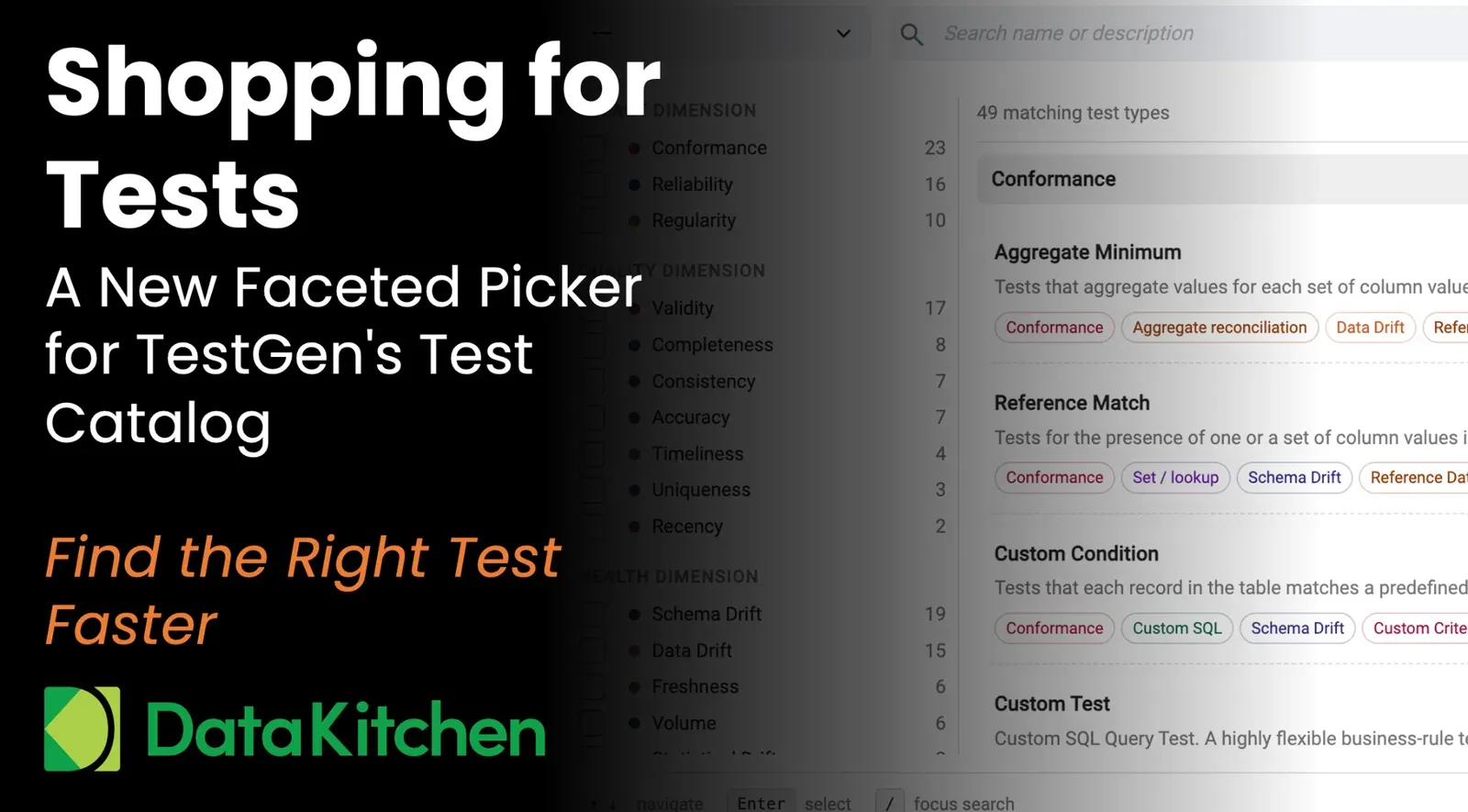
TestGen ships with 49 test types today, and we keep adding more. A flat list stopped working somewhere around type 30. So, in our June 30 release, available in both open-source and enterprise editions, the Add Test screen was rebuilt. It’s now a faceted picker. You filter the catalog to the tests you care about, just like you shop on Amazon. Nobody scrolls every product in “Electronics.” You pick brand, price, and rating, and the list shrinks to something a human can read.
How it works
Open Add Test and the full catalog appears with a filter panel on the left. Every test type carries tags across seven facets.
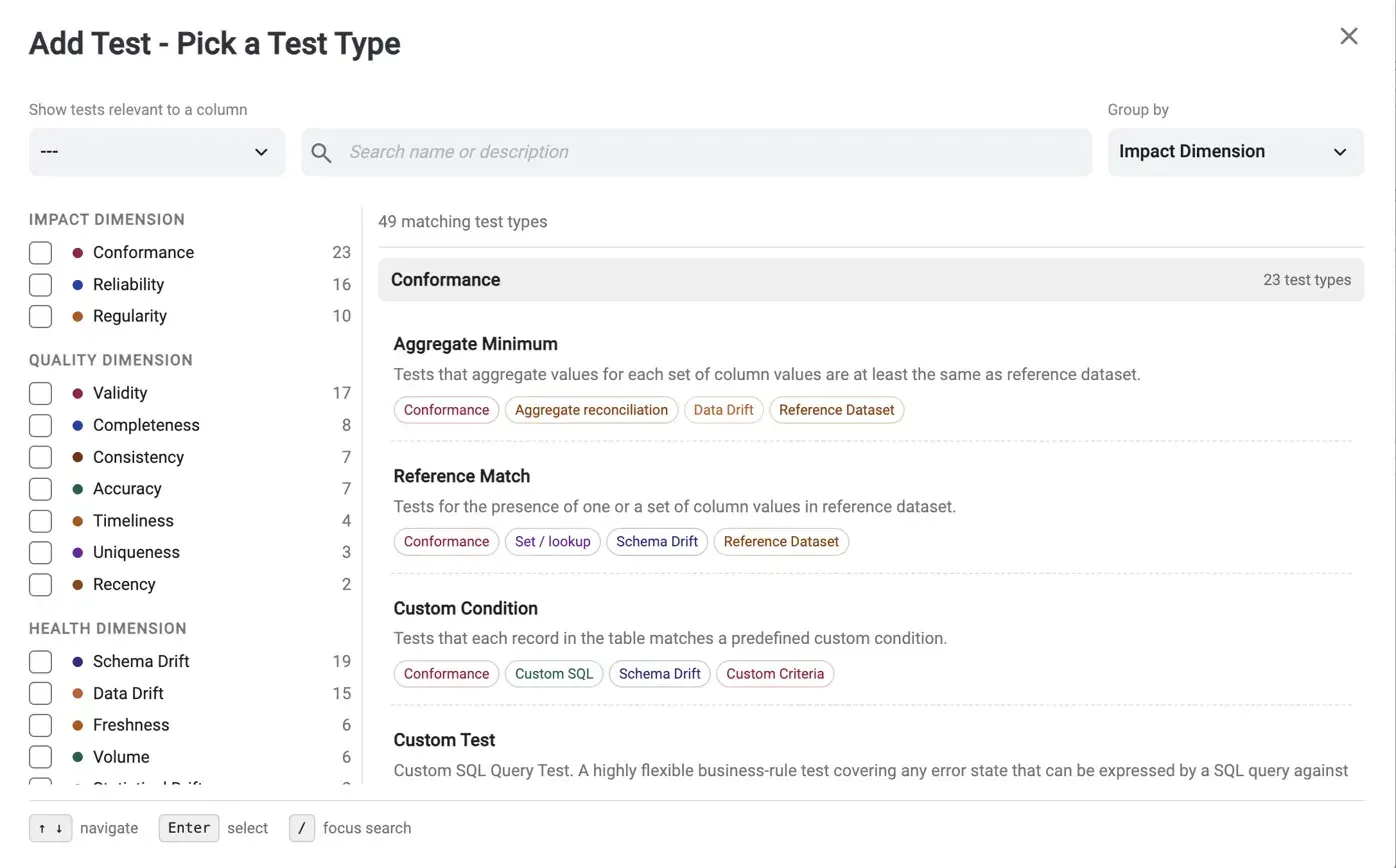
Three of the facets tell you what the test protects. Impact dimension covers conformance, reliability, and regularity. Quality dimension maps to the vocabulary your governance team already uses, from validity and completeness through uniqueness and recency. Health dimension flags symptoms such as schema drift, data drift, freshness, or volume.
The other four tell you how the test works and where it points. Algorithm describes the mechanism under the hood: counting, boundary checks, aggregate reconciliation, pattern matching, set lookups, or custom SQL. Statistical technique goes one level deeper for the drift tests, down to Cohen’s D or Jensen-Shannon divergence. Test scope covers whether the test runs against a column, a table, a table group, or a referential relationship. Criteria tells you what the test compares against: a defined rule, a threshold, a list of values, or a reference dataset.
Check a box and the list narrows. Check two, and it narrows further. The counts next to each facet show you where the tests are before you click.
Why facets and not folders
Because tests refuse to stay in one folder. Take Reference Match. It’s a conformance test. It uses a set lookup. It catches schema drift. It compares against a reference dataset. File it under any single category and three out of four people looking for it will look in the wrong place. Facets let the same test appear wherever it belongs.
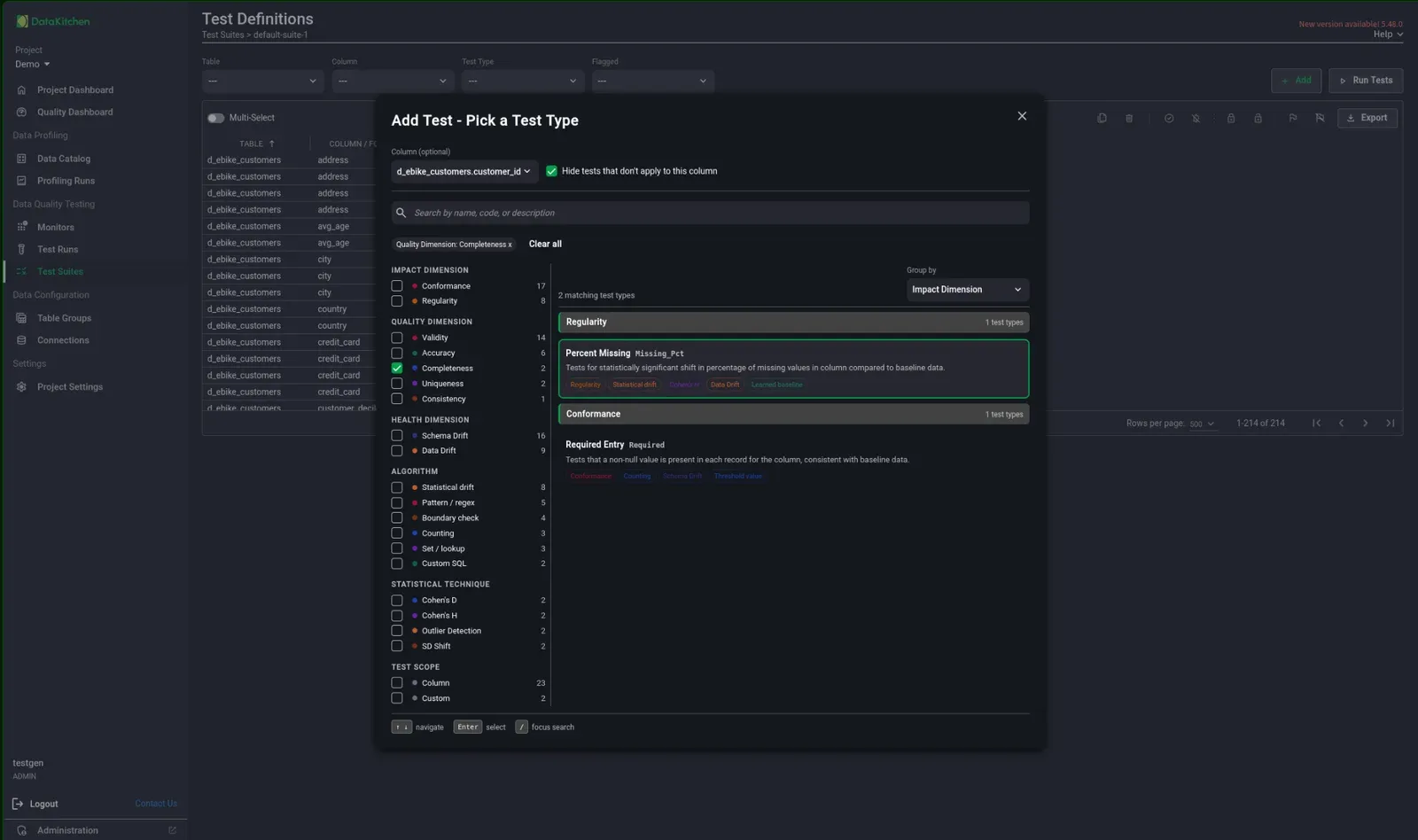
The other reason is growth. The roadmap has more test types coming. A category tree gets worse as it grows. A faceted catalog becomes more useful because every new test adds another data point to filter by.
Start from the column
Sometimes you’re not browsing the catalog. You’re staring at one column that worries you. The picker handles that case directly. At the top of Add Test, pick the column from the “Show tests relevant to a column” dropdown and the catalog trims itself to only the tests that apply.
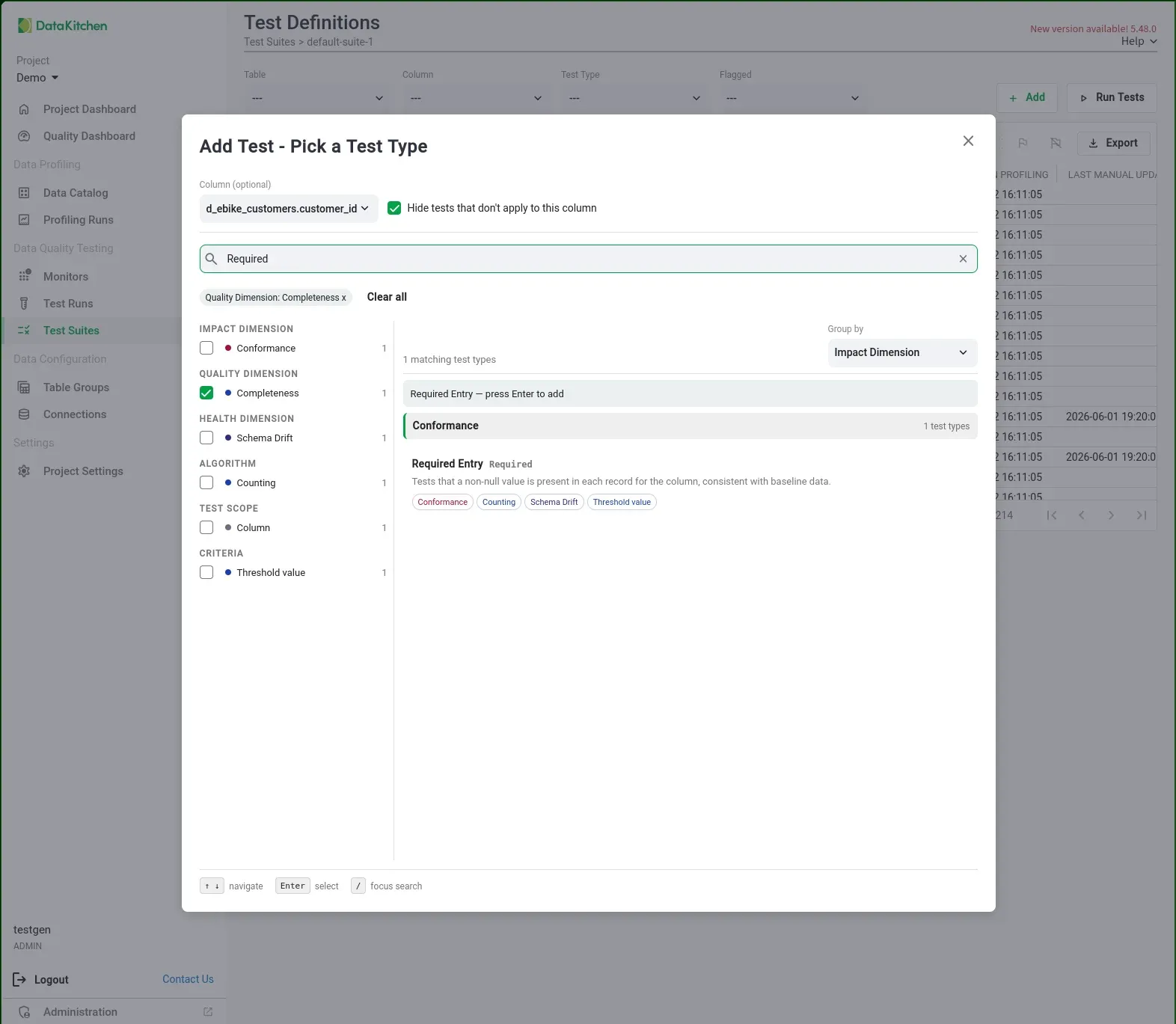
Apply means apply to that column’s type and profile. Pick a date column, and you get recency and freshness tests, not pattern matching built for strings. Pick a numeric column and boundary checks and aggregate tests surface, while the value-list tests meant for categorical fields stay out of your way. You stop evaluating tests that were never going to fit, which on a catalog this size is most of them.
This is the fastest path when the question isn’t “what tests exist” but “what should I put on transaction_amount before Friday’s load.”
Keyboard first
Your hands stay on the keyboard. Press / to jump to search and type a name or a description fragment. Arrow keys move through the results. Enter selects. If you already know which column you’re testing, pick it from the dropdown at the top, and the catalog trims itself to only the tests that apply to that column’s type.
The full catalog, with parameters and examples for every test, lives in the test types documentation. Try the picker in the latest release. And if you go shopping for a test that catches your particular 2 am failure mode and come up empty, tell us. That’s how the catalog grew this big in the first place.
FAQ
What are the key points in this blog?
The Add Test screen in TestGen is now a faceted picker rather than a flat list of 49 test types. Seven facets filter the catalog: Impact, Quality and Health dimensions describe what a test protects, while Algorithm, Statistical technique, Test scope and Criteria describe how a test works and where it points. Selecting a column trims the list to tests that apply, and keyboard search is built in.
How many test types does TestGen have?
49 as of the June 30, 2026 release, in both the open-source and enterprise editions, and more are on the roadmap. That count is why the Add Test screen became a faceted picker: a flat list stopped working somewhere around 30 test types. How TestGen generates and runs those tests is documented in its technical overview.
What are the seven facets in the TestGen test picker?
Impact dimension covers conformance, reliability and regularity. Quality dimension maps to governance vocabulary such as validity, completeness, uniqueness and recency. Health dimension flags symptoms such as schema drift, data drift, freshness and volume. Algorithm names the mechanism under the hood, Statistical technique goes one level deeper for the drift tests, Test scope says what the test runs against, and Criteria says what it compares to.
Why use facets instead of test categories or folders?
Because one test belongs in more than one place. Reference Match is a conformance test, it uses a set lookup, it catches schema drift, and it compares against a reference dataset, so filing it under a single category sends most people looking in the wrong place. Facets also scale: each new test type adds another data point to filter by rather than another folder.
How do I find the right test for one specific column?
Pick the column from the dropdown at the top of Add Test and the catalog trims itself to the tests that apply to the type and profile of that column. A date column surfaces recency and freshness tests instead of pattern matching built for strings. A numeric column surfaces boundary checks and aggregate tests, while value-list tests meant for categorical fields stay out of the way.
Which TestGen edition has the faceted picker, and how do I get it?
Both editions. The rebuilt Add Test screen shipped in the June 30, 2026 release of open-source and enterprise DataOps TestGen. The open-source edition is Apache 2.0 and you install it on your own infrastructure. Once you are in the picker, the fastest path is the keyboard: press / to search, arrow keys to move through results, Enter to select.