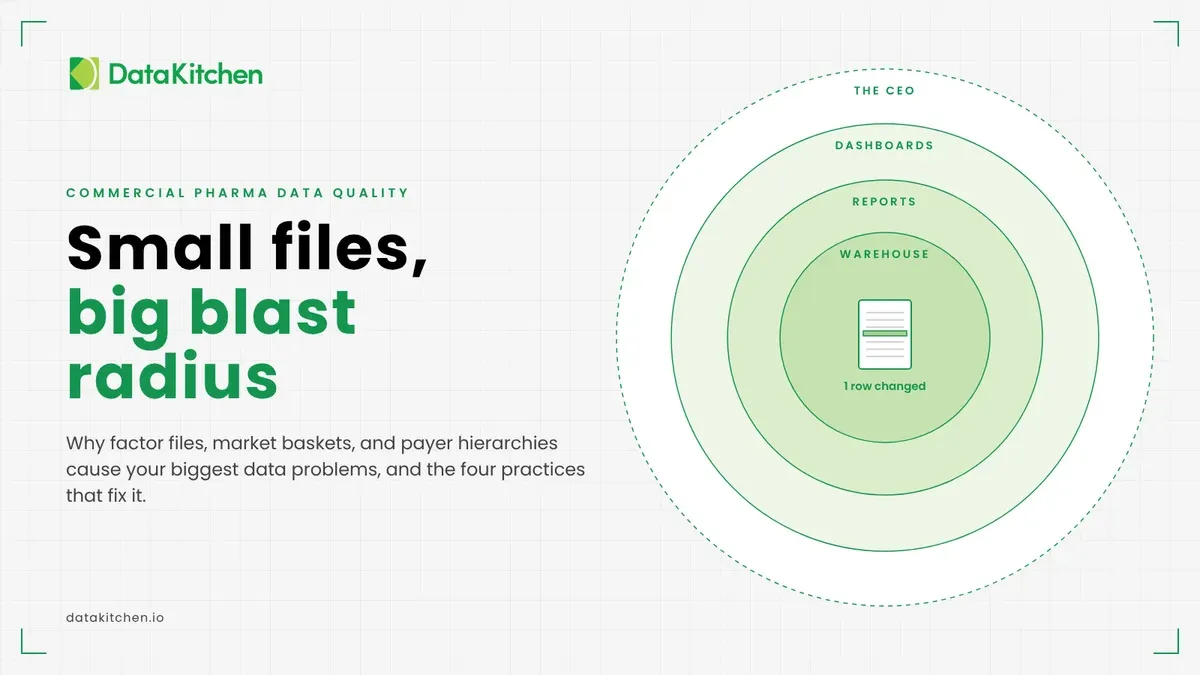
One of your biggest data quality risks lives in your smallest files.
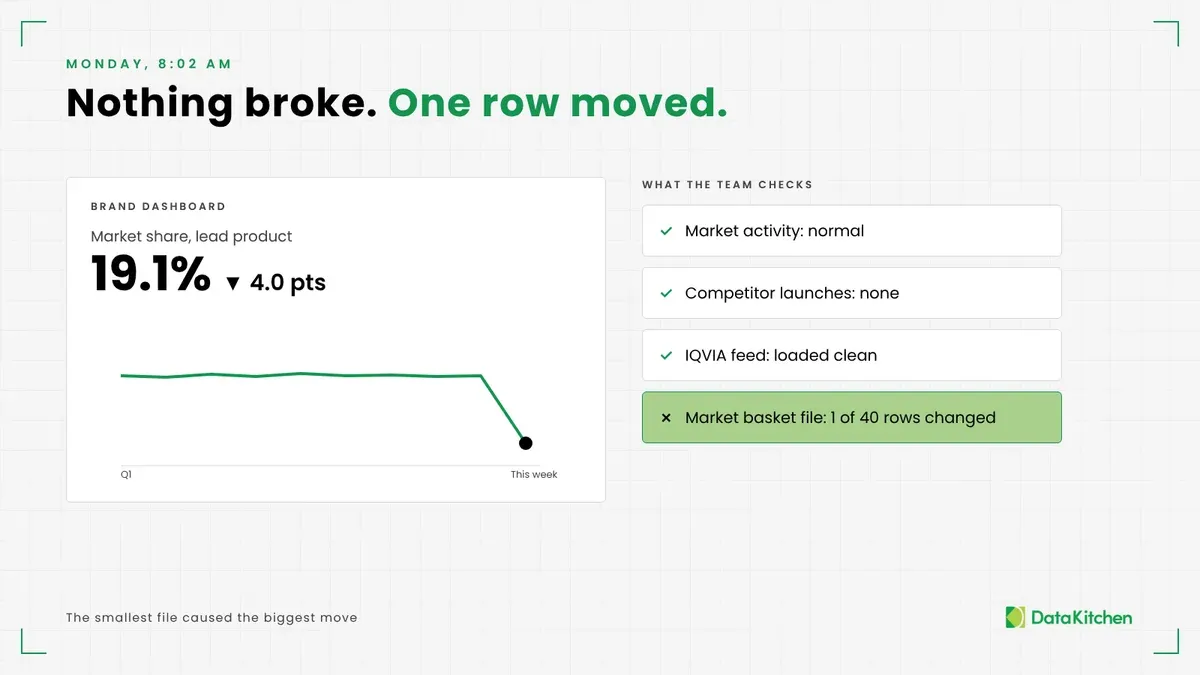
Monday morning. Your CEO opens the brand dashboard and sees market share for your lead product down four points over the weekend. Nothing happened in the market. No competitor launched. Your IQVIA feed loaded clean.
Somebody moved one product from one market basket to another. One row, in a file with 40 rows. That file, and the dozens like it in your stack, is what this post is about.
If you run commercial pharma data, or govern it, you’ve lived some version of this. Here’s why small files do so much damage, why they slip past the tests you already have, and the four practices we use to keep them honest. If you are not in pharma, but know data, you will recognize this challenge immediately.
The small files that run commercial pharma
Every commercial pharma data stack has two kinds of inputs. The big ones are syndicated: IQVIA prescriptions, claims data, Veeva call activity. They arrive on a schedule, from a vendor, with a data dictionary and an account manager. They still break, as we showed with IQVIA, specialty pharmacy, and your own files: the commercial data most likely to be wrong.
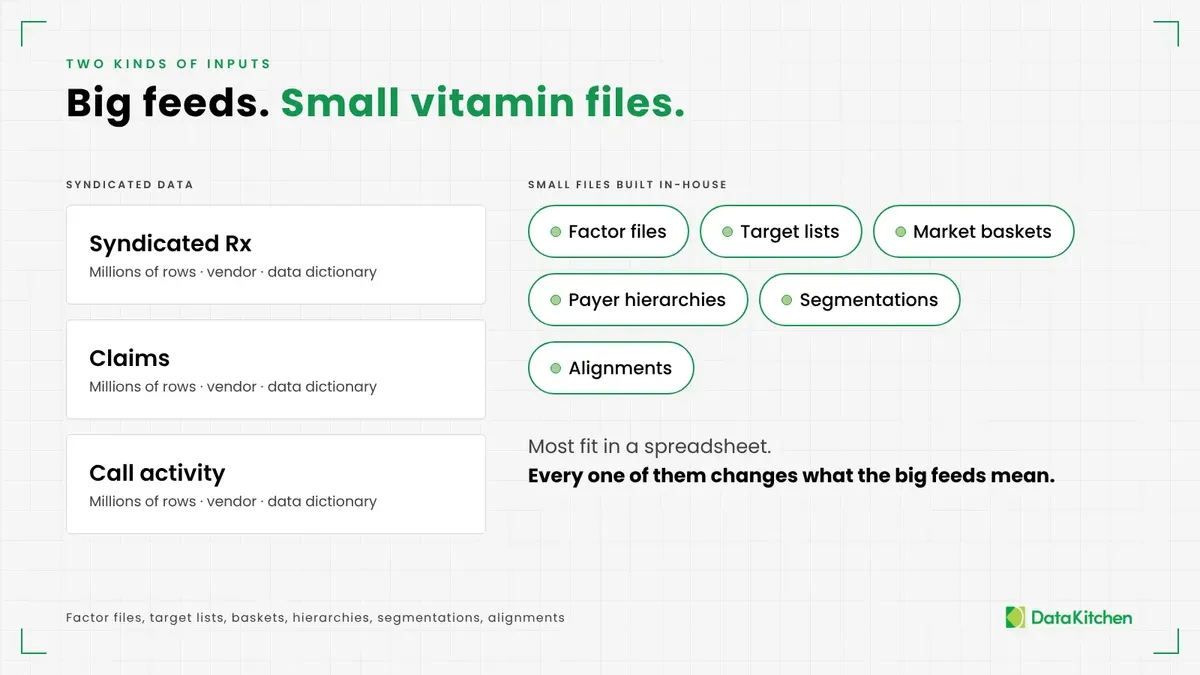
The small ones sit beside them. Factor files. Physician target lists. Product-market baskets. Payer hierarchies. Prescriber and payer segmentations. Territory alignments and call plans. Most of them fit in a spreadsheet. Some started as spreadsheets and never left.
We call them vitamins. You don’t take much, and everything depends on them. That name undersells it, though. A bad vitamin file acts more like nitrous in the wrong engine. Small dose, big reaction, and the reaction shows up far from where you put it in.
One line, a huge blast radius
A market basket defines your competitive set. Add or drop one product and every share calculation shifts. Those numbers roll straight up to the executive dashboard. Nobody on the executive team knows a basket changed. They just see the number move.
Picture it with six SKUs, an example we come back to in practice three below. Production and pre-production run the same pipeline and land on the same 575 total units. Change how products roll up to product groups and the group totals move, along with every report built on them.
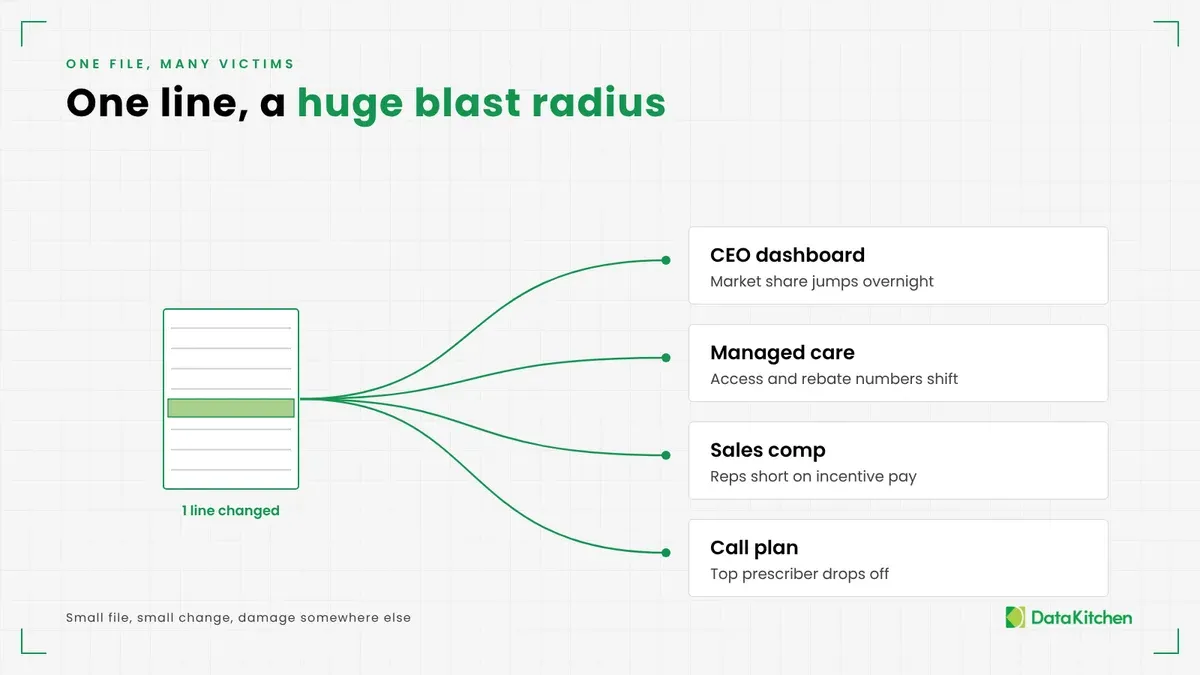
A payer hierarchy decides which plans roll up to which parent. Move one plan under a different PBM and your access and rebate numbers move with it. Your managed care team notices first, and they don’t keep it quiet.
A factor file turns raw data into facts. It allocates competitor prescriptions, adjusts for channel, or weights a market. Get one factor wrong, and a fact in your fact table goes bad. That fact feeds incentive comp. Now your sales reps are short on their bonus checks, and they will find out before you do.
A target list or alignment decides which rep calls on which physician. One bad row and a high-value prescriber falls off a call plan for a quarter. Here is how to test territory alignment and incentive comp data before payout.
A segmentation comes out of a model someone built. Rerun it with new inputs and a few hundred prescribers change deciles. Every report sorted by decile changes with them.
The pattern holds across all of them. The file is small, and the change is small. The damage lands somewhere else, in someone else’s report, and nobody traces it back to the source. Lineage can show you what sits downstream. Only a test tells you the number is wrong, which is why test coverage beats data lineage.
Why they get less attention than they deserve
Your syndicated data gets real rigor. A big file, a known schema, one vendor contact, and a contract that says what good looks like. You diff each delivery, run tests, and check it against history. The small files rarely get that treatment. They need it more. If your team’s honest answer is we just eyeball row counts and pray, the small files get even less.
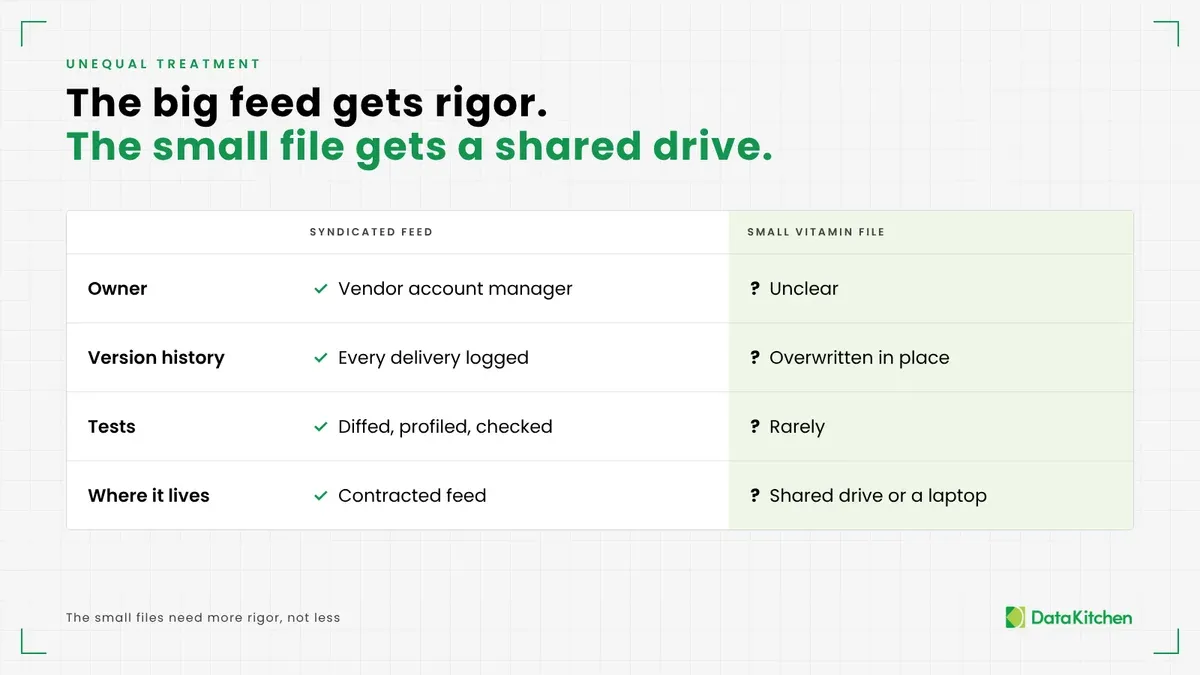
They come out of unmanaged processes. An analyst builds one. A brand lead asks for a change over email. IT says it manages these files, and for some of them it does. The rest live in a shared drive or on someone’s laptop. They are in-betweeners: built in an analytics lab, then promoted into production without anyone deciding they were ready.
Try a simple question at your next governance meeting. Who owns the physician target list? You’ll get three answers. Or none.
The process nobody can see
Testing the file is half the problem. The other half is the process that made it.
Here is how a lot of these files get born. Someone has an idea in a meeting. An analyst models it in a spreadsheet, pulls in a few sources, makes some assumptions, and produces a file. The file goes into production. Everyone moves on.
Three months later you need to refresh it, and the questions start. Do you still have the sources? Did a schema change upstream? Did a new competitor enter the market since the last run, and does your share attribution logic know about it? Someone hard-coded a date range. Was that on purpose, or should it roll forward to the latest mature quarter, the one where the data has settled? What will the change do to numbers people already trust?
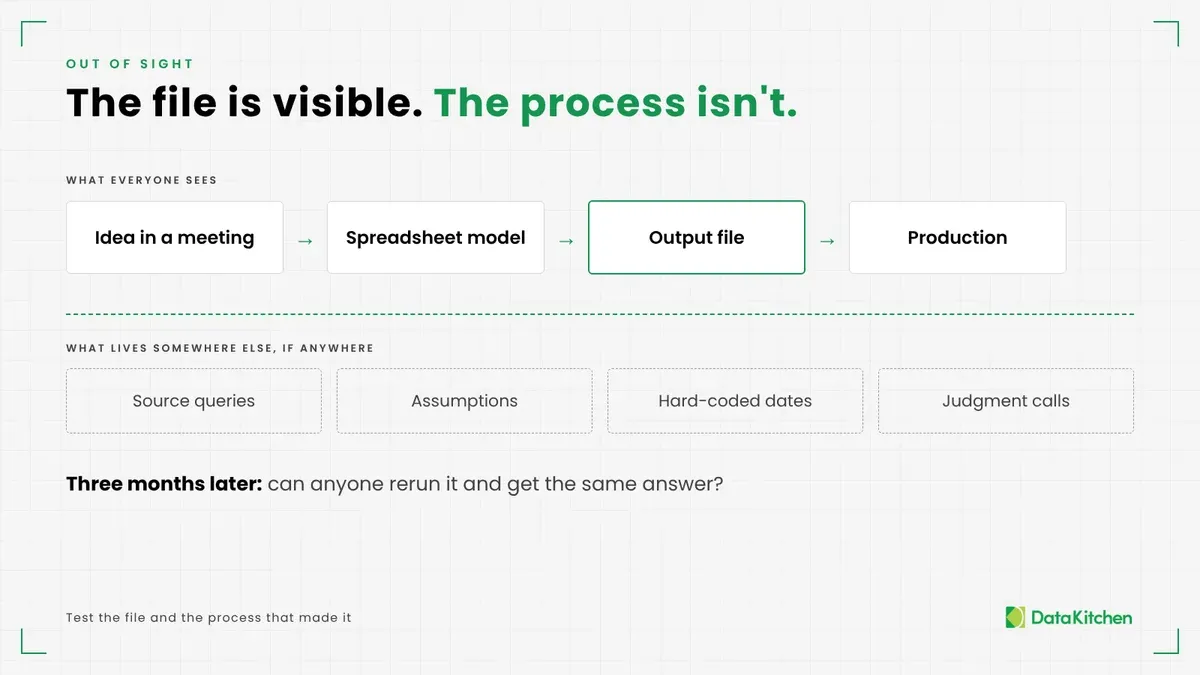
None of that is visible from the file. The file is the output. The logic and the judgment calls live somewhere else, if they live anywhere.
It gets worse when the logic exists in more than one place. The brand team has a prescriber segmentation. Sales ops built its own for call planning. Finance has a third for forecasting. Each uses a slightly different definition, and nobody knows which one is authoritative. When a business rule changes, some copies get updated, and some don’t. When one team finds and fixes an error in its copy, the fix rarely reaches the others.
You find out when two reports disagree, and someone burns a week figuring out which spreadsheet holds the real rule. We wrote about this pattern in Process Guardianship: The Most Valuable Data Engineering Work You’re Probably Not Doing. Small files do the most damage when business logic is scattered, because their output looks like data instead of logic.
Then Priya leaves
Every one of these files has a Priya. Priya built the factor logic. Priya knows which payers get special handling and why. Priya knows the date in cell B4 is supposed to change every quarter.
Then Priya takes two weeks off. Or Priya takes a job somewhere else. The refresh comes due, and nobody knows how to run it. Somebody opens the spreadsheet, squints at the formulas, and makes a best guess. That guess goes into production with the same authority as the original.
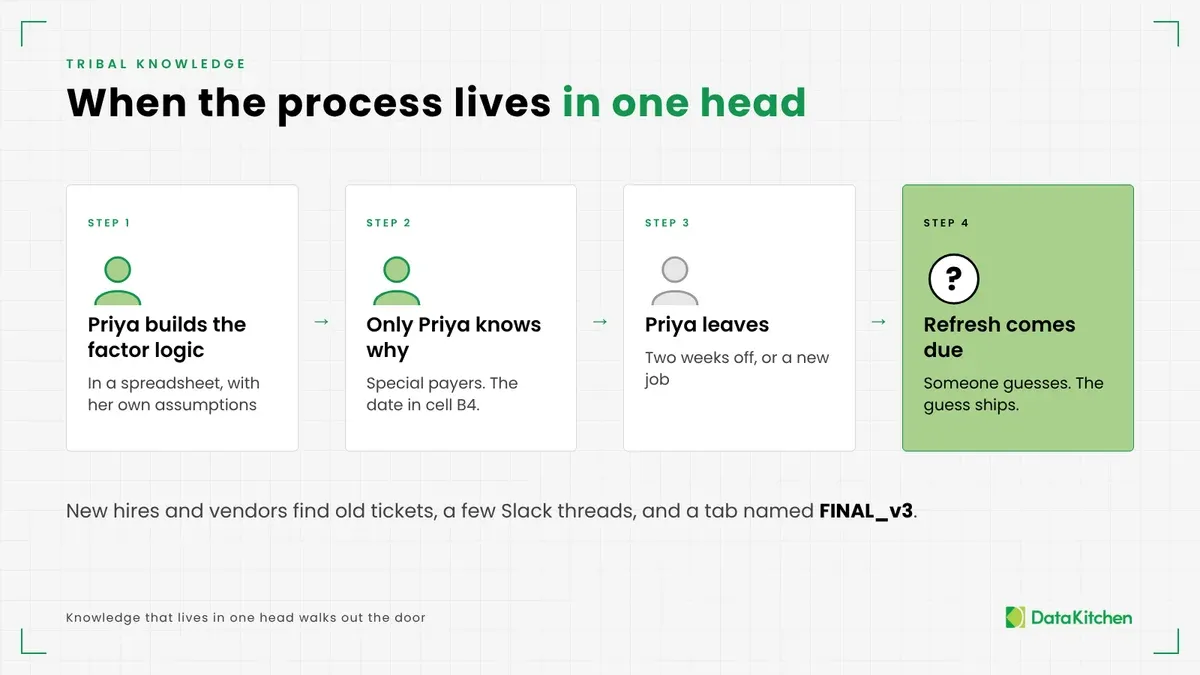
New hires and outside vendors hit the same wall. There is no code to read and no documentation to follow. There are old tickets, a few Slack threads, and a spreadsheet with a tab named FINAL_v3. We wrote about what should go in the handover when your only data engineer leaves, and the same list applies to every small file. So does the warning that the best data quality rules live in someone else’s head.
There is no there there. The process lived in one person’s head, and it walked out the door with them.
Most data quality programs in commercial pharma point their tests at the big syndicated feeds. That leaves the most powerful inputs in your stack unwatched. One of your biggest data quality risks lives in your smallest files.
This isn’t just a pharma problem
Pharma has its own names for these files. Every industry has the files.
In banking, a mapping table decides which general ledger accounts roll up to which line on the balance sheet. Move one account and a regulatory report changes. A credit risk team keeps a table of industry codes and risk weights, and one wrong weight changes how much capital the bank holds. A data scientist builds a customer segmentation that decides who gets which offer and which rate.
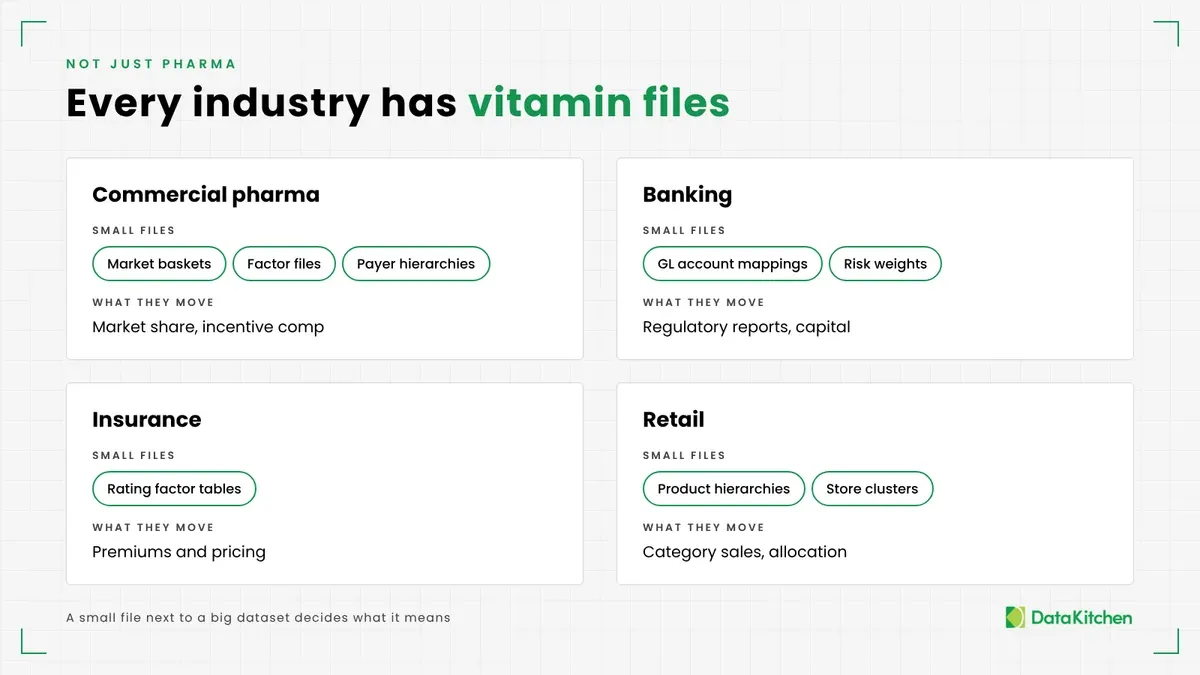
Insurers keep rating factor tables. Retailers keep product hierarchies and store clusters. The shape is the same every time. An analyst or a data scientist builds a small file. It sits next to a big dataset and quietly decides what the big dataset means. Nobody tests it like they test the big one.
Four practices that fix it
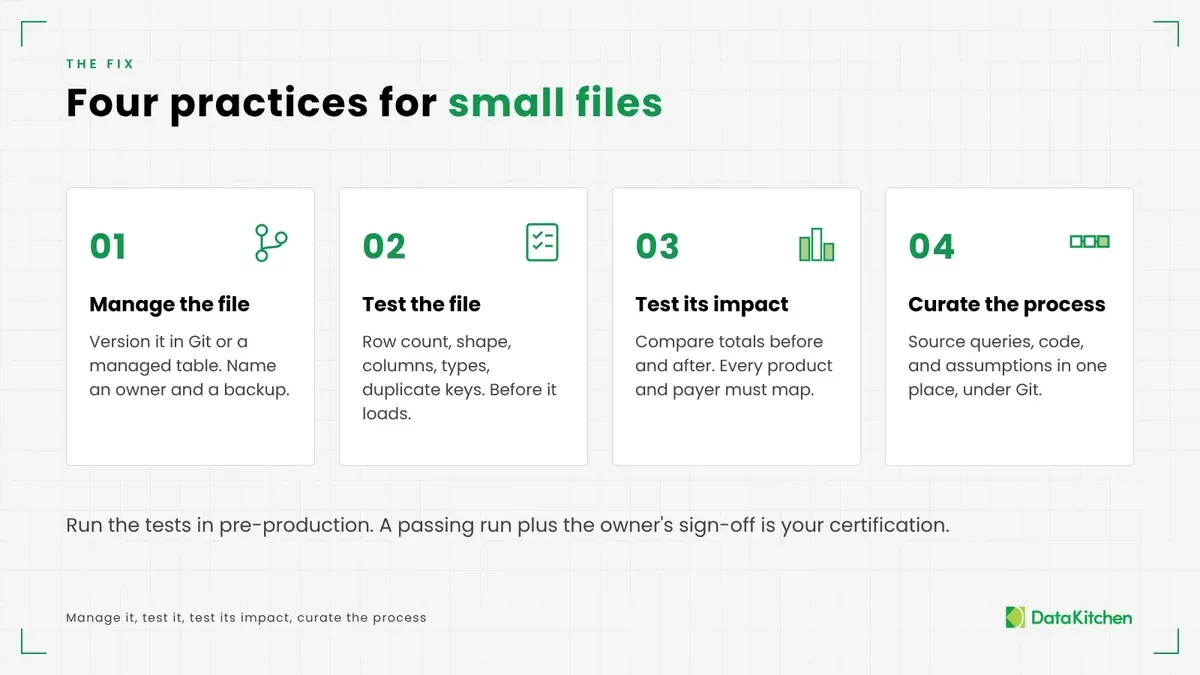
You don’t need a new platform. You need four habits, applied to every small file that touches production data.
1. Manage the file itself
Stop keeping these files in a spreadsheet on a shared drive or a scratch table in someone’s database schema. Put them under version control. Git works well for files this small. Every change gets a commit, an author, a timestamp, and a message explaining why. If the file has to live in a database, give it a managed table with a change history.
Either way, when something breaks, you can answer the two questions that matter. What changed? Who changed it?
Give every file a named owner and a backup. The owner approves changes and answers for the file when it breaks. That settles the governance meeting question for good.
2. Test the file every time you use it
Test the file on its own first, before it touches anything. Did the row count change? Is the shape the same? Are the columns the ones you expect, with the right types? Are there duplicate keys, or a product that maps to two groups? You want to know the file is broken before it loads, not after the CEO calls. For files that arrive from outside, here is how to check vendor CSV, Excel, and Parquet files before they break your reports. Our white paper, A Guide to DataOps Tests, covers the full set of tests and where each one runs.
3. Test the file’s impact on your main data
A small file can pass every check on its own and still do damage. Join it to the data it acts on and compare the results to the last version. If a regrouping moves sales between product groups by more than a threshold you set, stop and look. That’s the six-SKU example below: compare group totals in production and pre-production before the new mapping goes live. If the shift is intended, the owner approves it. If it isn’t, you just saved a Monday morning.
Test the join in the other direction, too. Every product in your sales data should map to exactly one group, and every payer should land somewhere in the hierarchy. When a new competitor launches or a new plan shows up, that test fails and tells you the file needs an update. Without it, the new product quietly drops out of your share numbers.
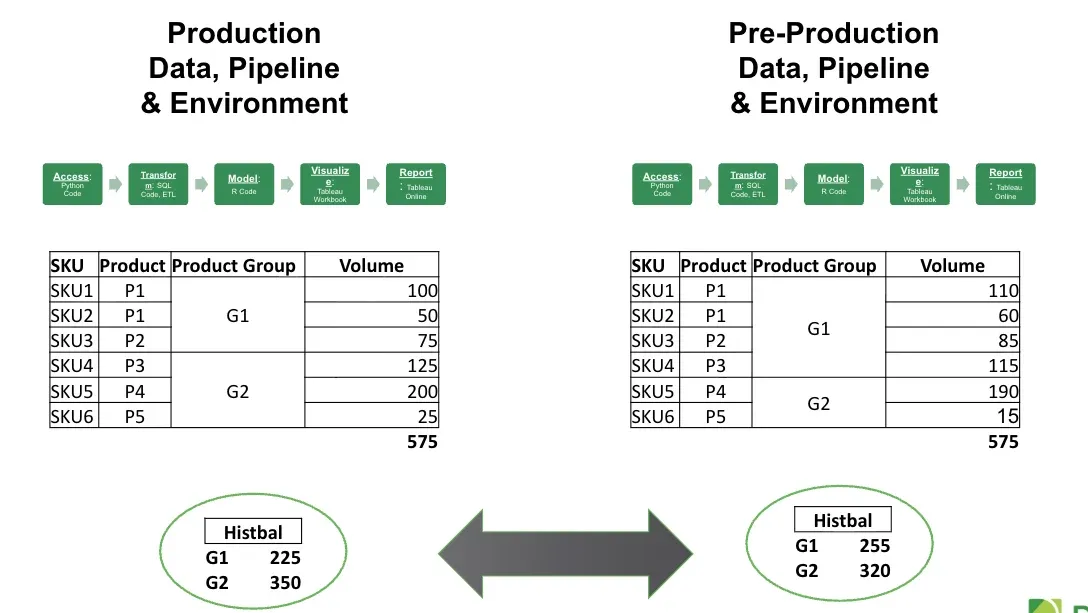
Run both kinds of tests in the pipeline on every change, in pre-production, before anything ships. A passing run plus the owner’s sign-off is your certification. Decide ahead of time whether a failure should stop the pipeline, quarantine the data, retry, or publish. It’s the same discipline as testing data before a BI or analytics release, and the white paper Data Quality: The DataOps Way shows how it scales.
4. Curate the process that creates the file
Most of these files come out of a process. Someone pulls a list from a database, cleans it, writes some Python, makes a few judgment calls, and saves the output. That process is the real asset, and it belongs in one place. Put it under Git, next to the file it produces. Include the source queries and the code, plus parameters like which quarter counts as mature. Write the assumptions down in the repo, not in someone’s head. Here is how to put analyst-written SQL and Python into production without rebuilding it.
Now when Priya leaves, or the factors come due for a refresh, someone else can rerun the process and get a file they trust. Then the tests from practices two and three tell you whether the new version makes sense next to the old one.
Manage the file, test it on its own, test its impact, and curate the process behind it. Small files will still have big effects. You’ll just know about them first.
How DataKitchen can help
We’ve built and run commercial pharma data platforms since the Celgene days, including launches at small pharma companies. Factor files, market baskets, payer hierarchies, and alignments show up in every one of those engagements. We version them, test them on every run, and keep the code that builds them in Git next to the rest of the pipeline. If your team is fighting these files, talk to us about commercial pharma analytics.
If you want to start with testing, try DataOps Data Quality TestGen. It’s open source. Point it at your database, and it profiles every table, including the small ones, then generates tests from what it finds. Its Aggregate Balance test checks that rollups still tie to their details for each grouping, or still match the prior delivery. That’s the six-SKU check above, run automatically every time the file changes. TestGen Enterprise adds 12 test types built for commercial pharma data, and the DataOps TestGen white paper explains how it generates and runs tests at scale. Short answers to the questions pharma data teams ask most are on our Answers page. For more on where pharma data breaks, read Why Testing Commercial Pharma Data Is Harder Than Anyone Tells You.
FAQ
What are the key points in this blog?
Small reference files such as factor files, market baskets, payer hierarchies, target lists, segmentations, and alignments cause outsized data quality problems in commercial pharma. One changed row moves numbers far downstream, and these files rarely get the testing syndicated feeds get. Four practices fix it: version the file with an owner, test it alone, test its impact on the main data, and curate the process behind it.
What is a vitamin file in commercial pharma data?
A vitamin file is a small, usually in-house file that sits beside the big syndicated feeds and decides what they mean. Examples include factor files, physician target lists, product-market baskets, payer hierarchies, prescriber segmentations, and territory alignments. Most fit in a spreadsheet, and some never left one. You don’t take much, and everything depends on them.
Why does a small change to a market basket or payer hierarchy cause so much damage?
Because the damage lands far from the file. A market basket defines the competitive set, so adding or dropping one product shifts every share calculation on the executive dashboard. Moving one plan under a different PBM moves access and rebate numbers. A wrong factor corrupts a fact that feeds incentive comp. Lineage shows what sits downstream, but only a test tells you a number is wrong.
Why do small data files get less testing than syndicated feeds?
Syndicated feeds arrive with a known schema, a vendor contact, and a contract that defines good, so teams diff and test every delivery. Small files come out of unmanaged processes: an analyst builds one, a brand lead requests a change over email, and the file lives on a shared drive or a laptop. Ask who owns the physician target list and you get three answers, or none.
How do you test a reference file before it changes production numbers?
Test it twice. First test the file on its own: row count, shape, expected columns and types, duplicate keys, and products mapped to two groups. Then join it to the data it acts on and compare the results to the last version, stopping when group totals shift past a threshold you set. Check that every product and payer maps somewhere. Run both tests in pre-production on every change.
How does DataOps TestGen help with small files like market baskets?
DataOps Data Quality TestGen is open source. It profiles every table, including the small ones, and generates tests from what it finds. Its Aggregate Balance test checks that rollups still tie to their details for each grouping, or still match the prior delivery, which catches a product regrouping automatically. TestGen Enterprise adds 12 test types built for commercial pharma data.