The Bane of Data Engineering: ‘The Mystery Box Full of Data Errors’
Do you have a dastardly dark database teaming with terrible data quality? Are the data sets around you a mystery box full of potential data errors? Is your data an enigma, wrapped in a pitch-black box, riddled with data irregularities? Or do you feel like the Forest Gump of data, where your data is like a box of chocolates, and you never know what will happen next?
Are you a member of a stressed-out, overworked data team that builds and runs data systems that produce embarrassing data errors regularly? Are you aware that only 22% of data engineers’ time is spent on innovation, but 78% on errors and manual execution (Gartner 2022)? Are you aware that a 2021 survey of 600 data engineers by DataKitchen and data.world found that 50% of data engineers named too much time finding and fixing errors as a source of burnout?
Do you have embarrassing production data errors your customer found (or, luckily, did not find)? Data errors cause your customers not to trust the data, are hard to find, take time to identify, and waste your time on re-work. Data errors can cause compliance risk and have an opportunity cost for the business because of the downtime. And wrong data or wrong reports/models themselves can cause costly business mistakes.
Do you need more time or business knowledge to create data quality validation tests? Data engineers deal with hundreds of data sets and diverse customer needs. They have backlogs on their daily task lists. So they don’t have time or energy to learn about each data set or customer to create robust production data validation tests. They need help creating tests that fit their data and customers’ needs without taking too much time to set up or babysit once they go live. They also need help adding new types of tests for the business and adjusting tests when new data arrives. Can data engineers make data stewards their allies in improving data quality through testing?
What if these challenges could be fixed? What are the benefits of shining a light on data and reducing errors in production?
- More Innovation – Reducing errors eliminates unplanned work that pulls data team members from their high-priority analytics development tasks. An enterprise cannot derive value from its data unless data engineers can stay focused on innovation.
- More Trust and Understanding – Errors undermine trust in data and the data team. Less confidence means less data-driven decision-making; in other words, emotionally-biased decision making. Validating the data customers use helps ensure their trust.
- Less Stress – Errors can occur at any moment. The feeling of continuous anxiety is unhealthy for team members and reduces their ability to relax and enjoy their work. Happy and relaxed people think more clearly and creatively.
- Less Embarrassment – Errors in data analytics tend to be very public. When data errors corrupt reports and dashboards, it can be highly uncomfortable for the manager of the data team. As embarrassing as having your mistakes highlighted in public, it’s much worse if the errors go unnoticed. Imagine if the business makes a costly and critical decision based on erroneous data.
The following white paper discusses how to make embarrassing data errors a thing of the past. We will start with how data engineers are challenged to understand their data and, as a result, need help identifying problematic data records. We will also discuss how the vast majority of data engineers are so busy that they don’t know or have time to write data tests to find data errors. We will then cover ways data engineers can create automatic data tests and a process to tweak existing production tests when new data comes in. And given the complexity of data, we will discuss the need for business-level data testing.
What Exactly Is The Problem? And Why Have We Not Solved It Already?
The data team may sometimes feel its work product is under a microscope. If the data looks “off,” users can often tell immediately. Business users are experts in their domain and will often see problems in data with only a glance. It’s generally an unpleasant experience for the data team to learn about analytics errors from its internal and external customers. Finding issues before your internal customers is critically important for the data team. So, what is causing these errors?
Problem #1: Say Nope to Hope
Data changes continuously as it flows through the system. Data can drift out of statistical range, defy data ingestion and preparation algorithms, and not meet business requirements. Manual testing of data is performed step-by-step by a person. This process tends to be expensive as it requires a precious resource, such as a data engineer, to execute test queries one at a time. Manual testing can also be prone to human error and is often too cumbersome to run frequently. Checking production data manually or not at all is a recipe for failure. Hoping your customers will not find problems in production is not a strategy. Check data with software, not a person.
Problem #2: Data Sources Gone Bad
Your data providers occasionally give you insufficient and even incorrect or corrupted data. Get used to it. If you do not quickly find these problems in your providers’ data and give them feedback, they will continually cause problems. Test your data sources as soon as they are ingested.
Problem #3: Too Much Data

Data, especially new data, is a mystery. Data Engineers can’t understand the characteristics of every data table in their organization. They can’t identify obvious problems in various data sources just by looking at the data. A data engineer may deal with dozens of discrete data sets. They don’t have a ‘theory of the business’ in their head to make judgments on data. Yet the data needs to be validated for use.
Problem #4: Too Little Time
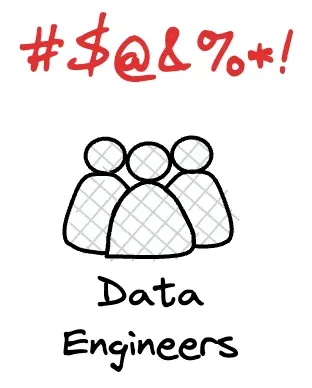
Data Teams often have too many things on their ‘to-do’ list. Customers are asking for new data, people need questions answered, and the tech stack is barely running – data engineers don’t have time to create tests. They have a backlog full of new customer features or data requests, and they go to work every day knowing that they won’t and can’t meet customer expectations.
Problem #5: It Takes Syntax, Semantics, and Pragmatics to Validate Data
To understand the time crunch that data engineers face and how it prevents them from testing their data sufficiently, we can think about three categories of data tests, using linguistics as an analogy: data syntax vs. semantics vs. pragmatics. In linguistics, Syntax is the study of sentence structure and grammar rules. While people can do what they want with language (and many often do), syntax helps ordinary language users understand how to organize words to make the most sense.
On the other hand, semantics is the study of the meaning of sentences. The sentence “Colorless green ideas sleep furiously” makes syntactic sense but is meaningless. Pragmatics takes semantics one step further because it studies the meaning of sentences within a particular context.
Let’s apply this idea from linguistics to data engineering challenges.
- Syntax-Based Profiling and Testing. By profiling the columns of data in a table, you can look at values in a column to understand and craft rules about what is allowed for a column. For instance, if a column is filled with US zip codes, a row should not have the word “bacon” in it. Data engineers need a quick way to profile data quickly and automatically cast a wide net to catch data anomalies. It’s analogous to setting up a burglar alarm in your home by deploying sensors at all possible entrances to catch a burglar who may only try one window. Automatically creating tests from profile data allows teams to maintain maximum sensitivity to real problems while minimizing false positives that are not worth the follow-up.
- Semantics-Based Business Rule Testing. What is a meaningful test for your business? Do you know as a data engineer? For example, you can compare current data to previous or expected values. These tests rely upon historical values as a reference to determine whether data values are reasonable (or within the range of reasonable). For example, a test can check the top fifty customers or suppliers. Did their values unexpectedly or unreasonably go up or down relative to historical values? What is the acceptable rate of change? 10%? 50%? Data engineers are only sometimes able to make these business judgments. They must thus rely on data stewards or business customers to ‘fill in the blank’ on various data testing rules.
- Pragmatics-Based Custom Testing. Many companies have widely diverging business units. For example, a pharmaceutical company may be organized into Research and Development (R&D), Manufacturing, Marketing and Sales, Supply Chain and Logistics, Human Resources (HR), and Finance and Accounting. Each unit will have unique data sets with specific data quality test requirements. Drug discovery data is so different from manufacturing data that data test cases require unique domain knowledge or a specific, pragmatic business context based on each group’s unique data and situation.
Problem #6: Data Changes and Testing Needs Change With It
Finally, data teams must start small and quickly add more complex data tests over time. Data is not static. As their teams grow and data conditions change, they must continually add and modify their existing database profiles and test suites.
Problem #7: Alignment with Data Stewards/Business Owners
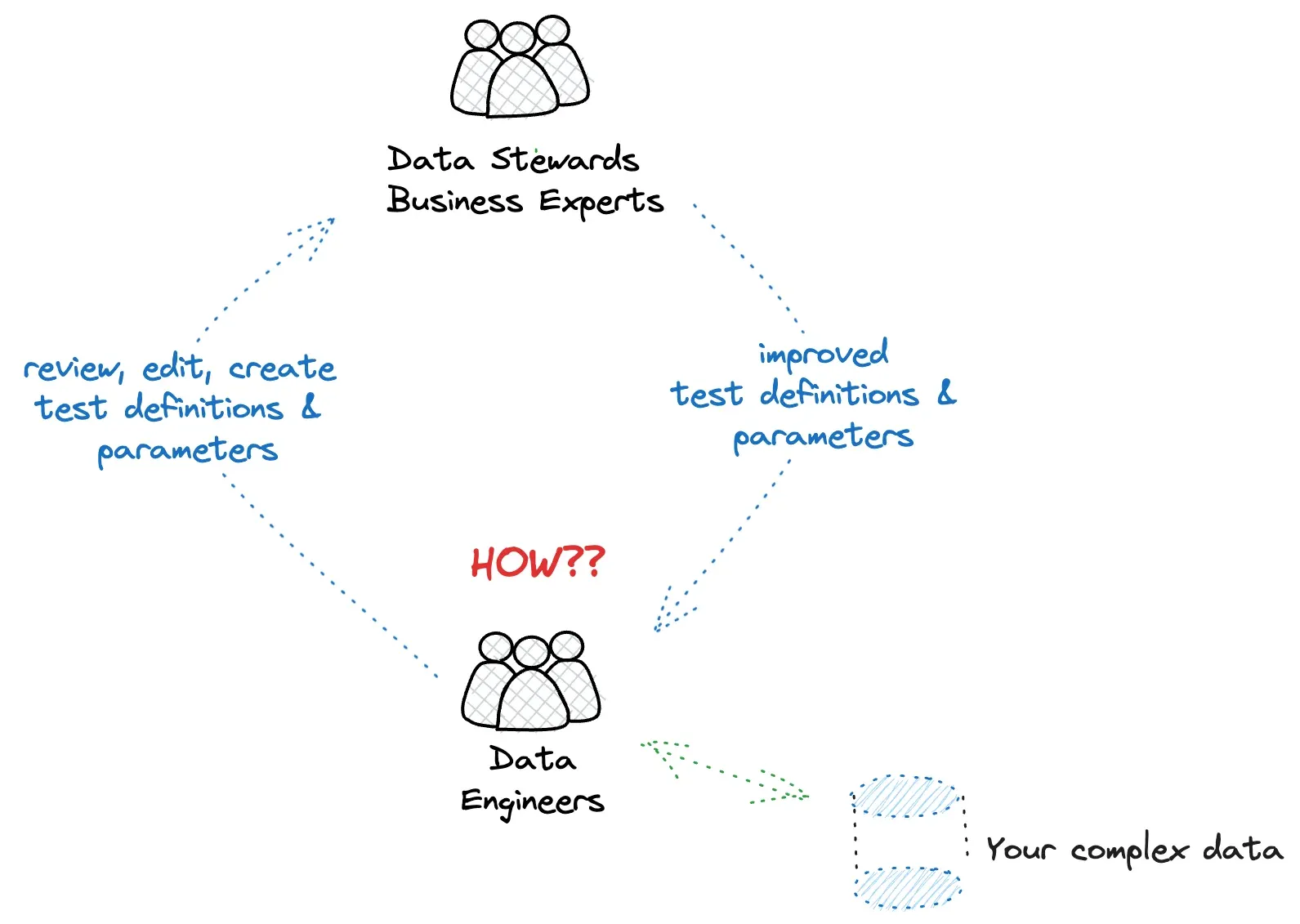
Data engineers face another challenge: understanding what tests are needed and configuring the parameters of those tests. That knowledge is often in the heads of business users or Data Stewards. How do you get those individuals involved looped in early? How can you share the responsibility to edit data test definitions and configurations with people who know your business context the best? How can we empower these non-technical people to configure tests?
Problem #8: Multiple Data Architecture Layers
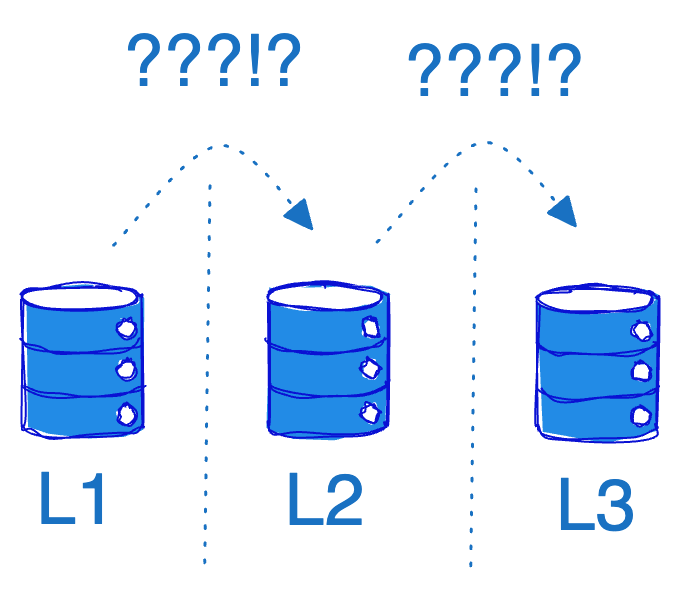
Data teams today often organize their data warehouse or data lake into layers: L1, L2, and L3. The layers generally refer to different stages of data processing, storage, and access. The naming and specifics of these layers can vary somewhat depending on the context and the specific data warehousing approach, but here is a generalized description:
- L1 - Operational Data Layer (ODL): The Source layer. This initial layer is where the data extracted from various source systems, such as operational databases, external files, web services, or third-party systems, is placed.
- L2 - Integration Layer (IL): Also known as the Harmonization layer or the Transformation layer. Data from different source systems are cleaned, transformed, and integrated.
- L3 - Access Layer (AL): The Presentation or Information layers. This is the layer that users and applications interact with. The data in this layer is usually organized into facts and dimensions. This layer is where business users interact with data, often through reporting, dashboarding, and analytics tools.
Data Teams face specific challenges in understanding and testing data in each layer. First, they must ensure that each layer has not inherited lost or mangled data from previous processing. They must also ensure that data properties match business logic in each layer. For example, an application may expect 1 million rows of data to arrive in L1. Via testing, you need to verify that the correct quantity of data arrived in L1 and that the same quantity is present in layers L2 and L3.
Problem #9: Varied Data Engineer Team Cultures
Data Engineers adopt various development approaches. Some waterfall-driven teams need precise specifications and shareable test result artifacts to progress through various development phases. Some teams are the opposite; they are in full ‘hero mode,’ working night and day to add new features and data tests and rapidly fix any problems. Regardless of the approach, both teams must discover data problems rapidly and fix the errors to deliver value to their customers on time. Regardless of the approach, every data team needs a more effective and rapid method to test data.
Problem #10: Will Data Tests Slow Production?
Data teams are often concerned about running data tests during the production process. Will those tests cause performance problems? Will they cause me to miss my SLA? Data engineers also don’t want to duplicate data in other systems just to run tests; they need the data tests to run in the production database quickly and with low impact. They want to understand the test queries clearly and see them in the database execution log so they can quickly take the best action.
Problem #11: Data Lineage is Static Analysis in a Dynamic World
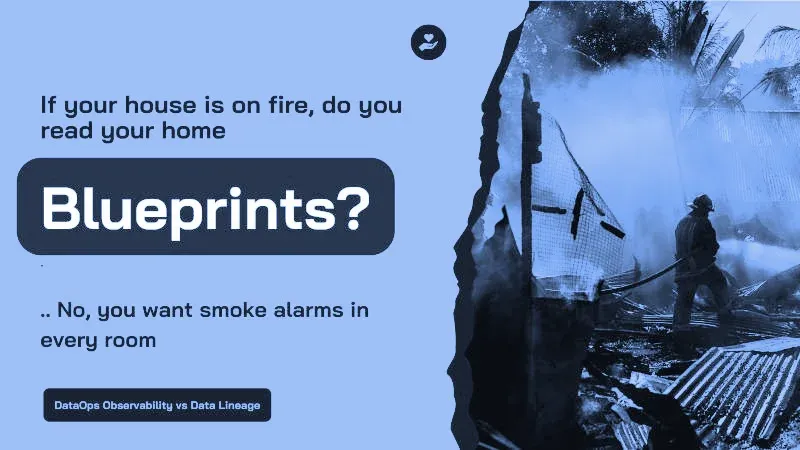
Data Teams look, at times, to Data Lineage capabilities to help reduce production errors. Data lineage answers questions like, “Where is this data coming from, and where is it going?” Data Lineage is thus a way to describe the data assets in an organization. It is a description used to help data users understand where data came from and, with a data catalog, the content of specific data tables or files. These represent static blueprints for your data, which are valuable but insufficient. Think of it this way: if your house is on fire, you don’t want to go to town hall and rely on just the blueprints of your home to understand better how the fire could spread. You want detectors in every room so you can be alerted quickly to avoid damage. Data Lineage is the blueprint of the house; Data Testing is the set of fire detectors sending you signals in real time. You need both to provide the complete picture. Data Lineage alone is insufficient to produce error-free data.
Problem #12: Coding Data Validation Tests From Scratch
It is time-consuming to write data tests from scratch. It’s much less work to refine a small number of pre-coded tests that miss the target. It’s much more work – if not impossible in the real world – to manually create a blanket of relevant tests that can alert you when anything goes wrong. Many data syntax and semantic tests can be configured instead of coded to give you the necessary test coverage. There will always be data tests that are unique to your industry, company, or domain. Wouldn’t you like time to focus on the tests where your team can add unique value?
DataKitchen DataOps TestGen Fixes The ‘Mystery Box Full of Data Errors’
Imagine having a simple and fast way to generate and execute data quality tests without hassle, automatically. With DataOps TestGen, you can say goodbye to tedious and time-consuming manual test processes. We designed TestGen to be simple, fast, and highly efficient. It automates the entire data profiling, test generation, and execution process for SQL databases, saving you valuable time and resources. With DataOps TestGen, you can focus on what matters most - delivering trusted insight to your customers - while TestGen ensures data accuracy and quality.
DataOps TestGen creates the terms and conditions of your data contract by automatically generating valuable data tests with no coding or script writing. DataOps TestGen is your go-to “Easy Button” for database data quality monitoring and anomaly detection. The product streamlines the entire testing process, from test development through test execution, making it a breeze to identify and rectify any data errors or anomalies.
DataOps TestGen Data Profiling and Bad Data Detectors
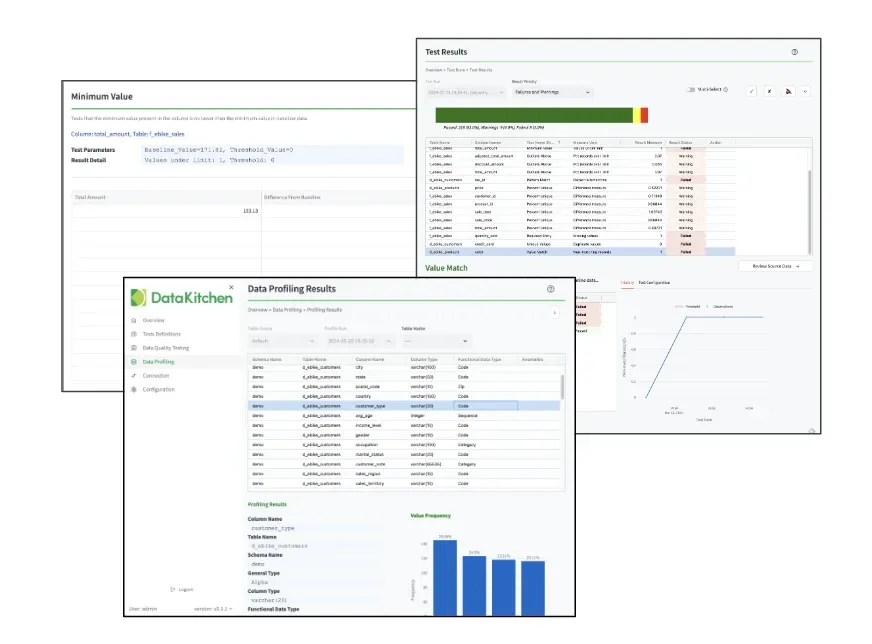
DataOps TestGen’s first step is to profile data and produce a precise understanding of every table and column. It looks at 51 different data characteristics that have proven critical to developing practical data tests, regardless of the data domain. TestGen then performs 13 ‘Bad Data’ detection tests, providing early warnings about data quality issues, identifying outlier data, and ensuring data are of the highest quality. The strength of your data-driven decisions is directly proportional to the quality of your data. With TestGen, we guarantee the latter so you can continually rely on the data in the database. TestGen de-mystifies your data and spots complex data - without the need to write tests.
DataOps TestGen Data Quality Test Creation and Execution
TestGen produces and executes tests that validate data at rest and in motion during any production process. From data in its raw form to cleaned and prepared data sets, TestGen ensures rigorous testing, providing an extra layer of confidence in your data-driven decision-making.
One of the standout features of DataOps TestGen is the power to auto-generate data tests. With a library of 28 distinct tests automatically generated based on profiling data, TestGen simplifies the testing process and saves valuable time. These tests require minimal or no configuration, taking the heavy lifting out of your hands, so you can focus on what matters – extracting insights from your data.
TestGen also offers 11 business rule data tests that, with minimal configuration, can be used for more customized tests. These tests allow users to customize testing protocols to fit specific business requirements with a “fill in the blank” model, offering a perfect blend of speed and robustness in data testing. These types of tests ensure your data not only meets general quality standards but also aligns with your unique business needs and rules. Data stewards, who may know more about the business than a data engineer, can quickly change a setting to adjust the parameters of a data test - without coding.
DataOps TestGen Features Summary
DataOps TestGen automatically creates data tests and executes those tests in your databases, saving the results. TestGen is more than just a tool; it’s your strategic partner in navigating the complex world of data quality and testing. Trust in TestGen - the perfect blend of automation, adaptability, and accuracy. The capabilities of DataOps TestGen are summarized in these statistics:
| Capability | Count |
|---|---|
| Data Profiling Column Characteristics | 51 |
| Bad Data Detector Tests | 13 |
| Auto-Generated (No or Optional Configuration) Data Tests | 28 |
| Business Rule (Requires Configuration) Data Tests | 11 |
The ‘Mystery Box Full Of Data Errors’ Is Only One Part Of The ‘Data Journey’
So far, this white paper focuses on the importance of testing data in databases and how DataOps TestGen can enable rapid test development and execution. However, you very likely utilize many data tools in front of that database and beyond that database: They may include Talend, Azure Data Factory, Glue, Informatica, DataBricks, Airflow, Testing Tools, other ETL Tools and Orchestrators, Data Science Tools, Dashboard Tools, bucket stores, servers, even custom tools - the potential list is very long. These tools work together to take data from its source and deliver it to your customers in a form they can use.
We call that multi-tool data assembly line a ‘Data Journey.’ And just like data in your database, the data across the Data Journey, and the technologies that make up the Data Journey, all have to be observed, tested, and validated to ensure success. Successful Data Journeys track and monitor all levels of the data stack, from data to tools to servers to code across all critical dimensions. A Data Journey supplies real-time statuses and alerts on start times, processing durations, test results, technology and tool state, and infrastructure conditions, among other metrics. With this information, data teams will know if everything is running on time and without errors and immediately detect the parts that didn’t.
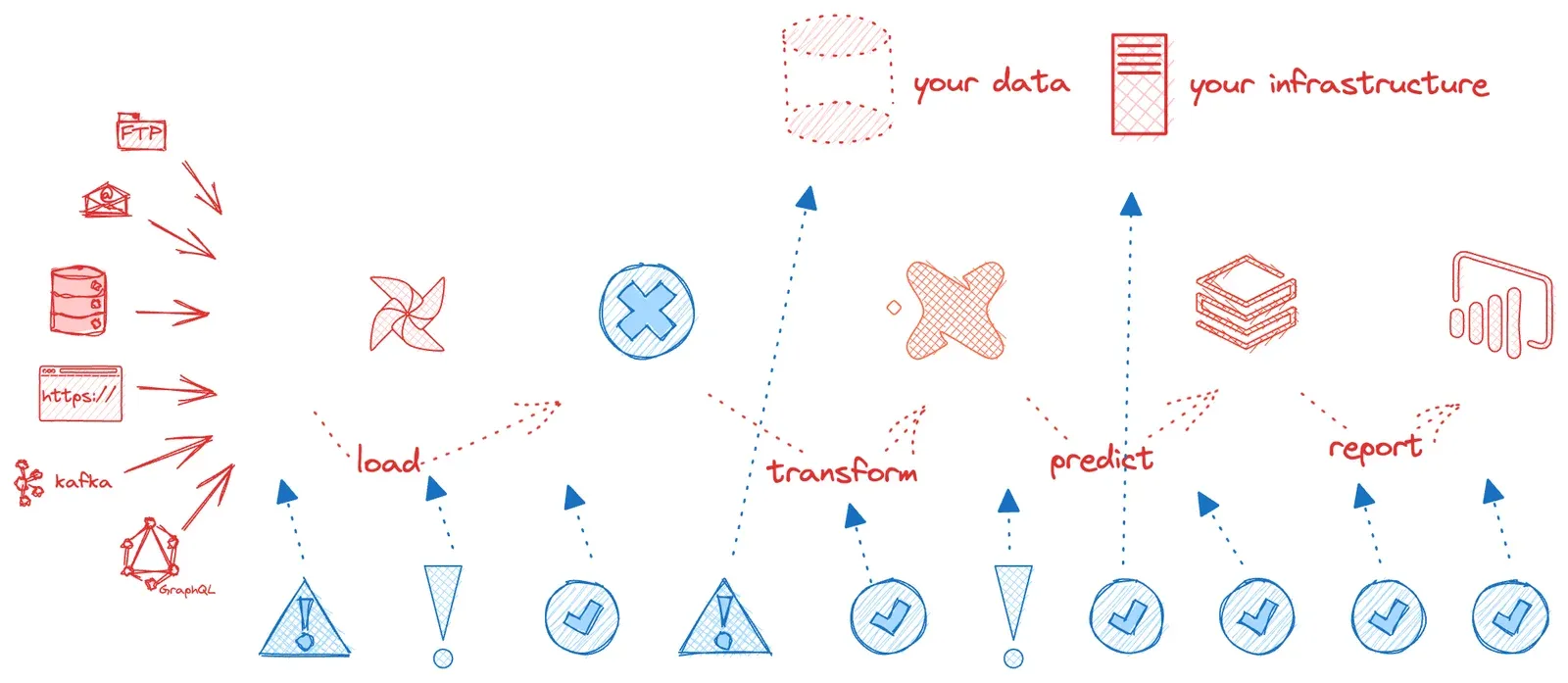
In the illustration above, we see a typical Data Journey and the status of what is working and not working across all of its components. For each component, it’s essential to compare the current state to the expected state, or the Data Journey’s “expectations,” at every step, from source to value delivery across multiple dimensions, including the Five Pillars Of Data Journeys:
- Across The Steps: Check Runs, Order Of Operations, Schedules
- Down The Stack: Monitor Metrics, Logs, And Costs
- Data At Rest: Validate Data Quality Automatically
- Data In Use: Test The Results Of Models, Visualizations, Delivery, And Utilization
- Set Expectations: Compare Expected Against Reality, Alert, Analyze
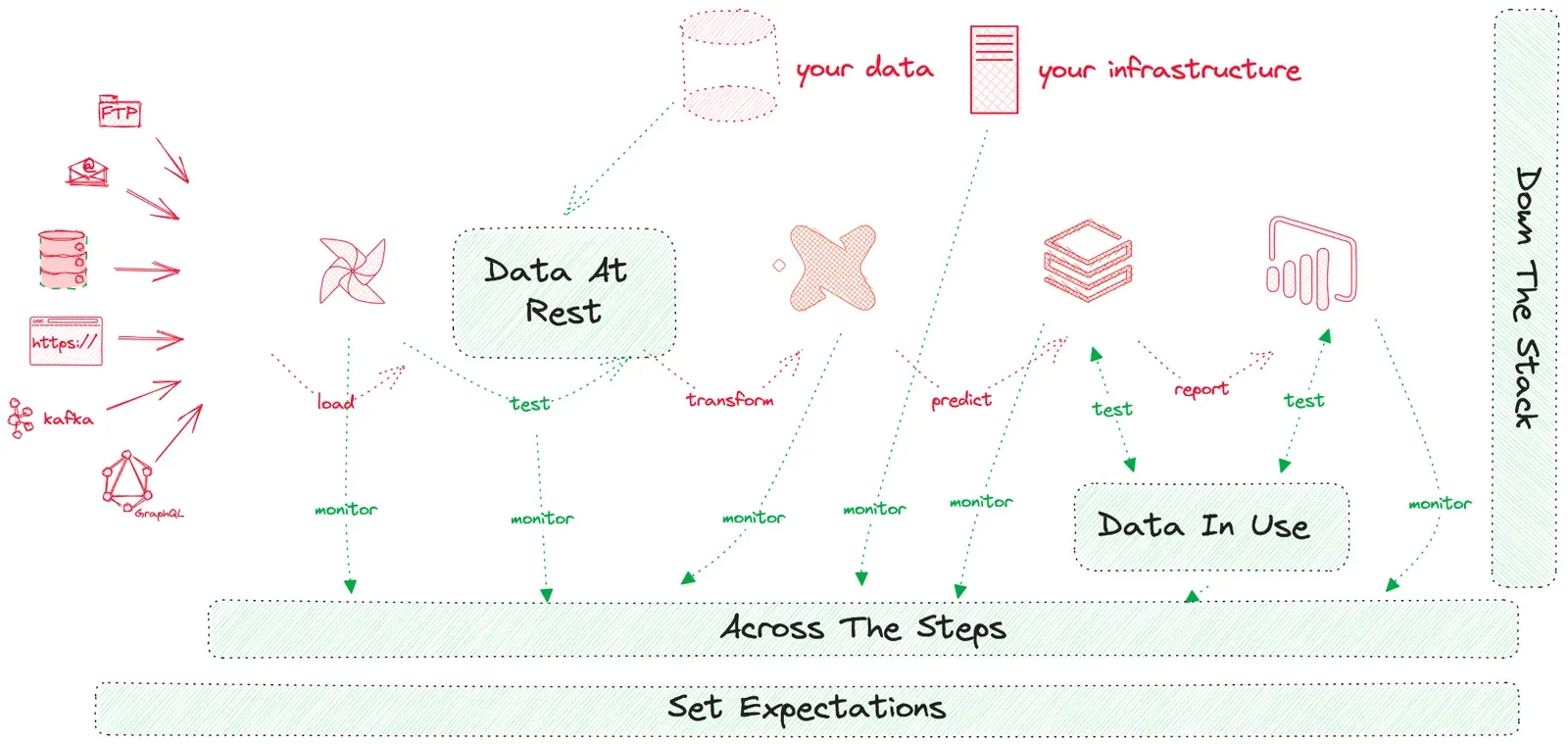
Within a Data Journey, you need to monitor a complex series of steps in an active, action-oriented way to validate the results you deliver to your customers. And you need to be alerted, in real-time, when critical expectations are not met. DataKitchen’s DataOps Observability product enables this Data Journey monitoring and alerting. DataOps Observability is designed to seamlessly extract these status details and test results, including those produced by DataOps TestGen, from every Data Journey, with no changes to current jobs and processes, and compare them to expectations and alert when variances exist - allowing data teams to understand the current state of every Data Journey, enterprise-wide.
How to Embed Effective Data Tests in Data Journeys
For complete ‘Data In Rest’ Data Quality Testing of databases across a Data Journey, two types of tests are needed. The first type includes Data Quality Measurement Tests. These tasks include data profiling, lineage, and ‘bad data’ detection tests. The second type features Active Data Tests for validating data in motion during production. These are operational data tests of data in raw, cleaned, and prepared forms within databases. As described above, DataKitchen’s TestGen product can help you create and execute both kinds of tests automatically with no coding.
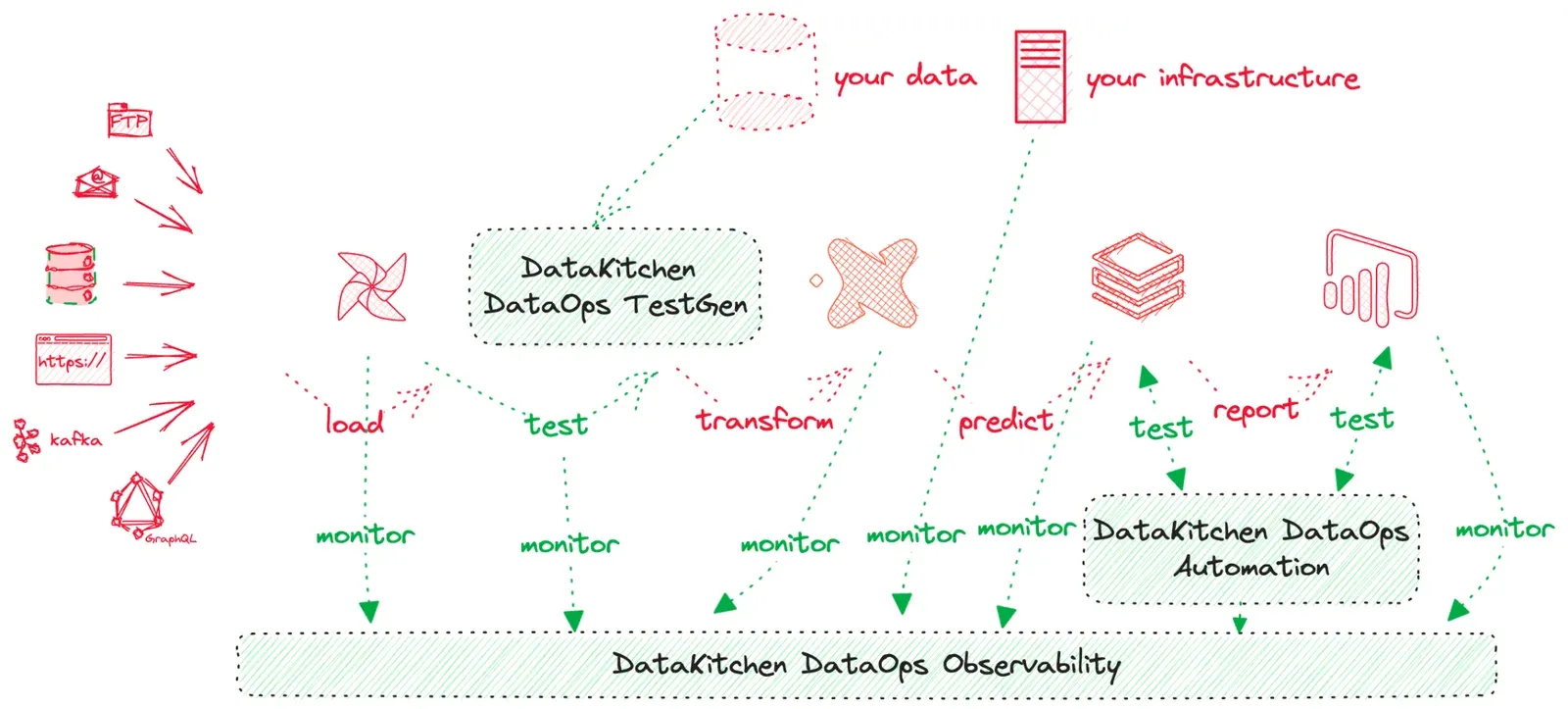
To enable Data Quality Testing on ‘Data In Use,’ a solution should interact with data tools and their outputs and allow for customized, often domain-specific business tests. Business rule and custom SQL tests, however complex, run in DataOps TestGen. For checks written in Python or packaged in a container, DataKitchen offers DataOps Automation.
Importantly, any tests that are developed and executed either in TestGen or Automation are automatically collected by DataKitchen DataOps Observability and compared to expectations, helping to provide a complete view of the status of every Data Journey.
Conclusion
This white paper discussed the need to automatically generate and execute data quality checks that identify errors in your data before your customer finds them. We discussed the need to test data during the production process directly in the database. We also discussed engineers’ various approaches to understanding their data and identifying problematic data records. Finally, we talked about the challenge of enabling data engineers to expand from automatic data tests to a list of configurable ‘fill in the blank’ data tests.
DataKitchen DataOps TestGen meets all those challenges:
- Detect issues proactively, empowering your data team to stay ahead of your internal customers.
- Reduce your data team’s task load significantly by automatically generating and executing data tests, freeing up your team to develop new data solutions.
- Avoid manual checking or the risk of not checking production data at all, thanks to DataOps TestGen’s automated data verification system.
- Test your data sources instantaneously upon ingestion with rapid, real-time testing.
- Automatically gain deep insights into the characteristics of every data table in the organization, eliminating the need for manual review.
- Ensure alignment between data properties and business logic at every processing layer through precision verification.
- Improve your data team’s organizational culture with a seamless and swift data testing experience.
- Ease your data team’s concerns about running data tests during production with real-time, risk-free testing capabilities.
- Supplement data lineage via a robust error-detection system that produces error-free data.
- Adapt to your team’s growth and changing data conditions seamlessly through a dynamic database profile and test suite management feature.
Reducing errors eliminates unplanned work so your team can stay focused on innovation. Errors undermine trust in data and the data team. By reducing errors and the stress accompanying them, data team members think more clearly and get more done. DataOps TestGen opens the mystery box of data and fixes the errors.
Additional Resources
- DataOps Observability – Principles and Ideas
- DataOps Observability - Technical Product Overview
- DataOps Observability and Automation Software
- DataOps TestGen Documentation
- DataOps TestGen Technical White Paper
- Install DataOps TestGen today — free and open source, running on a laptop in minutes
Related Reading
- Data Quality: The DataOps Way — the method that surrounds the tooling in this paper
- 7 Steps to Implement DataOps — the engineering practices underneath
- What is DataOps Observability? — the discipline that collects these test results
- The Syntax, Semantics, and Pragmatics Gap in Data Quality Validation Testing — the three-layer model expanded
- The Terms and Conditions of a Data Contract Are Data Tests — why a contract with no tests is a wish
- Test Coverage Beats Data Lineage — the blueprint-versus-detector argument, at length
- The Seven Deadly Sins of Data Quality — the habits that keep the mystery box shut
- Scaling Data Reliability: The Definitive Guide to Test Coverage — how much testing is enough
- Announcing DataOps Data Quality TestGen 3.0 — where the product went after this paper
FAQ
What is the main point of this paper?
Data engineers cannot write enough data quality tests by hand, so the tests have to be generated for them. The paper argues that the practical fix for embarrassing production data errors is to profile every table automatically, generate a broad blanket of syntax tests from that profile, let data stewards fill in business rule tests without coding, and run all of it inside the production database.
What is the ‘mystery box full of data errors’?
It is a database whose contents nobody on the data team actually understands. Data arrives from providers, drifts out of statistical range, breaks ingestion logic, and stops matching business requirements — all without anyone noticing. The team learns about the errors when a business user spots them in a report, which is the worst possible time and the worst possible messenger.
Why don’t data engineers have time to write data quality tests?
Because testing competes with a backlog that never empties. Engineers field new data requests, answer questions, and keep a fragile tech stack running, and they go to work knowing they cannot meet customer expectations. Writing tests from scratch for dozens of data sets is slow work with no visible output, so it loses to whatever is on fire that day.
What is the difference between syntax, semantics, and pragmatics in data testing?
Syntax tests check structure: a US zip code column should not contain the word ‘bacon’. Semantic tests check meaning against business expectation, such as whether the top fifty customers moved by a reasonable percentage. Pragmatic tests check meaning in a specific context, where a pharmaceutical company’s drug discovery data needs entirely different rules from its manufacturing data.
What does DataOps TestGen actually do?
It profiles the columns of every table in a SQL database, produces a precise description of what is in them, detects outlier and ‘bad’ data, then generates and executes data quality tests from that profile. Test development, test execution, and result storage all happen without writing code or scripts, so a team gets coverage in hours rather than quarters.
How many data quality tests does DataOps TestGen generate automatically?
TestGen profiles 51 column characteristics, runs 13 ‘bad data’ detector tests, and auto-generates 28 distinct data tests that need minimal or no configuration. A further 11 business rule tests use a fill-in-the-blank model for cases that need a human judgement about the business, such as an acceptable rate of change.
How can data stewards and business experts help improve data tests?
They supply the business knowledge engineers lack. A data steward knows whether a 10% swing in supplier volume is normal or alarming, and that knowledge belongs in a test parameter rather than in someone’s head. Configurable business rule tests let a steward change a threshold or definition directly, with no code and no engineering ticket.
Why does data need testing at every layer of a data warehouse?
Because each layer can silently lose or mangle what the previous one delivered. Teams commonly organise storage into L1 operational, L2 integration, and L3 access layers. If an application expects a million rows in L1, testing has to confirm that the million arrived and that the same quantity survived into L2 and L3, and that each layer still matches business logic.
Will running data quality tests in production slow down my pipelines?
Not if the tests run as ordinary queries inside the production database. Teams worry about performance and missed SLAs, and they do not want to copy data into a separate system just to test it. Tests that execute in place, appear in the database execution log, and can be read as plain SQL keep the impact low and the behaviour transparent.
Is data lineage enough to prevent production data errors?
No. Lineage answers where data came from and where it is going, which makes it a static blueprint of the data estate. If your house is on fire, you do not drive to town hall to read the blueprints — you want smoke detectors in every room. Lineage is the blueprint and testing is the detector, and a complete picture needs both.
What is a Data Journey, and how does database testing fit into it?
A Data Journey is the multi-tool assembly line that moves data from source to customer, spanning ingestion tools, orchestrators, warehouses, models, and dashboards. Database testing covers one stop on that line. The rest of the journey — run order, schedules, logs, costs, tool state, and the results delivered to users — has to be observed and compared against expectations too.
How do TestGen, DataOps Automation, and DataOps Observability work together?
TestGen generates and runs data quality tests inside databases, including the business rule and custom SQL tests you write, however complex. DataOps Automation runs Python and containerized tests. DataOps Observability collects the results from both, compares them against expectations across the whole Data Journey, and raises alerts when reality and expectation diverge.
What are the business benefits of catching data errors before customers do?
Four things improve at once. Innovation rises, because unplanned rework stops pulling engineers off high-priority development. Trust rises, because validated data supports data-driven decisions instead of emotionally biased ones. Stress falls, because the team is no longer braced for the next public failure. And the business avoids the costly decisions that erroneous data produces.
Get the PDF
The full paper is on this page. Fill in the form for a PDF copy to keep or share.