Data analytics is performed using a seemingly infinite array of tools. In larger enterprises, different groups can choose different cloud platforms. Multi-cloud or multi-data-center integration can be one of the greatest challenges to an analytics organization. DataKitchen works across different tool platforms, enabling groups using different clouds to work together seamlessly. There’s nothing special about clouds – DataKitchen treats on-prem as just another toolchain environment so this discussion also applies to hybrid clouds.
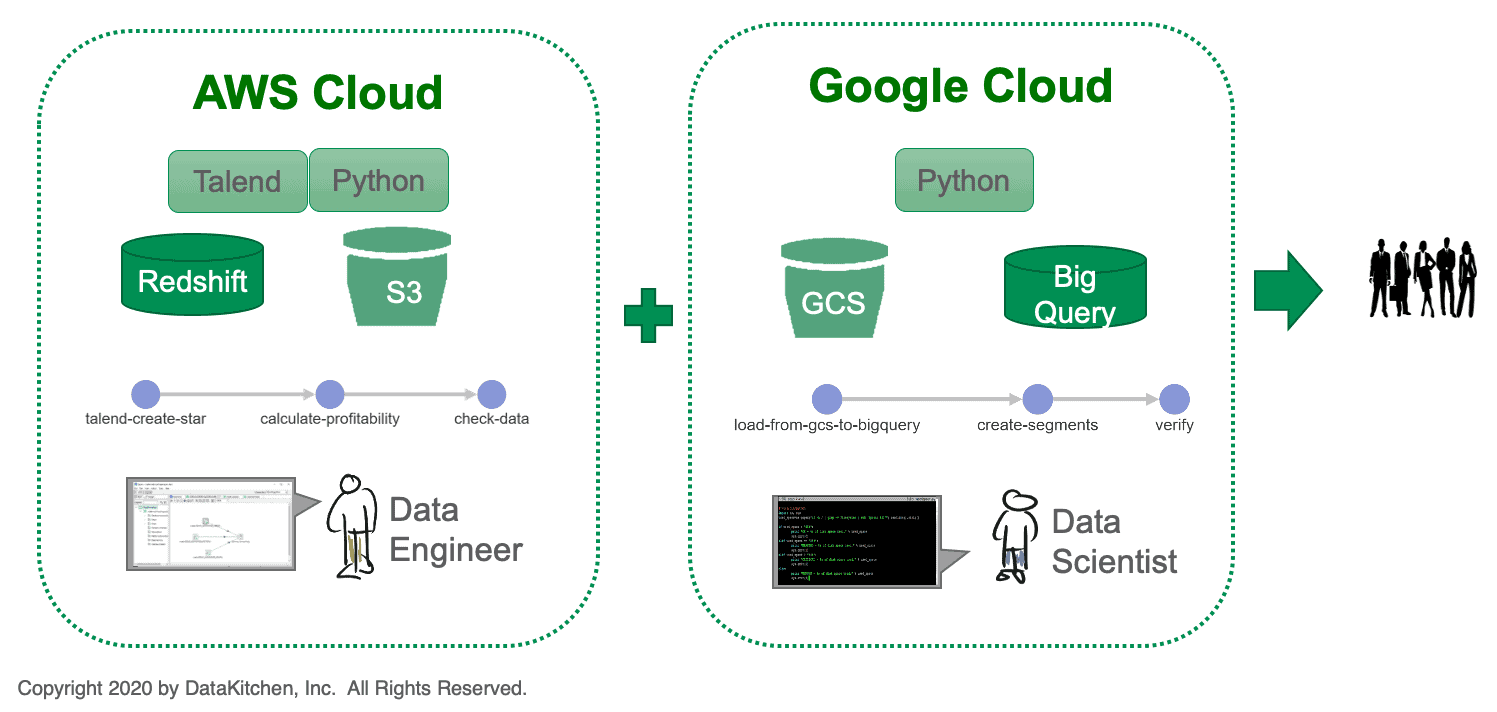
Figure 1: A multi-cloud environment creates challenges for an analytics organization.
We recently encountered an enterprise with two groups that use different cloud platforms (see Figure 1). One group consists of data engineers utilizing tools like Talend, Python, Redshift and S3 on an Amazon (AWS) cloud platform. The second group consists of data scientists who use Google Cloud Storage (GCS), BigQuery and Python on a Google cloud platform (GCP). It’s very difficult to integrate analytics across a heterogeneous environment such as these. Note, we are highlighting Amazon and Google in this example, but the same difficulties hold true for other cloud and on-prem technologies.
In the AWS environment, the data flows through three processing steps. The results are fed to the Google cloud where three more steps are performed before charts, graphs and visualizations are delivered to users. In technology-driven companies, tools, workflows and incentives tend to drive people into isolated silos. It’s very hard to keep two teams such as these coordinated. How do you balance centralization and freedom? In other words, how do you keep control over the end-to-end process without imposing bureaucracy that stifles innovation?
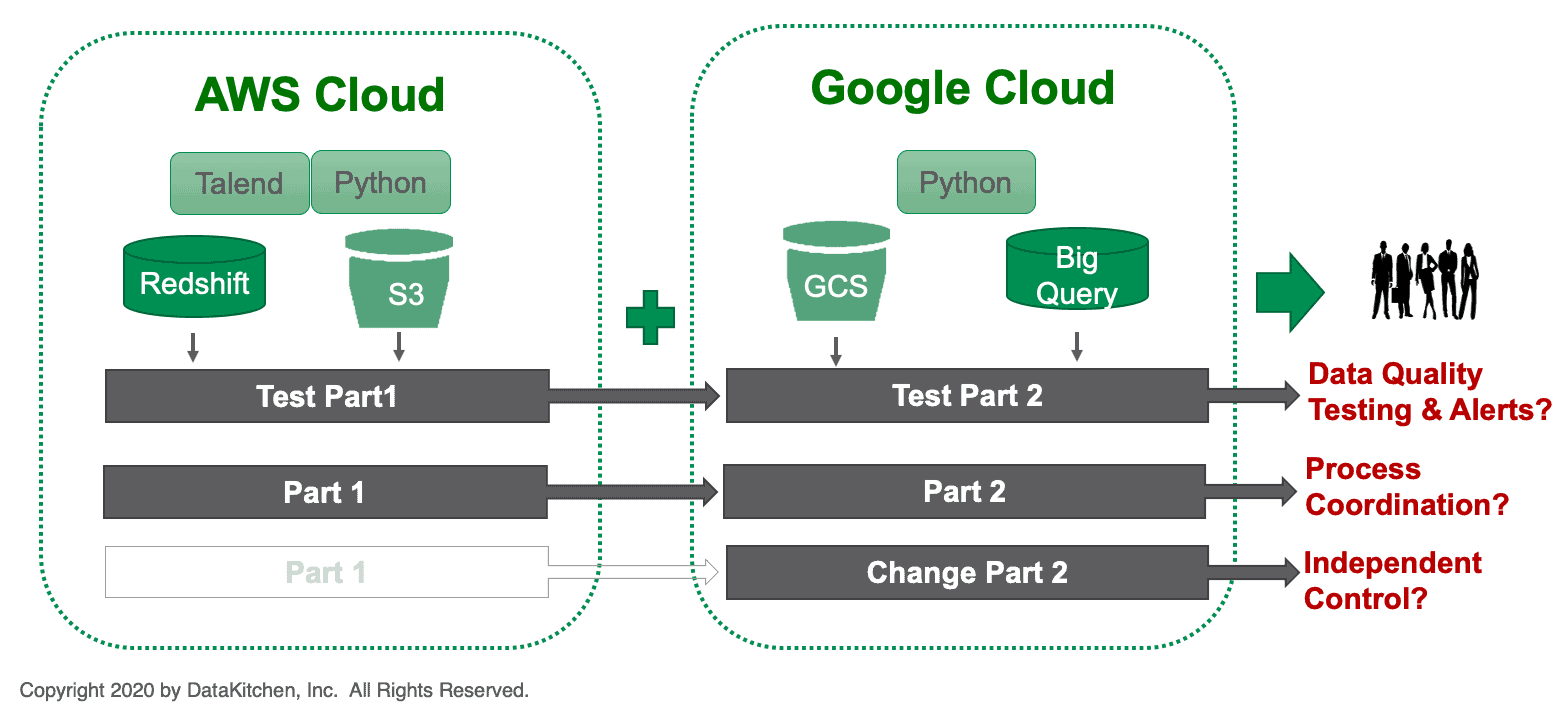
Figure 2: In a heterogeneous architecture, the two halves of the solution must work together to ensure data quality.
Figure 2 illustrates a few challenging aspects of heterogeneous-architecture integration. The two halves of the solution must work together to ensure data quality. Can test metrics be passed from one environment to the other so that data can be checked against statistical controls and business logic? Can the two groups coordinate alerts that notify the right development team of an issue that requires someone’s attention?
The two teams must also engage in process coordination. How do the teams perform impact analysis, i.e., if someone makes a change, how does it affect everyone else? When one team makes an architectural change, is the other team aware? The two teams may have different iteration cadences or business processes, which keep them out of lock step. How can the two groups work together seamlessly while maintaining their independence?
Multi-Cloud with DataKitchen DataOps Automation
The challenges of integrating multiple environments are greatly simplified when using DataKitchen DataOps Automation. DataKitchen creates a coherent framework which interoperates with the two technical environments respectively. DataKitchen DataOps Automation supports orchestrated data pipelines called “Recipes.”
Figure 3 shows a Recipe (data pipeline) that consists of four steps:
- Call-aws – Execute analytics on the AWS platform
- Move-data – move data from AWS to GCP
- Verify-move – test data just moved
- Call-gcp – Execute analytics on the GCP platform
The call_aws and call-gcp nodes are different from the others – they are Recipes that are being used as sub-components of a top-level Recipe. We call these types of Recipes, “Ingredients.” Both call_aws and call-gcp are Ingredients that when called, execute on the respective cloud platforms.
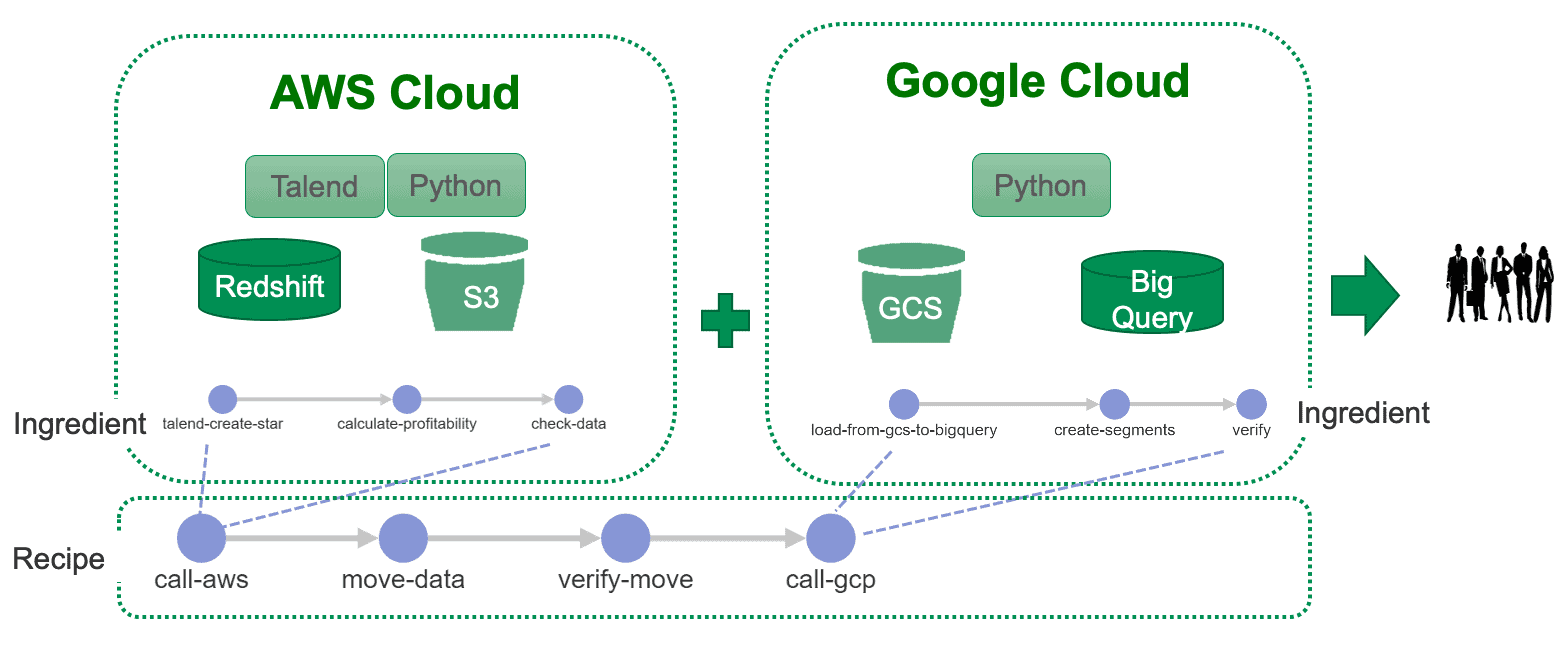
Figure 3: A Recipe that uses Ingredients to execute on respective cloud platforms.
The DataKitchen architecture abstracts the interface to target toolchains. It references the tools in each of the technical environments using variables. During automated orchestration of the pipelines, references to the variables are overridden and diverted to a specific tool instantiation in the correct technical environment. The target environment can then be changed by modifying the overrides. DataKitchen embeds software agents in the technical environments to help facilitate this interface modularity.
DataKitchen executes testing within each Ingredient pipeline and across the cloud environments. Once the top-level Recipe is in place it serves as a robust and modular interface between the two groups. Each group can work independently, focusing on the local call_aws and call_gcp Ingredients respectively. The two groups do not have to understand each other’s toolchain or environment. Data flowing between the two cloud platforms is compartmentalized and error-checked in the move-data and verify-move steps of the top-level Recipe.
DataKitchen DataOps Automation serves as a unifying platform for the two cloud environments. It orchestrates both the local and global data pipelines. It tests data at each processing step and across the end-to-end data flow so that quality is maintained. DataKitchen supports the creation and management of testing across all cloud environments, simplifying end-to-end testing. It liberates the two teams from having to understand each other’s toolchains or workflow processes. With DataKitchen in place, the teams work efficiently and independently, without hindrance from quality, process coordination or integration issues.
FAQ
What are the key points in this blog?
Two groups on different clouds — data engineers using Talend, Python, Redshift and S3 on AWS, data scientists using Google Cloud Storage, BigQuery and Python on Google Cloud — can share one pipeline when a top-level Recipe calls each side as a reusable sub-pipeline, moves and verifies the data between them, and runs tests inside each side and across the boundary. On-prem counts as another environment, so hybrid works the same way.
What makes analytics hard to integrate across multiple clouds?
Each group standardizes on its own platform and toolchain, and the boundary between them breaks the things that keep a pipeline honest. Test metrics computed in one environment are not available in the other, alerts do not reach the team that has to act, and a change on one side is invisible to the other until something fails. Different iteration cadences keep the two out of step.
How can two teams on different cloud platforms share one data pipeline?
By nesting pipelines. In DataOps Automation, a Recipe used as a sub-component of another Recipe is called an Ingredient, so the AWS team owns one Ingredient, the Google Cloud team owns another, and a top-level Recipe of four steps calls each side, moves the data between them and tests what moved. Neither team has to learn the other toolchain.
How is a pipeline pointed at a different cloud environment?
Through variables rather than hard-coded tool references. The architecture abstracts the interface to each target toolchain and refers to tools by variable; during orchestration those references are overridden and diverted to a specific tool instantiation in the correct environment. Changing the overrides retargets the pipeline, and software agents embedded in each environment carry out the interface.
How is data quality maintained when data crosses from one cloud to another?
Tests run in three places: inside each side of the pipeline, on the data moving between the clouds, and across the end-to-end flow. In the worked example the top-level pipeline has a dedicated move step and a verify step, so the handoff is compartmentalized and error-checked instead of being an assumption that whatever arrived is what was sent.
Does the multi-cloud approach work for on-prem and hybrid architectures?
Yes. There is nothing special about a cloud here: an on-prem data center is treated as another toolchain environment, so the same Recipe and Ingredient structure spans on-prem and cloud, or two clouds, or a mix. The DataOps practice is the same in each case: orchestrate across environments, test at every step, and let each team keep its own tools.